Useful features
Menu settings
64
Useful features
Menu settings
65
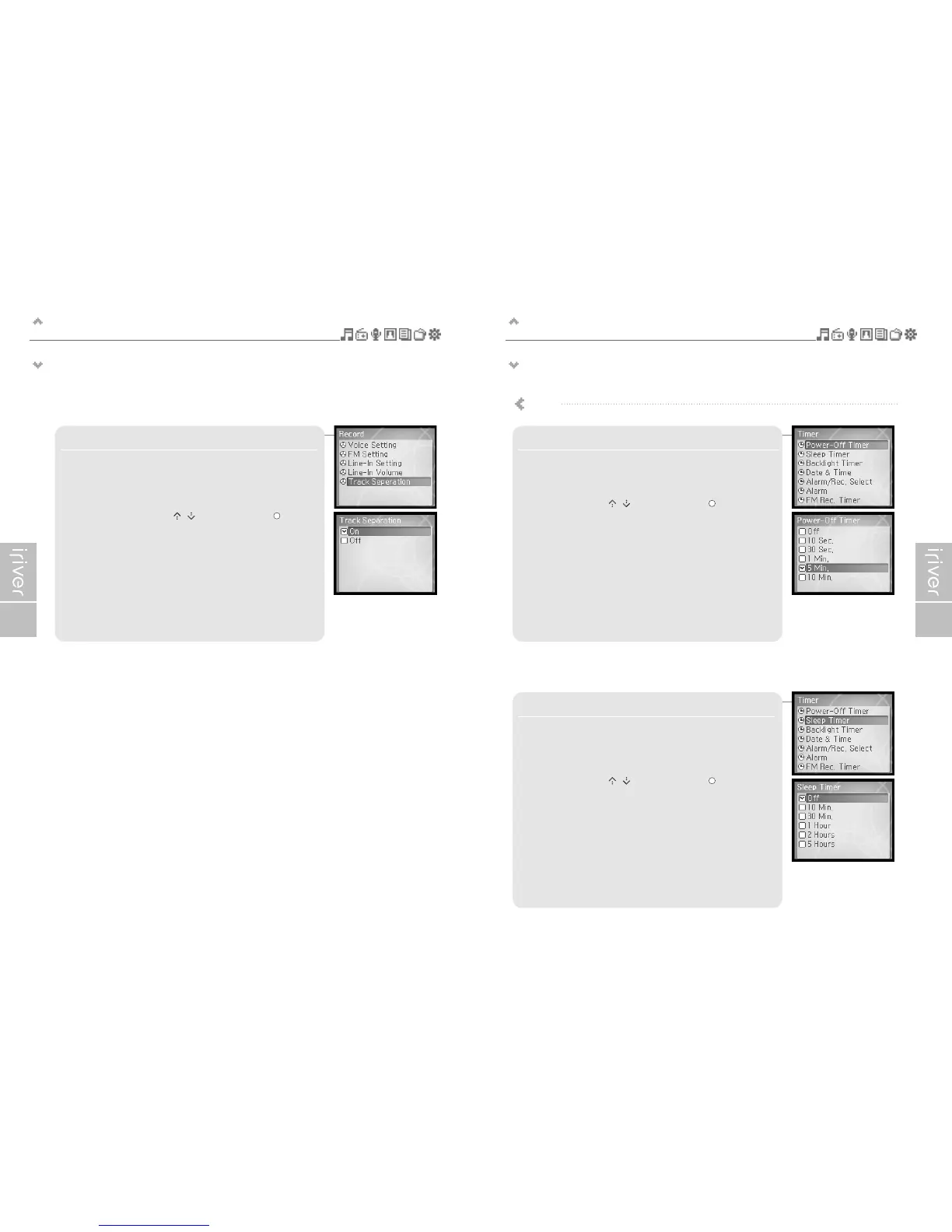
5. Track Seperation
While recording from external device, if no sound occurs for
around 1.5 minutes, a new file will be created.
If you use the <Track Seperation> function with connecting external
devices such as CD or tape, each track will be save to an individual file.
Select <On> or <Off> using the [ / ] scroll and press the [ ] button to
confirm it.
1. Power-Off Timer
Automatically turns the power off at stop mode after fixed time.
The available time settings are <Off>, <10 Sec.>, <30 Sec.>, <1 Min.>,
<5 Min.>, <10 Min.>.
Select the time using the [ / ] scroll and press the [ ] button to
confirm it.
2. Sleep Timer
Automatically turns the power off after fixed time.
The available time settings are <Off>, <10 Min.>, <30 Min.>, <1 Hour>,
<2 Hours>, <5 Hours> and if it is set to <Off>, the power will not be turned
off.
Select the time using the [ / ] scroll and press the [ ] button to
confirm it.
Timer



 To Next Page