Basic operation
Viewing images
49
Basic operation
Recording
48
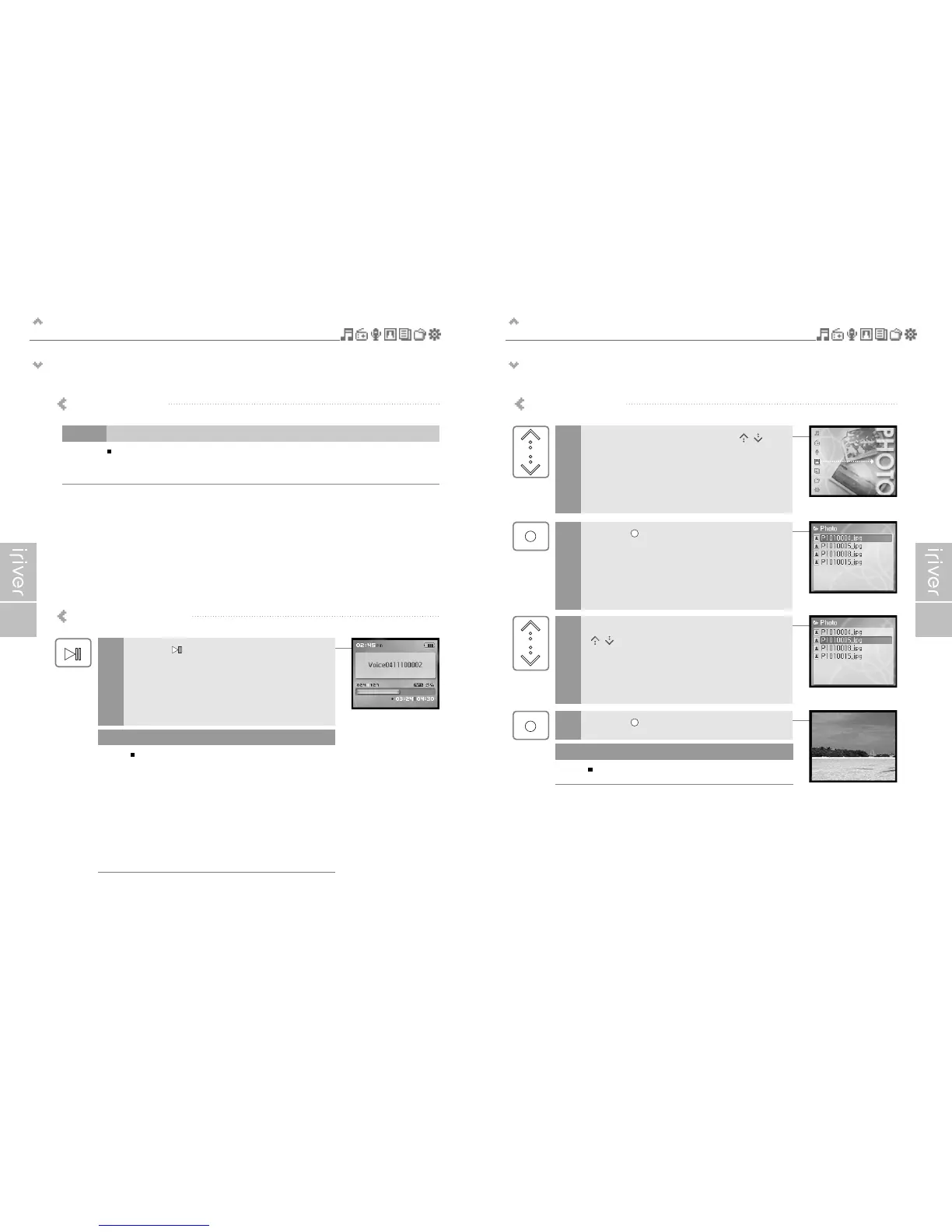
Viewing image supports JPG file.
Viewing image file
Select the <PHOTO> mode using the [ / ]
scroll from the main menu.
1
2
Press the [ ] button to display the Image list
screen.
4
Press the [ ] button to display the Image screen.
3
Move to the desired image file using the
[ / ] scroll in the Image list screen.
Loading time for large images may take longer.
Note
Notices for recording
Playing the recorded file
Press the [ ] button in recording standby mode
to play the recorded file.
1
Recording is automatically stopped if :
- The player's memory is full.
- The battery is low.
Note
The recorded file is saved in following locations
depending on the SOURCE.
Voice
iriver H10 20GC/My Recordings/VoiceYYMMDDXXX.MP3
Line In
iriver H10 20GC/My Recordings/AudioYYMMDDXXX.MP3
Tuner
iriver H10 20GC/My Recordings/TunerYYMMDDXXX.MP3
(YYMMDD - Y : Year, M : Month, D : Day)
Note


 To Next Page