Useful features
Menu settings
66
Useful features
Menu settings
67
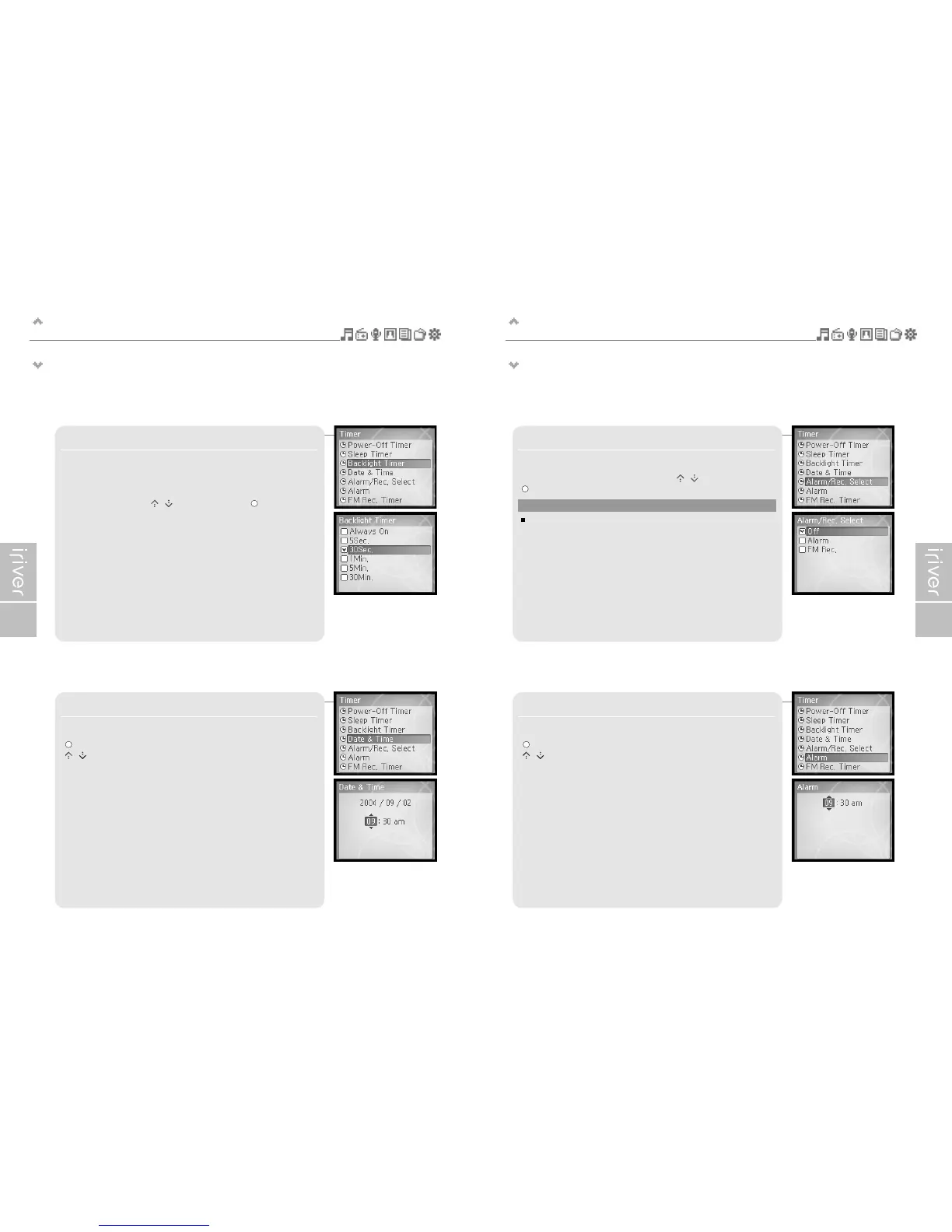
3. Backlight Timer
Sets the time that the backlight stays on.
The available time settings are <Always On>, <5 Sec.>, <30 Sec.>,
<1 Min.>, <5 Min.>, <30 Min.>.
Select the time using the [ / ] scroll and press the [ ] button to
confirm it.
4. Date & Time
Sets the current time.
[ ] : Selects item
[ / ] : Sets the current time
5. Alarm/Rec. Select
Sets the time to activate the alarm function or the FM Rec Timer.
Select <Off>, <Alarm>, <FM Rec.> using the [ / ] scroll and press the
[ ] button to confirm it.
6. Alarm
Sets the time to activate the alarm function.
[ ] : Selects item
[ / ] : Sets the time for alarm
Note
Be sure to set the date and time prior to using timed FM recording
or the Alarm function.


 To Next Page
 Loading...