EasyManua.ls Logo

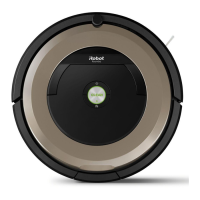
iRobot Roomba 900 - User Manual

iRobot Roomba 900
36 pages
Print Icon
To Next Page IconTo Next Page
Loading...
Roomba
®
900
Owner’s Manual

Other manuals for iRobot Roomba 900

Questions and Answers

  • C
    Carlos RamseySep 8, 2025
    Why does my iRobot Vacuum Cleaner show Error 5?
    • A
      Alyssa BowenSep 8, 2025
      iRobot Vacuum Cleaner shows Error 5 because its left or right wheel is stuck. If the robot is stuck, free it and start it in a new location. Clean the side wheels of hair and debris. Push the wheels in and out, and check that they both turn freely.
  • K
    Krista FrederickSep 6, 2025
    What to do if iRobot Vacuum Cleaner shows Error 8?
    • C
      Charles LongSep 7, 2025
      If your iRobot Vacuum Cleaner displays Error 8, it indicates that the vacuum fan is stuck or the filter is clogged. To resolve this, remove and empty the robot's bin, clean the filter, and then briskly tap the bin to loosen any remaining trapped debris.
  • J
    Janet SmithAug 22, 2025
    What to do if iRobot Vacuum Cleaner shows Error 2?
    • S
      Shawn Davidson MDAug 22, 2025
      If your iRobot Vacuum Cleaner displays Error 2, it means the main extractors can’t turn. Remove and clean the Roomba’s extractors and caps, then press CLEAN to restart.
  • E
    Emily WeeksSep 4, 2025
    What does Error 18 mean on iRobot Roomba 900?
    • T
      Terry ValenciaSep 4, 2025
      If your iRobot Vacuum Cleaner displays Error 18, it means the Roomba cannot return to its Home Base or starting position. Ensure there are no obstacles in front of the Home Base or starting position. Wipe the charging contacts on both the Home Base and the robot with a clean, dry cloth.
  • J
    Jennifer Gonzalez MDSep 3, 2025
    What does Error 17 mean on iRobot Roomba 900 Vacuum Cleaner?
    • D
      David ClarkSep 3, 2025
      If your iRobot Vacuum Cleaner displays Error 17, it means the Roomba cannot complete its job because its path is blocked. To resolve this: * Ensure there is sufficient light for the Roomba to navigate. * Ensure there is not excessive clutter that could contribute to this error. * Ensure the Roomba cannot close any doors that may block its path. * Wipe the clear window on the robot’s top surface with a clean, dry cloth. * Turn the Roomba over and clean the Floor Tracking Sensor.
  • J
    Justin GreenSep 1, 2025
    What does Error 10 mean on iRobot Roomba 900?
    • S
      seankruegerSep 1, 2025
      If your iRobot Vacuum Cleaner displays Error 10, it means the left or right wheel is not moving. If the Roomba is stuck, free it and start in a new location. Clean the Roomba’s side wheels of hair and debris. Push the wheels in and out, and check that they both turn freely.
  • R
    robert20Aug 31, 2025
    What does Error 16 mean on iRobot Roomba 900?
    • S
      stephenwardAug 31, 2025
      If your iRobot Vacuum Cleaner displays Error 16, it means the Roomba has started while moving or at an angle, or was bumped while running. Move the Roomba to a flat surface then press CLEAN to restart. Avoid moving the robot when pressing CLEAN or when the Roomba is running.
  • B
    Brandon WiseAug 30, 2025
    What does Error 9 mean on iRobot Vacuum Cleaner?
    • M
      Michael HallAug 30, 2025
      Error 9 on your iRobot Vacuum Cleaner indicates that the bumper is stuck, or the bumper sensor is dirty. Briskly tap the Roomba’s bumper several times to dislodge any debris that may be trapped underneath, then press CLEAN to restart.
  • B
    barkersydneyAug 28, 2025
    Why does iRobot Vacuum Cleaner show Error 6?
    • A
      April TannerAug 29, 2025
      If your iRobot Vacuum Cleaner shows Error 6, it means that the cliff sensors are dirty, it is hanging over a drop, or it is stuck on a dark surface. If the Roomba is hanging over a drop, or on a dark surface, start in a new location. Otherwise, wipe its cliff sensors with a dry cloth, then press CLEAN to restart.
  • V
    Vanessa ZhangAug 27, 2025
    What to do if iRobot Vacuum Cleaner shows Error 1?
    • K
      Kristin MillerAug 27, 2025
      If your iRobot Vacuum Cleaner displays Error 1, it indicates that the Roomba is stuck with its left or right wheel hanging down. Ensure the Roomba’s wheels are firmly on the floor. If the Roomba is on an obstacle or hanging over a drop, start in a new location. Otherwise, clean its side wheels of hair and debris. Push the wheels in and out, and check that they both turn freely, then place the Roomba on a flat surface and press CLEAN to restart.

Summary

Important Safety Information

General Safety Instructions

Read all safety and operating instructions before operating your robot.

Use Restrictions

Product Usage Limitations

Specifies conditions and environments where the robot should not be used.

Setup Guide

Activate Roomba

Steps to prepare and activate the Roomba robot for the first time.

Start Cleaning Cycle

How to initiate a cleaning cycle on the Roomba robot.

Download the iRobot HOME App

Instructions for downloading and installing the companion mobile application.

iRobot HOME App Features

App Functionality Overview

Details the benefits and features of using the iRobot HOME App.

Basic Operating Instructions

Cleaning with Roomba

Core instructions for operating the Roomba during cleaning cycles.

Pausing and Resuming Cleaning

How to temporarily stop and restart the Roomba's cleaning process.

How Roomba Cleans Your Home

Spot Cleaning Function

Details the process for intense cleaning of specific localized areas.

Cleaning Preferences

Carpet Boost Feature

Explains how Roomba adjusts vacuum power for different surfaces.

Number of Cleaning Passes

Information on how Roomba cleans areas multiple times for deep cleaning.

Edge Clean Function

Describes Roomba's feature for cleaning along walls and furniture.

Behavior When Bin is Full

Options for Roomba's behavior when its dust bin becomes full.

iRobot Roomba 900 Series Anatomy

Top View Components

Identifies parts and indicators visible on the top of the Roomba.

Bottom View Components

Identifies parts visible on the bottom of the Roomba robot.

Cleaning Head Components

Details the parts that make up the Roomba's cleaning head assembly.

Tips for Optimizing Performance

General Cleaning Tips

Advice for improving Roomba's cleaning efficiency and maintenance.

Floor Conditioning for Pets

Guidance for homes with pets that shed heavily, optimizing cleaning.

Positioning the Home Base

Recommendations for optimal placement of the Roomba charging station.

Dual Mode Virtual Wall Barriers

Virtual Wall Mode Operation

How to use the Virtual Wall barrier to block openings up to 10 feet.

Halo Mode Operation

How to use the Halo mode for a protective zone around items.

Virtual Wall Device Use

Instructions for operating the Virtual Wall device and its storage.

Regular Robot Care

Robot Part Maintenance Schedule

Table outlining care and replacement frequency for various Roomba parts.

Bin and Filter Care

Instructions for emptying the bin and cleaning the filter.

Sensor and Contact Cleaning

Guide to cleaning sensors and charging contacts for optimal performance.

Brush and Wheel Maintenance

Procedures for cleaning the side brush and front caster wheel.

Extractor Maintenance

Detailed guide on cleaning the Roomba's debris extractors.

Battery and Charging Information

Lithium Ion Battery Handling

Important safety and shipping instructions for lithium ion batteries.

Battery Charging Issues

Troubleshooting common problems encountered during battery charging.

Battery Removal and Storage

Procedures for removing, storing, and disposing of the Roomba battery.

Troubleshooting

Error Code Explanations

Explains error messages and their likely causes and solutions.

Rebooting Roomba

Instructions on how to reboot the Roomba to resolve certain errors.

Repeating Error Messages

How to repeat the last error message displayed by the Roomba.

Declaration of Conformity

EU Directives and Standards

Lists the EU directives and standards Roomba complies with.

iRobot Customer Care

Contacting Customer Support

Information on how to contact iRobot for assistance and support.

iRobot Roomba 900 Specifications

General IconGeneral
ModelRoomba 900 Series
Wi-Fi ConnectivityYes
Recharge and ResumeYes
Smart Home CompatibilityAmazon Alexa, Google Assistant
Bin Capacity0.6 Liters
Weight8.4 lbs
App CompatibilityiRobot HOME App
Auto DockingYes
CategoryRobot Vacuum
Cleaning System3-Stage Cleaning System
Battery TypeLithium-ion
Charging TimeAbout 3 hours
Dimensions3.6 inches in height
Warranty1 year limited warranty
NavigationiAdapt 2.0 with Visual Localization

Related product manuals