DOC. MIE91093 Rev. 1.34 Page 27 of 145
There's an easy way to check the power transformer vector
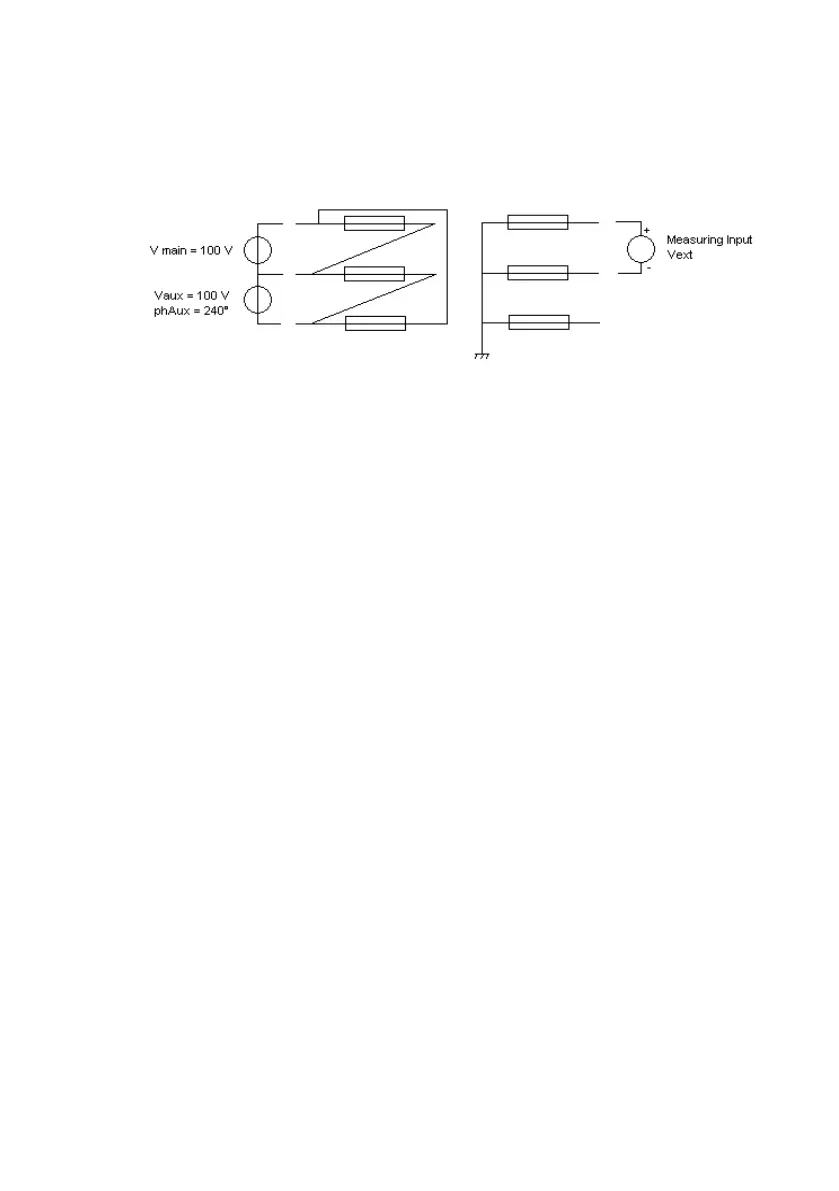
group. Please make reference to the following wiring diagram.
Connect V main to the transformer HV side phase 1 and
2 (positive and negative).
Connect V aux to the transformer HV side phase 2 and
3 (positive and negative).
Adjust the same voltage value on both generators.
Adjust 240° for Vaux with respect to the mains.
Connect the measuring input Ext V (the 600 V or the
10 V input, as a function of the transformer ratio) to LV
side terminals 1 and 2.
Select the measurement of the ExtV - Vmain phase
angle.
This way, we are generating a three phase voltage on HV side,
all voltages with 120° phase shift. But, since phase angle of
V12is 0°, the phase shift measured on ExtV per respect to
Vmain, divided by 30, gives you the transformer group.
Suppose you measure 150°, the transformer group would be
150/30=5.


 To Next Page