Chapter 5 REGISTRATION MODE
5
[Other Data Select]
Same procedure will be applied as above to
upload the desired data (see below).
Data Selection
P10-01-01 All data
P10-01-02 Store data
P10-01-03 Item data
P10-01-04 Preset data
P10-01-05 Message 1 data
P10-01-06 Format data
P10-01-07 Config. data (E2ROM)
P10-01-08 Coupon data
P10-01-09 Message 2 data
P10-01-10 Message 3 data
P10-01-11 Total data
P10-01-12 Operator data
P10-01-13 Title data
P10-01-14 Advertisement data
P10-01-15 Campaign data
6
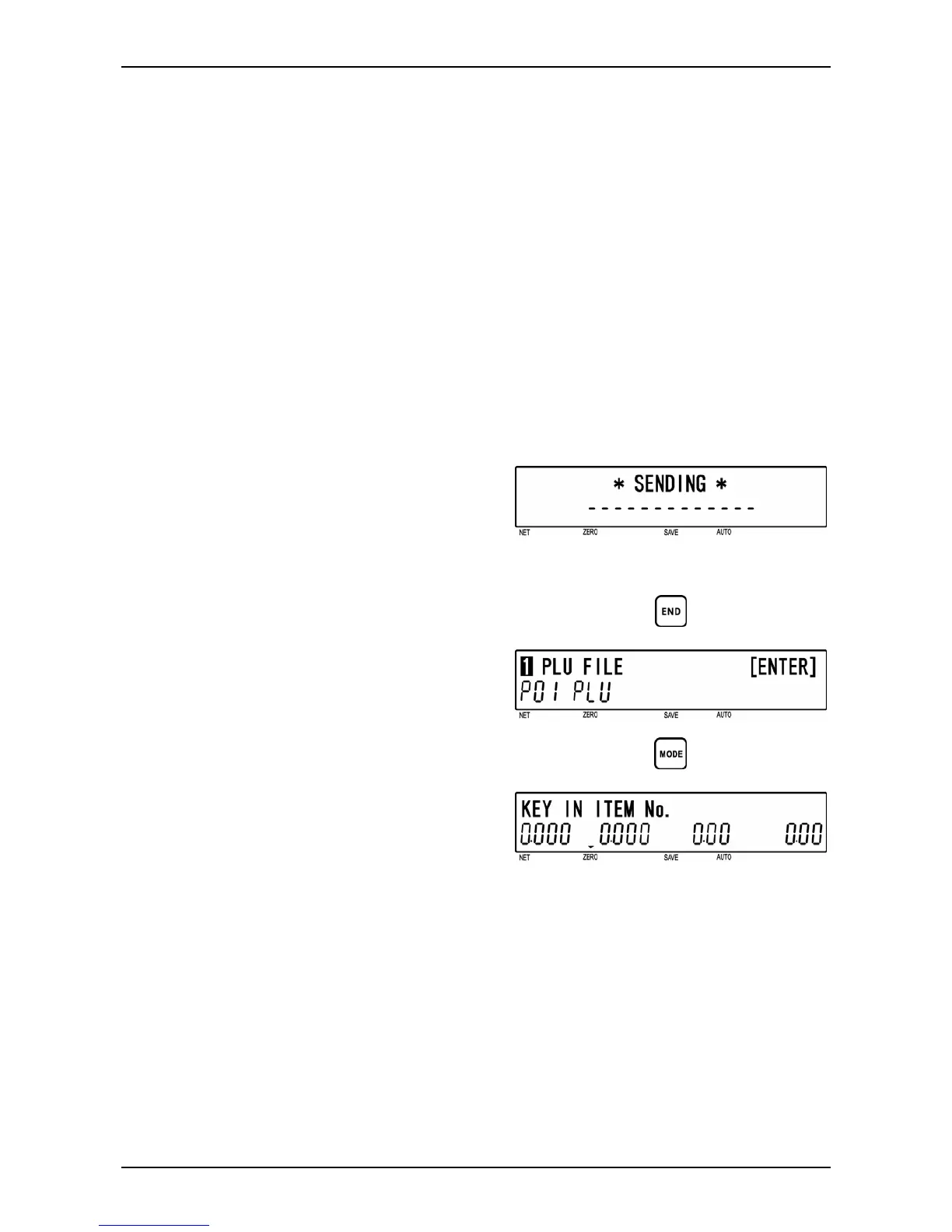
[Sending]
While the specified data is being sent,
“SENDING” screen is displayed.
Note: If an error occurs, “DATA SEND ERR”
screen will be displayed.
7
[Return to P01]
Press the [END] key to return to the P01
screen.
d
8
[Registration Mode Exit]
To exit Registration Mode, press the
[MODE] key.
The initial screen will appear.
d
BC-4000TEC User’s Manual No. JBAW97EBC-4000TEC 5-33


 To Next Page