Chapter 5 REGISTRATION MODE
DOWNLOADING DATA (P10-02) ** NOT AVAILABLE **
1
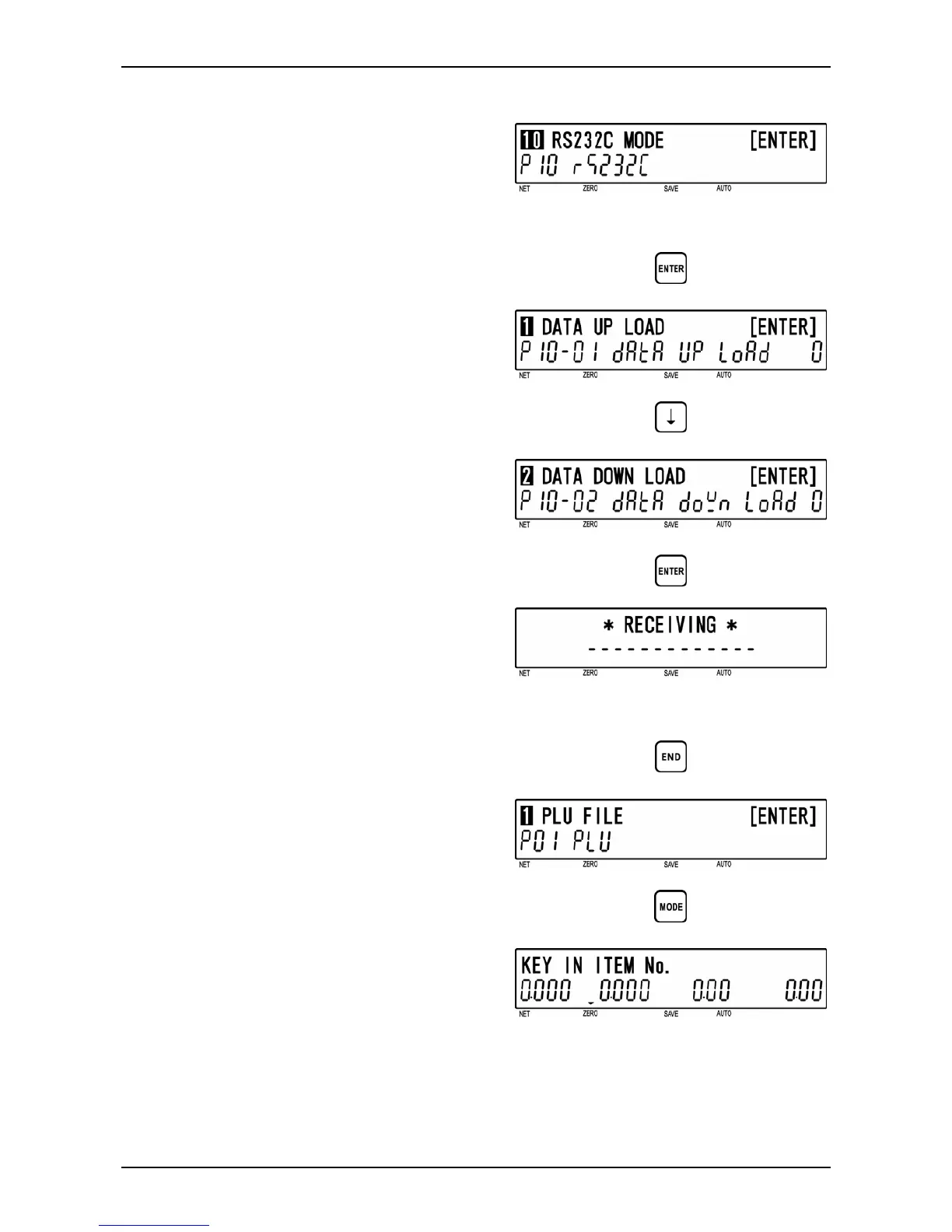
[P10 Screen]
Make sure that “RS232C Mode” screen
(P10) appears on the display.
Otherwise, enter this screen by referring to
Section 5.1: Registration Mode Entry/Exit.
2
[Data Upload]
Press the [ENTER] key to enter “Data
Upload” screen (P10-01).
d
3
[Data Download]
Press the [ ↓ ] key to proceed to “Data
Download” screen (P10-02).
To download all data, press the [ENTER]
key.
d
d
4
[Receiving]
While all data is being received,
“RECEIVING” screen is displayed.
Note: In order to exit receiving status, turn OFF
and ON the power.
5
[Return to P01]
Press the [END] key to return to the P01
screen.
d
6
[Registration Mode Exit]
To exit Registration Mode, press the
[MODE] key.
The initial screen will appear.
d
5-34 BC-4000TEC User’s Manual No. JBAW97EBC-4000TEC


 To Next Page