EasyManua.ls Logo

IST DCM 600 - DUST DRAIN AND DIAGRAMS; Dust Drain Procedures; Component Diagrams

IST DCM 600
44 pages
Print Icon
To Next Page IconTo Next Page
To Previous Page IconTo Previous Page
Loading...
T
he
reference
in
surface
TreaTmenT
International
Surface
T
echnologies
istsurface.com
16
DCM600 to 1800 - Instruction Manual
DRAIN OF DUST
DIAGRAMS FOR LEFT
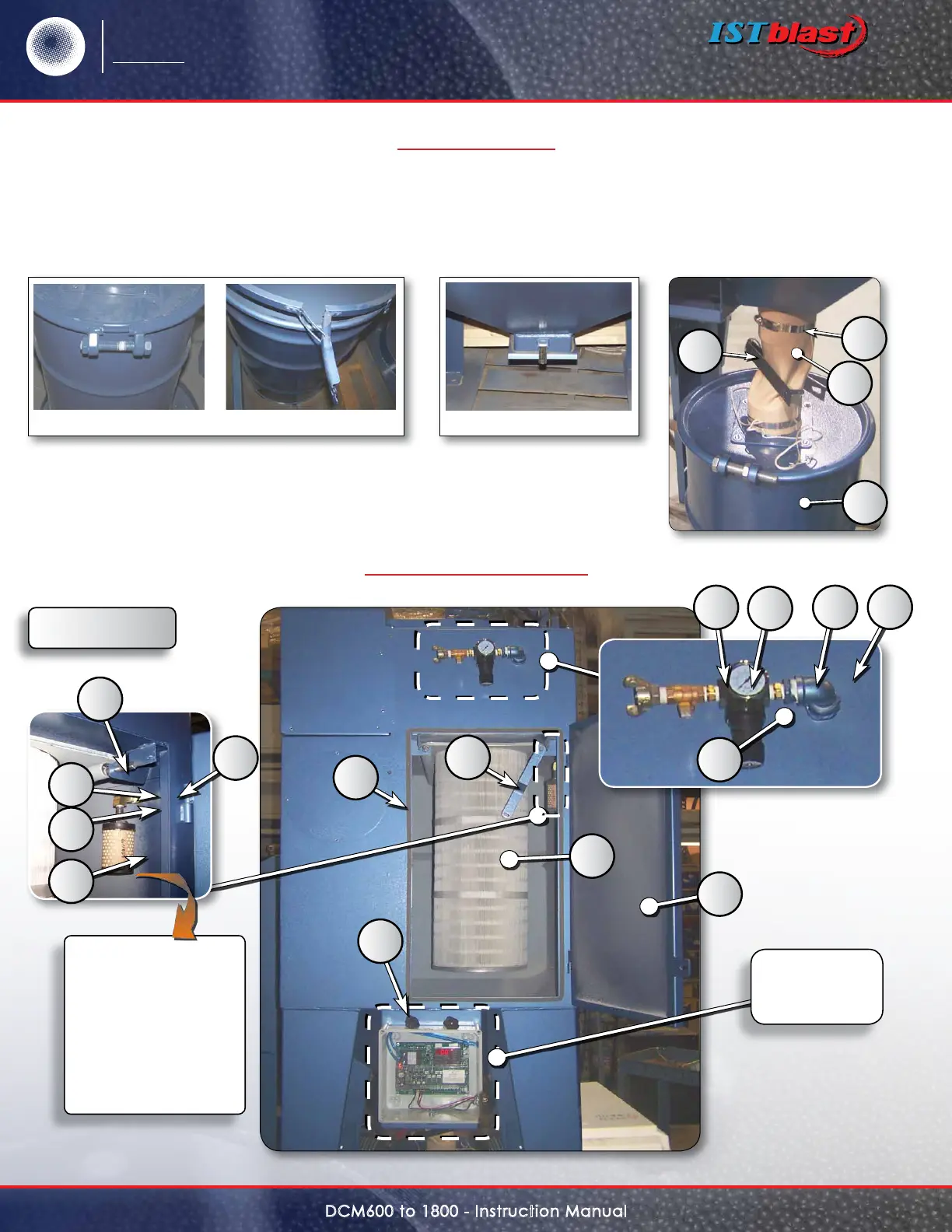
Remove dust from the barrel on a regular basis. Before opening the door, make sure you have a container
under the trap to collect dust. If you are equipped with a barrel under your dust collection, open the lid
and empty the barrel.
System for opening barrels Drain trap
The Pamic lter
protects the
pressure
switch DCP 100 against
dust that may cause
undesired operation.
Regular cleaning will
be required to allow
the system to make a
good read.
Figure A
14
11
15
19
18
16
17
13
5
9
3
2
4
1
12
8
7
10
20
Electrical
panel
see p. 21