T
he
reference
in
surface
TreaTmenT
International
Surface
T
echnologies
istsurface.com
17
DCM600 to 1800 - Instruction Manual
DIAGRAMS MOUNTING CARTRIDGES
Remove dust from the barrel on a regular basis. Before opening the door,
make sure you have a container under the trap to collect dust. If you
are equipped with a barrel under your dust collection, open the lid and
empty the barrel.
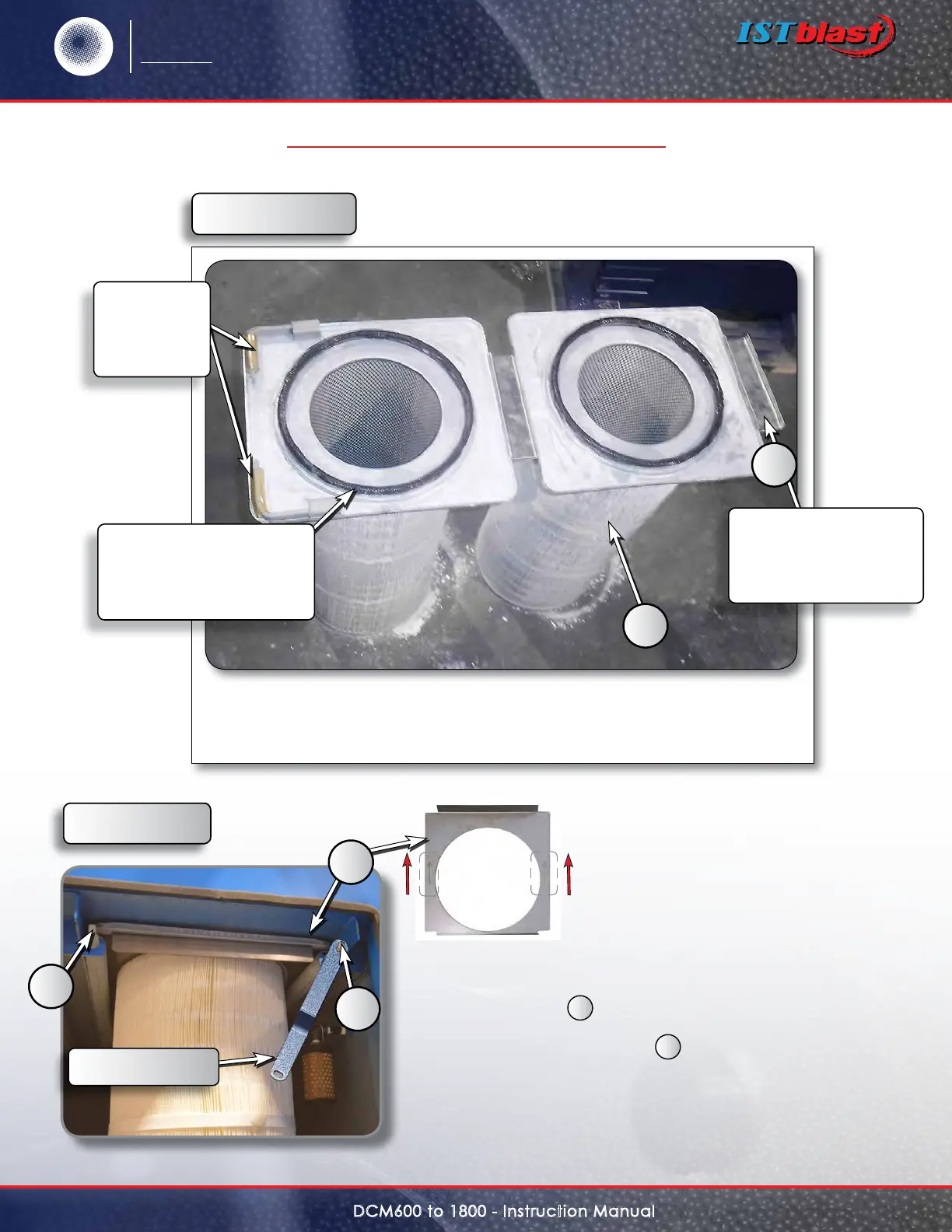
Mounting cartridges
When replacing the cartridge
• Put the spacer
1
on the top of the cartridge, with the
arrows pointing to the back, insert the cartridge into the
DCM above the two axles
A
, centered it then turn each
axle a quarter turn clockwise to lock the cartridge in place.
• Repeat the same operation with the cartridge 2, 3 and 4 if
necessary.
Figure C
1
A
A
Figure A, item 10
Figure B :
Two handles
are used to
fastening the
Filters.
The two spacers
serve for aligning the
cartridges on the axes
of the cleaning nozzles
In order to assure an airtight
t, the rubber joints must be
coated with Vaseline before
installation
1
2


 To Next Page