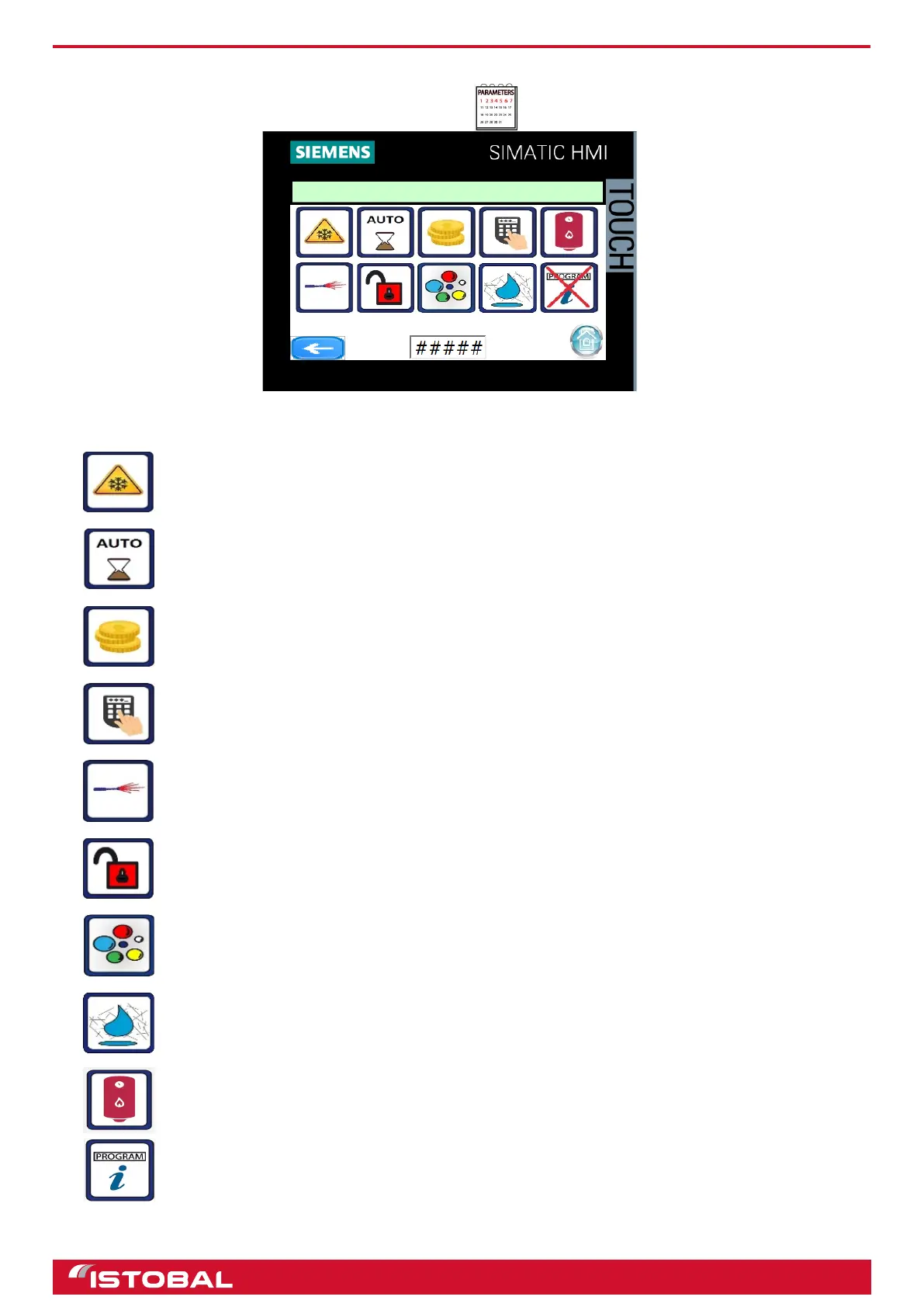
SIEMENS KTP400 touch-screen screen
PARAMETERS
Access PARAMETERS from the main menu by pressing .
The parameters menu allows users to enable/disable optional extras, devices and operating modes.
To enable/disable frost prevention via pipe-emptying.
To set when credit starts being used. If the icon is on, the jet wash starts using credit instantly; if it is
off, credit is not used until the program starts running.
To enable/disable if the coin-operated payment system is installed.
To enable/disable is the Codax system is installed.
To enable/disable lance for pipe-emptying.
To enable/disable if the anti-theft alarm is installed.
To enable/disable triple foam.
To enable/disable osmosis water.
To enable/disable the hot water tank. Enable where the jet wash installation has a hot water
generator with a 40 L hot water tank and disable if the generator has a 2.5 L tank.
To enable/disable information messages when a program is changed on the TFT display.
BLEED DOSING PUMPS
PARAMETERS
MINIMUM CREDIT TIM
34


 To Next Page