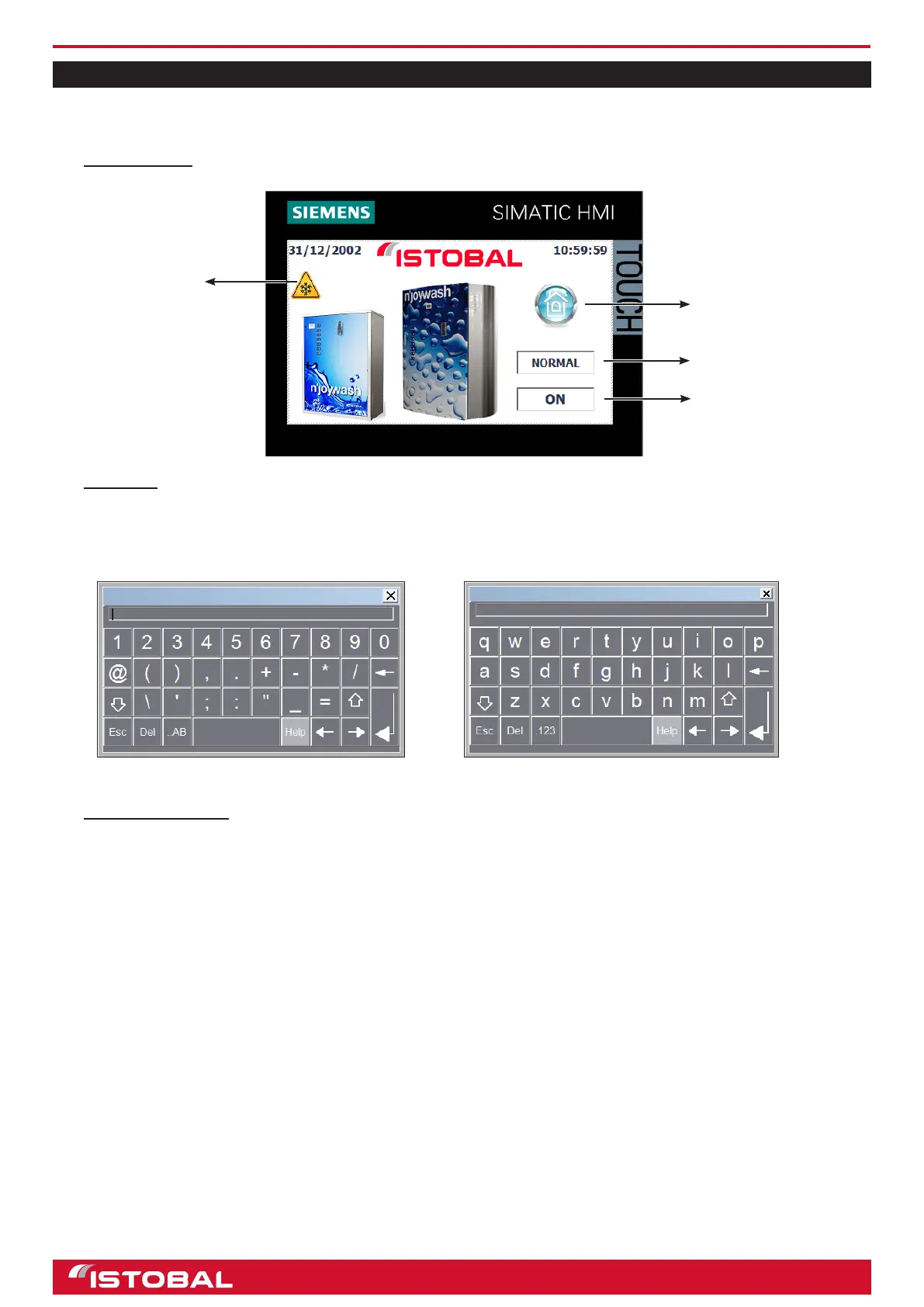
SIEMENS KTP400 touch-screen screen
SIEMENS KTP400 TOUCH-SCREEN SCREEN
The touch-screen allows us to see the jet wash information, determine and modify parameters, congure programs,
counters, etc.
MAIN SCREEN
KEYPADS
The keypads shown on the screen allow users to enter letters and numbers. The keypads will appear when a
modiable eld is selected for editing. The keypad will be either numbers or letters depending on the data to be
entered.
Number keypad Letter keypad
ACCESS CONTROL
There are three levels of access to menus and information:
• “Administrator” Password. Total control and unlimited access. Can create new operators, customers and
administrators.
• “Operator” Password. Access to counters, view faults, view descriptions of errors, bleed dosing pumps, and
view machine specications. Access to conguration of parameters not allowed.
• “Customer” Password. Authorization to do all of the above, plus run tests, change the language, and
congure programs and access levels.
NOTE: Users will not be required to enter the password again unless they return to the main menu or attempt to
enter a menu for which they have no authorization.
Type of rate
Bay status
Main menu activation
Activation frost
prevention by water loss
24


 To Next Page