11
Note:
When you order the broadband service, pay attention to the Internet connection type. The PLC wireless adapter adopts
Ethernet connection. Technical parameters of Internet connection properties are provided by your Internet service provider
(ISP). For example, your ISP should tell you whether the Internet connection mode is static IP or dynamic IP, and whether the
protocol used for Internet communication is DHCP or PPPoE.
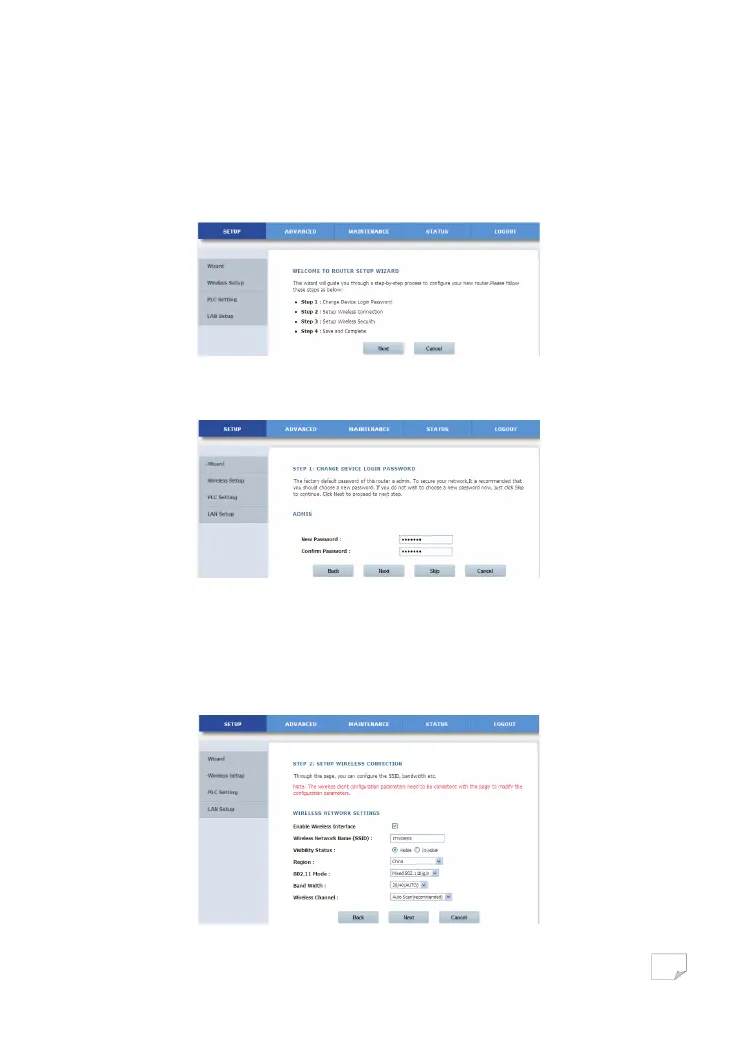
Step 2 Click Setup Wizard to display the following page:
Step 3 There are 4 steps for configuring the wizard. Click Next to display the following page:
Note:
The factory default password of this adapter is admin. To secure your network, it is recommended that you should set a new
password.
Step 4 On this page, you can change the password of the PLC wireless adapter. If you do not want to change the password, click
Next or Skip. After setting the new password, click Next to display the following page:
Downloaded from www.vandenborre.be


 To Next Page