22
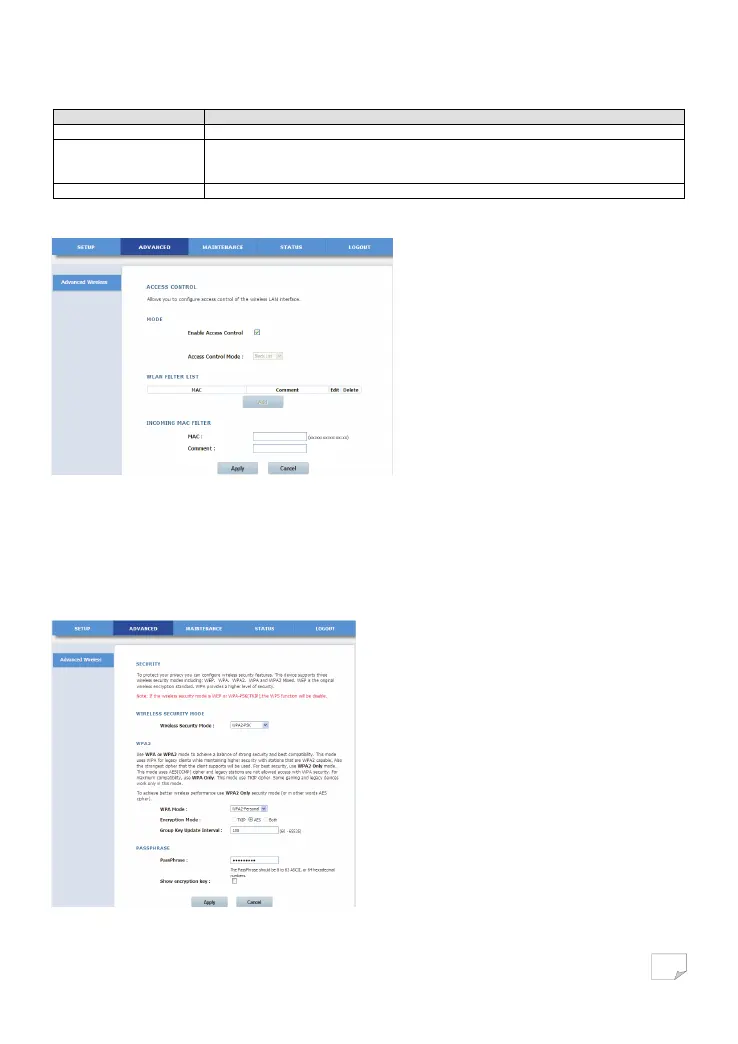
The following table describes parameters in this page:
Field Description
Enable Access Control You can enable or not enable the access control.
Access Control Mode
You can select black list or white list. The white list means that if a MAC address of a LAN device
is consistent with the specified MAC address, the PLC wireless adapter will assign the bound IP
address to the device. The black list means the opposite.
Add Add new WLAN filters.
Click Add to display the following page.
Enter the MAC address and comment of the incoming MAC filter, and click Apply to save the configuration.
Advanced Security
Choose Advanced Wireless > Advanced Security on the left pane or click Advanced Security in the ADVANCED WIRELESS page to
display the following page.
Downloaded from www.vandenborre.be


 To Next Page