25
Status
Device information
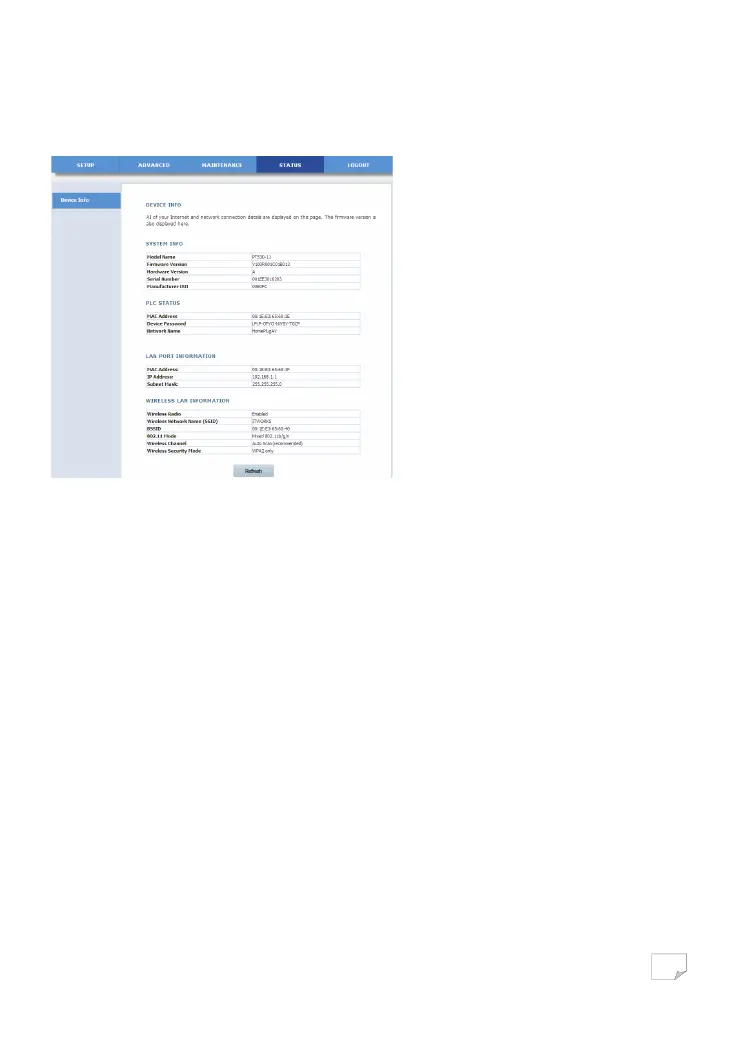
Choose STATUS > Device Info to display the following page.
This page displays device information, including system information, PLC status, LAN information and WLAN information. Click
Refresh to refresh the page.
Logout
Click Logout to log out from the Web configuration page.
USING THE SECURITY PUSHBUTTON
This chapter describes how to add new devices to, or remove old devices from a HomePlug AV logical network (AVLN). Both can
be accomplished by using a Security (NMK) pushbutton.
Operation progress and outcome can be monitored by observing the behaviours of the Power and Data LED indicators.
Forming a HomePlug AV Logical Network
When two devices (A and B) with different NMK values are connected to the same power line, you want them to form a logical
network. Do as follows:
Step1 Press the Security pushbutton on A or B for at least 10 seconds. The device will reset and restart with a random NMK.
Step2 Press the Security pushbutton on the first device A for less than 3 seconds.
Step3 Press the Security pushbutton on the second device B for less than 3 seconds. Press the pushbutton on B within 2
minutes.
Step4 Wait for the connection to complete.
Downloaded from www.vandenborre.be


 To Next Page