27
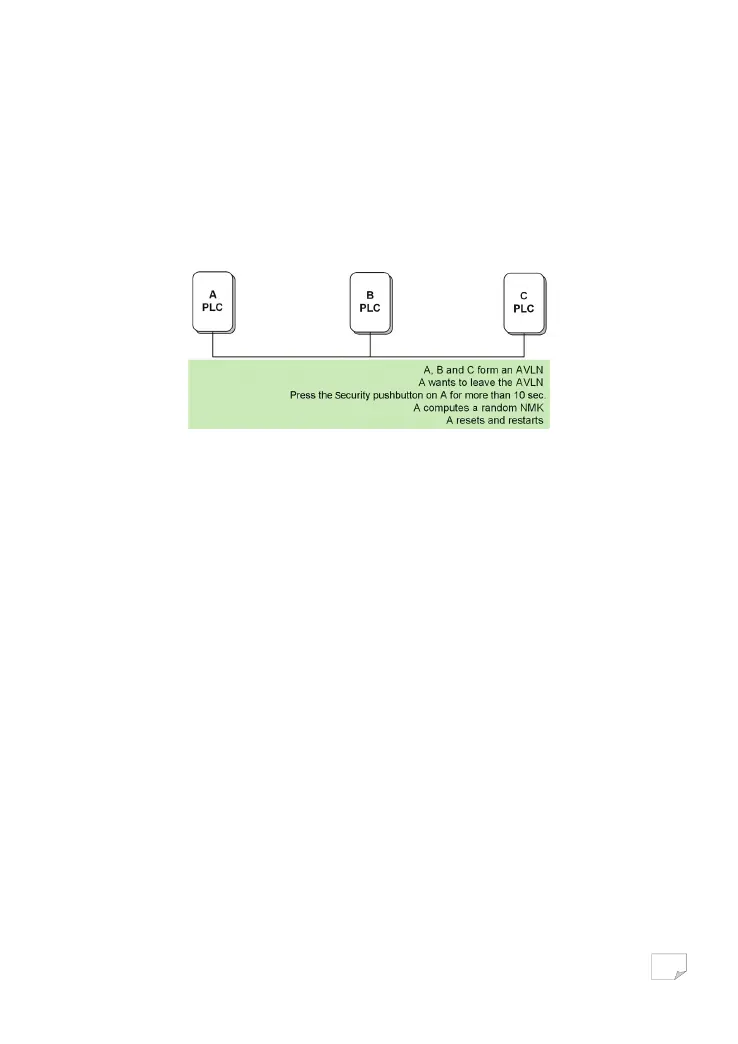
Assume that a network exists. If you want to remove one device, the ‘leaver’ from an AVLN network, or remove the device from
the existing network and have it join another logical network, do as follows:
Step1 Press the Security pushbutton on the ‘leaver’ for more than 10 seconds.
The device will reset and restart with a random NMK.
Step2 Wait for reset to complete.
The Power LED indicator on the ‘leaver’ will momentarily extinguish during reset and flash during restart, then illuminate steadily.
The ‘leaver’ is removed from the existing network successfully.
Once the process completes, you may disconnect the device from the medium or join it to another logical network on the same
medium.
TROUBLESHOOTING
Why all the LED indicators are off?
(1) Check the connection between the power adapter and power socket.
(2) Check whether the device is turned on.
Why the Ethernet indicator is off?
(1) Check the connection between your PLC wireless adapter and computer, hub, or switch.
(2) Check the running status of your computer, hub, or switch, and verify whether they run normally or not.
(3) Check the network cable that is connected to the PLC wireless adapter and other devices.
Why you fail to access the Web page?
Follow the steps below to check the connection between the computer and the device:
(1) Click Start > Run and enter ping command ping 192.168.1.1 (the IP address of PLC wireless adapter).
(2) If you fail to access the PLC wireless adapter, check the following settings:
− The network cable type
− The connection between your adapter and the computer
− TCP/IP settings of PC
How to restore factory defaults after carrying out the incorrect configuration?
(1) Press the Reset pushbutton for about 3 seconds and then release it.
Downloaded from www.vandenborre.be


 To Next Page