23
For the parameters in this page, refer to Wizard.
MAINTENANCE
Device Management
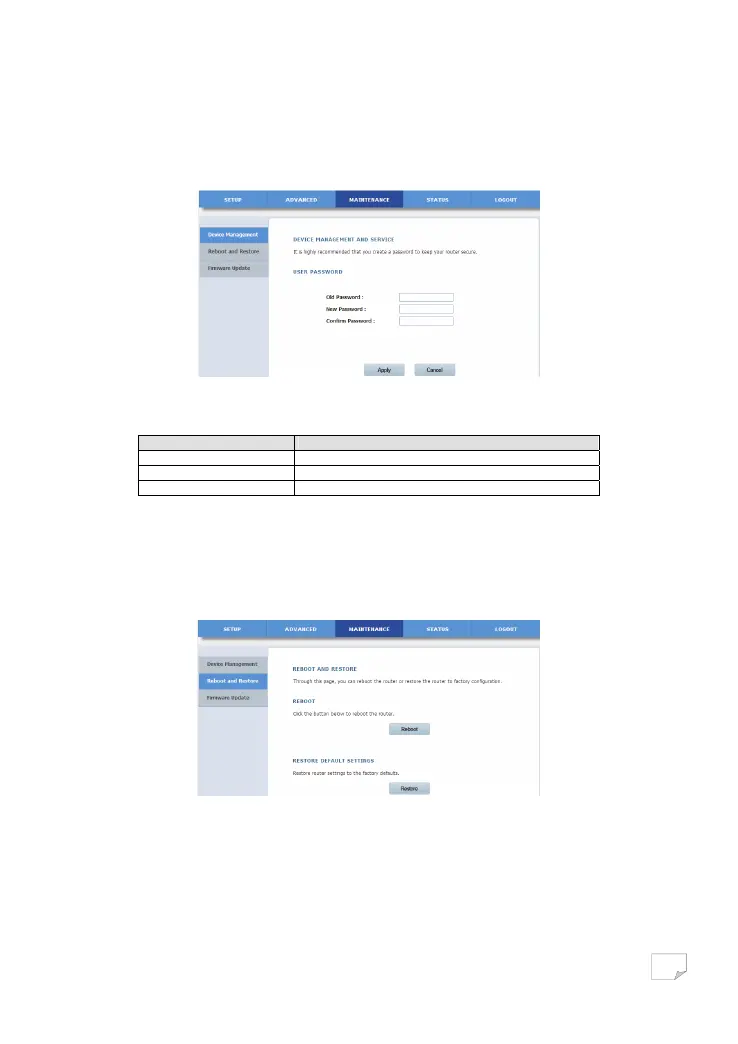
Choose MAINTENANCE > Device Management, and the following page appears.
On this page, you can modify the password for logging in to the PLC wireless adapter.
The following table describes parameters on this page:
Field Description
Old Password Enter the current password.
New Password Enter the new password.
Confirm Password Enter the new password again.
After setting the parameters, click Apply to save the configuration.
Reboot and Restore
Choose MAINTENANCE > Reboot and Restore to display the following page.
On this page, you can reboot the adapter and restore the factory default settings of the adapter.
• Reboot
Click Reboot to reboot the adapter.
Downloaded from www.vandenborre.be


 To Next Page