6
Interface Description
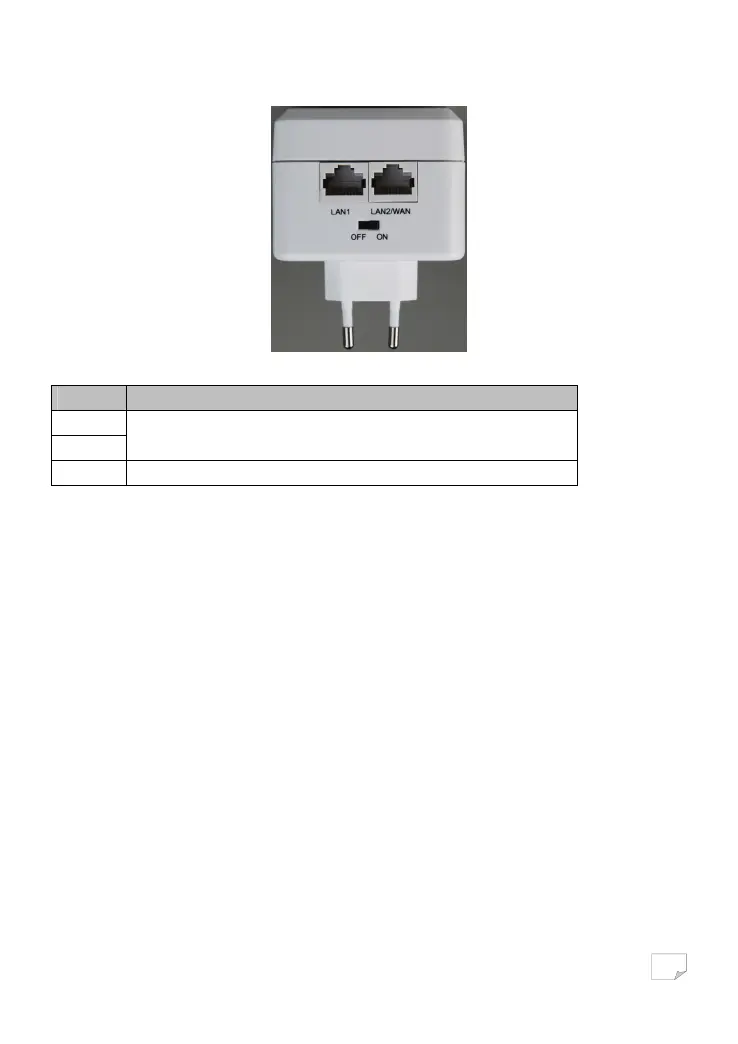
The following table describes interfaces on the PLC wireless adapter:
Interface Description
LAN1
LAN2/WAN
RJ45 LAN interface, for connecting a hub, switch, or computer on a LAN.
OFF ON Turn on or turn off the device.
Hardware Installation
System requirements
Before installing the device, please ensure that the following items are ready:
• At least one Ethernet RJ45 cable (10Base-T/100Base-T)
• One PLC wireless adapter
• One PLC passthrough adapter for PLC communication
• A PC that is installed with the TCP/IP protocol and can access the Internet.
Before You Begin
Before you install the device, please pay attention to the following items:
• When the device is connected to a computer, hub, router, or switch, the Ethernet cable should be shorter than 100 meters.
• Place this device on a stable surface or support. Do not put this device on the ground.
• Keep the device clean. Keep away the device from direct sunshine. Avoid any metal in the device.
• Place the device in the centre of the placement area, and try to optimise the wireless coverage.
Connecting the Device
To connect the device, do as follows:
Downloaded from www.vandenborre.be


 To Next Page