5
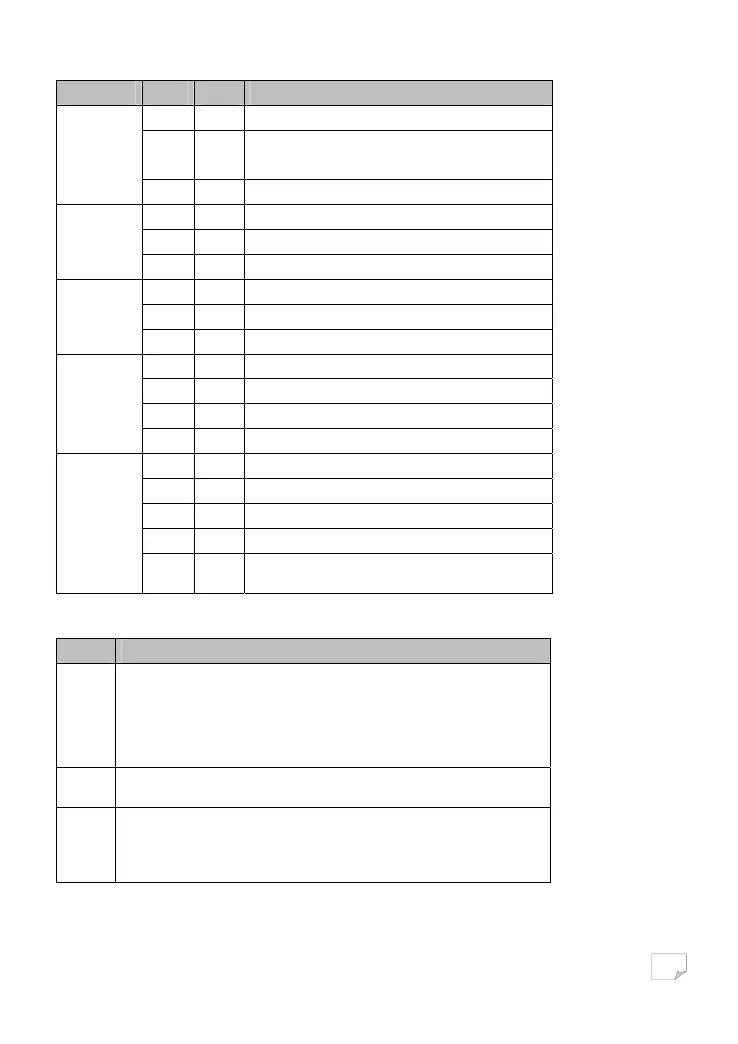
LED indicator Colour Status Description
Green On System runs normally.
Green Flash
System is resetting.
System is in the process of password synchronisation.
Power
__ Off Device is powered off or system is down.
Green On Connection via the LAN1 interface succeeds.
Green Flash Data is being transmitted via the LAN1 interface.
LAN1
__ Off No connection is established via the LAN1 interface.
Green On Connection via the LAN2 interface succeeds.
Green Flash Data is being transmitted via the LAN2 interface.
LAN2/WAN
__ Off No connection is established via the LAN2 interface.
Green On PLC transmission rate equals to or is greater than 40 Mbps.
Orange On PLC transmission rate is between 20 Mbps and 40 Mbps.
Red On PLC transmission rate is smaller than or equals to 20 Mbps.
Data
__ Off Device is not connected to the power line network.
Green On WLAN is enabled.
Green Flash Wireless data is being transmitted.
__ Off WLAN is disabled.
Orange On WLAN is enabled and WPS connection succeeds.
WLAN/WPS
Orange Flash
WPS negotiation is in progress and wireless data is being
transmitted.
The following table describes push buttons on the front panel.
Button Description
Security
It is used to set the status of the device members.
• Press and hold the Security button for more than 10 seconds to exit the current
network and generate a random password of network member.
• Press and hold the Security button for about 3 seconds, and then the PLC wireless
adapter becomes a member of the existing AVLN.
Reset
Press and Reset button for about 3 seconds and then release it. System will restore
the factory default settings.
WPS
It has the following functions:
• Press the WPS button for about 3 seconds to enable the negotiation of PBC mode.
• Press and WPS button for about 5 seconds to enable or disable WLAN.
Downloaded from www.vandenborre.be


 To Next Page