13
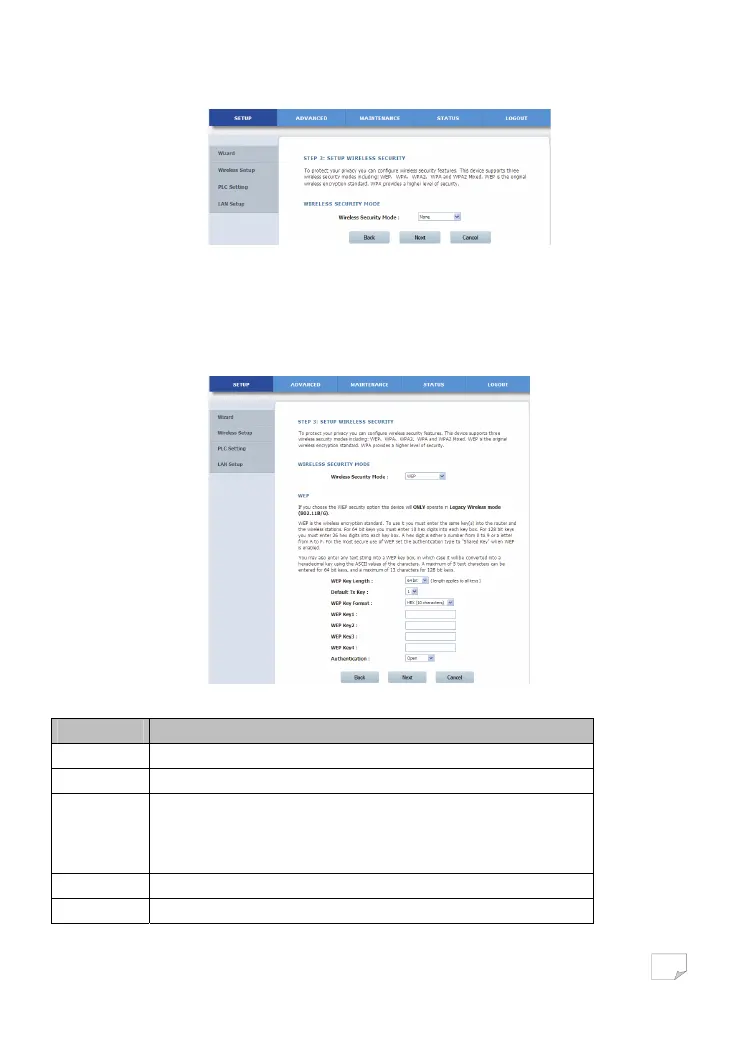
Select None from the drop-down list to display the following page.
None means data encryption is not adopted, the network is not secure, and any station can access the network.
This option is not recommended.
(2) WEP
Select WEP from the drop-down list of wireless security mode to display the following page.
The following table describes parameters related to the WEP mode:
Field Description
WEP Key Length Select the encryption length of WEP key. You can select 64 bit or 128 bit.
Default Tx Key Select one from the four keys as the default key of the wireless network.
WEP Key Format
• When the key format is 64 bit, you need to enter 5 ASCII characters or 10 hexadecimal
digits.
• When the key format is 128 bit, you need to enter 13 ASCII characters or 26
hexadecimal digits.
WEP Key 1/2/3/4 Set 64-bit or 128-bit key according to the key format.
Authentication Select the proper authentication mode. You can select Open or Share Key.
Downloaded from www.vandenborre.be


 To Next Page