15
The following table describes parameters related to the WPA2 mode:
Field Description
WPA Mode Only WPA2-Personal is available.
Encryption Mode Only AES is available.
Pre-shared Key Set the pre-shared key. The PLC wireless adapter uses this key to authenticate the
identity of workstation.
(5) WPA/WPA2-PSK
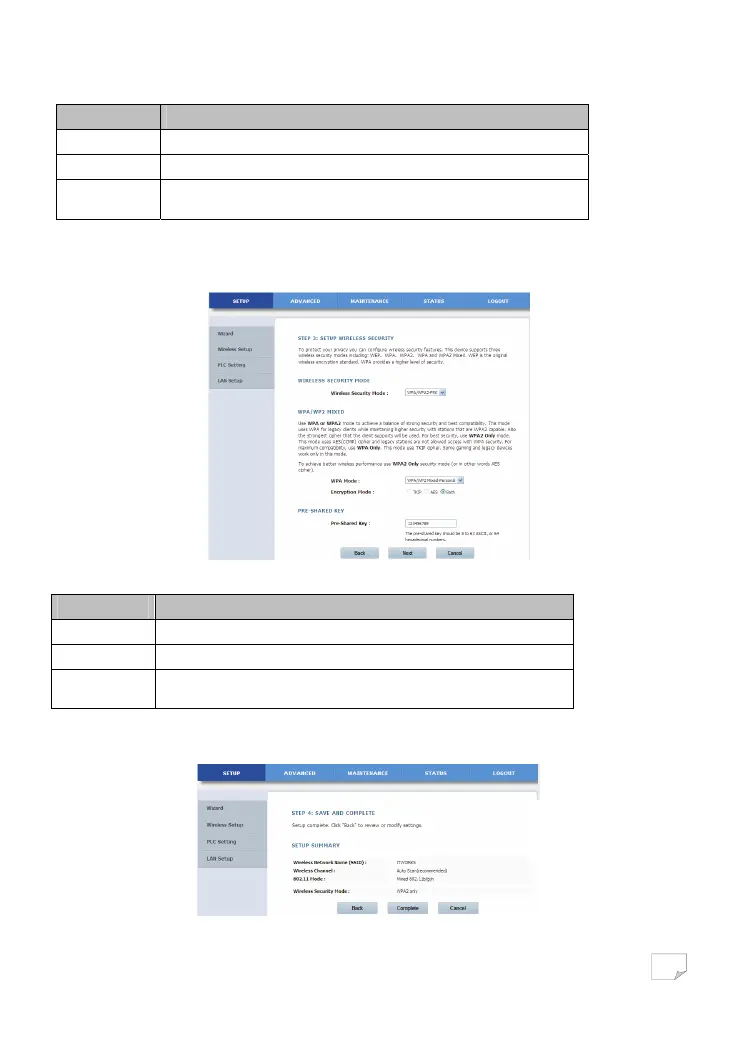
Select WPA/WPA2-PSK from the drop-down list of wireless security mode to display the following page.
The following table describes parameters related to the WPA/WPA2 Mixed mode:
Field Description
WPA Mode Only WPA/WPA2 Mixed-Personal is available.
Encryption Mode You can only select Both.
Pre-shared Key Set the pre-shared key. The PLC wireless adapter uses this key to authenticate the
identity of workstation.
Step 8 After selecting the proper wireless security mode and its relevant parameters, click Next to display the following page.
Downloaded from www.vandenborre.be


 To Next Page