8
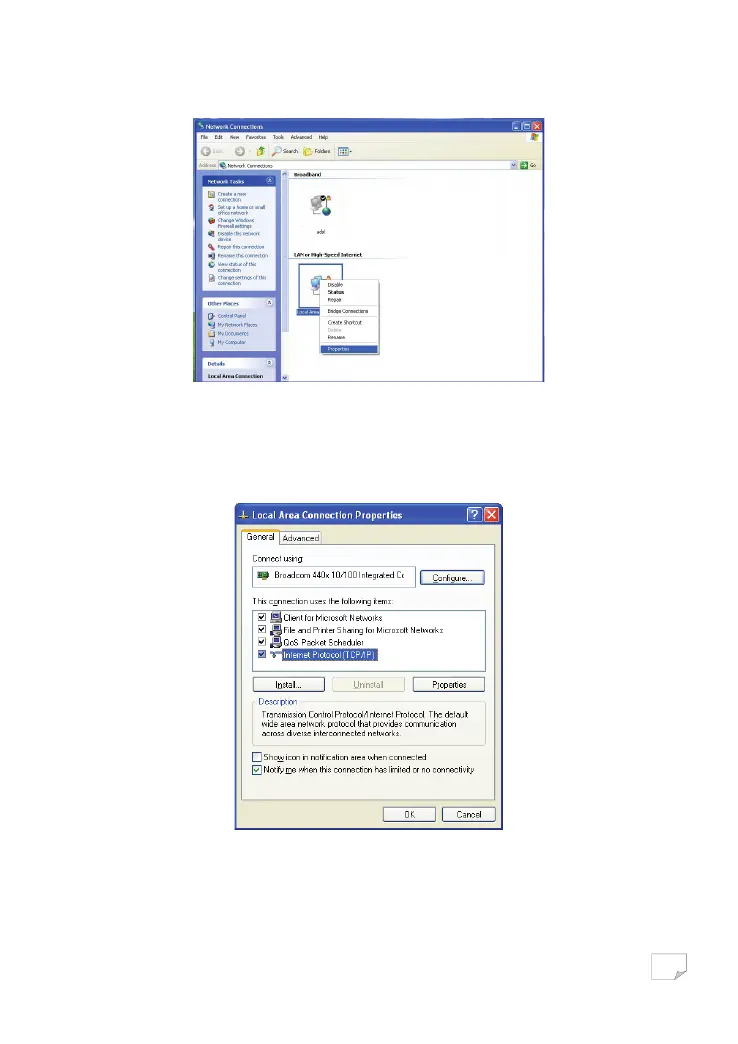
Step 2 Right-click the network adapter icon and choose Properties from the menu. The Local Area Connections Properties
window appears.
Note:
If multiple network cards are installed on your PC, a window other than the Local Area Connections Properties window may
appears.
Step 3 Double-click Internet Protocol (TCP/IP) and the Internet Protocol (TCP/IP) Properties window appears.
Step 4 Select Use the following IP address and enter the IP address of the network adapter. Set the IP address to 192.168. 1 .X
(‘X’ is a number in the range of 2 to 254) and set the subnet mask to 255.255.255.0. Configure the default gateway and
IP addresses of the DNS servers according to your actual network, or leave them blank. After setting the parameters,
click OK.
Downloaded from www.vandenborre.be


 To Next Page