Quick Reference
Copyright © ITECH Electronics Co., Ltd. 11
2.4 Keyboard Introduction
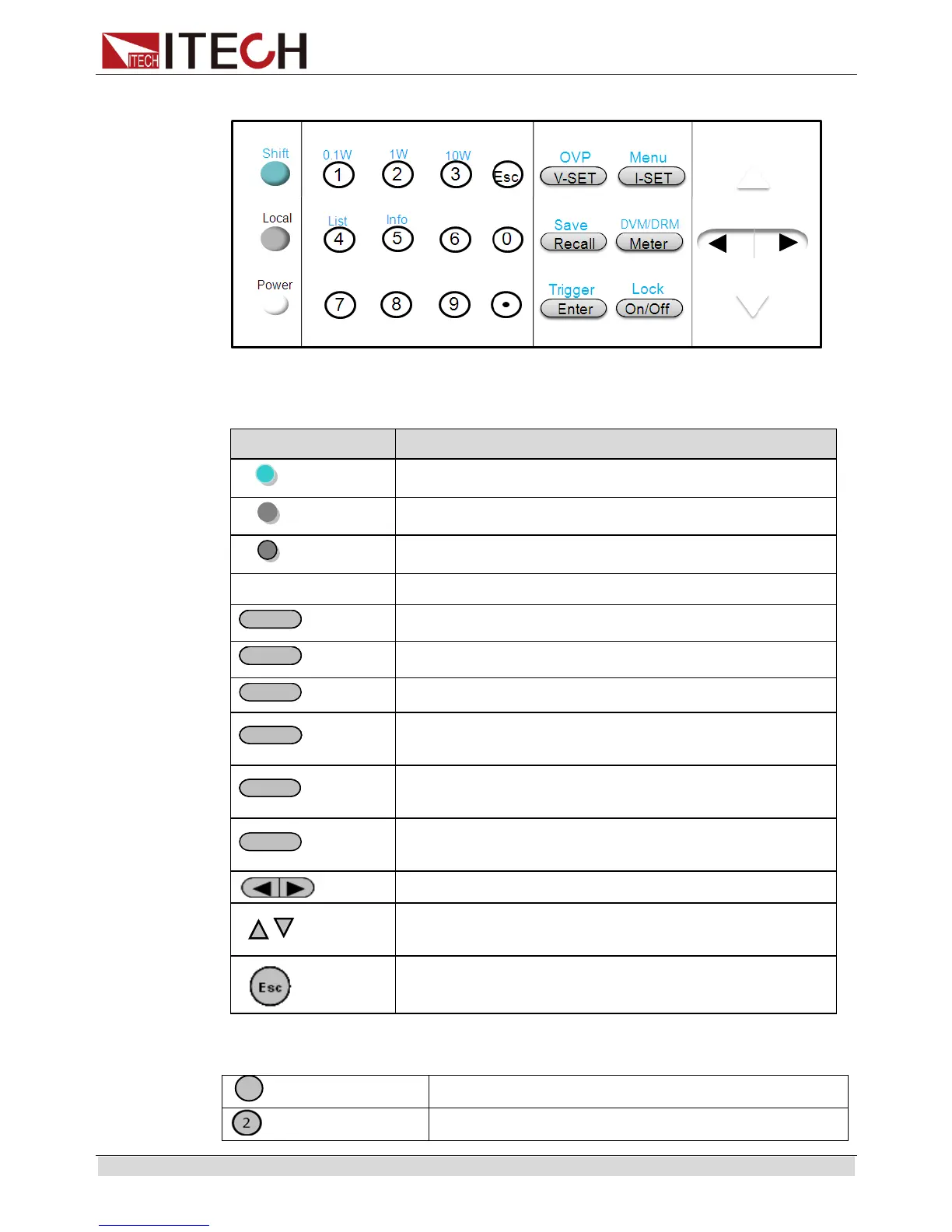
The functions of keys on the front panel of the IT6100B series power supply are
shown in the following table.
Use to access secondary functions
Enable front panel operation when in remote mode
Numerical keys for direct entry of values
Set the voltage value, OVP value
Set the current value and enter into the menu
Recall(Save) operating data from internal memory
Switch between Setting/Meter display, also used to
switch to DVM measuring state.
Press to confirm numerical entries,or provide a
trigger signal
Set the output state of the power supply,or to lock
the front-panel keys
Right/left keys to adjust the position of cursor
Up/down key to overturn the menu items or
increase/decrease the setting value.
Numerical keys/Secondary Shift Functions:
Set the range of the mΩ Meter to 0.1W
Set the range of the mΩ Meter to 1W


 To Next Page