Basic operation
Copyright © ITECH Electronics Co., Ltd. 28
Remote sense
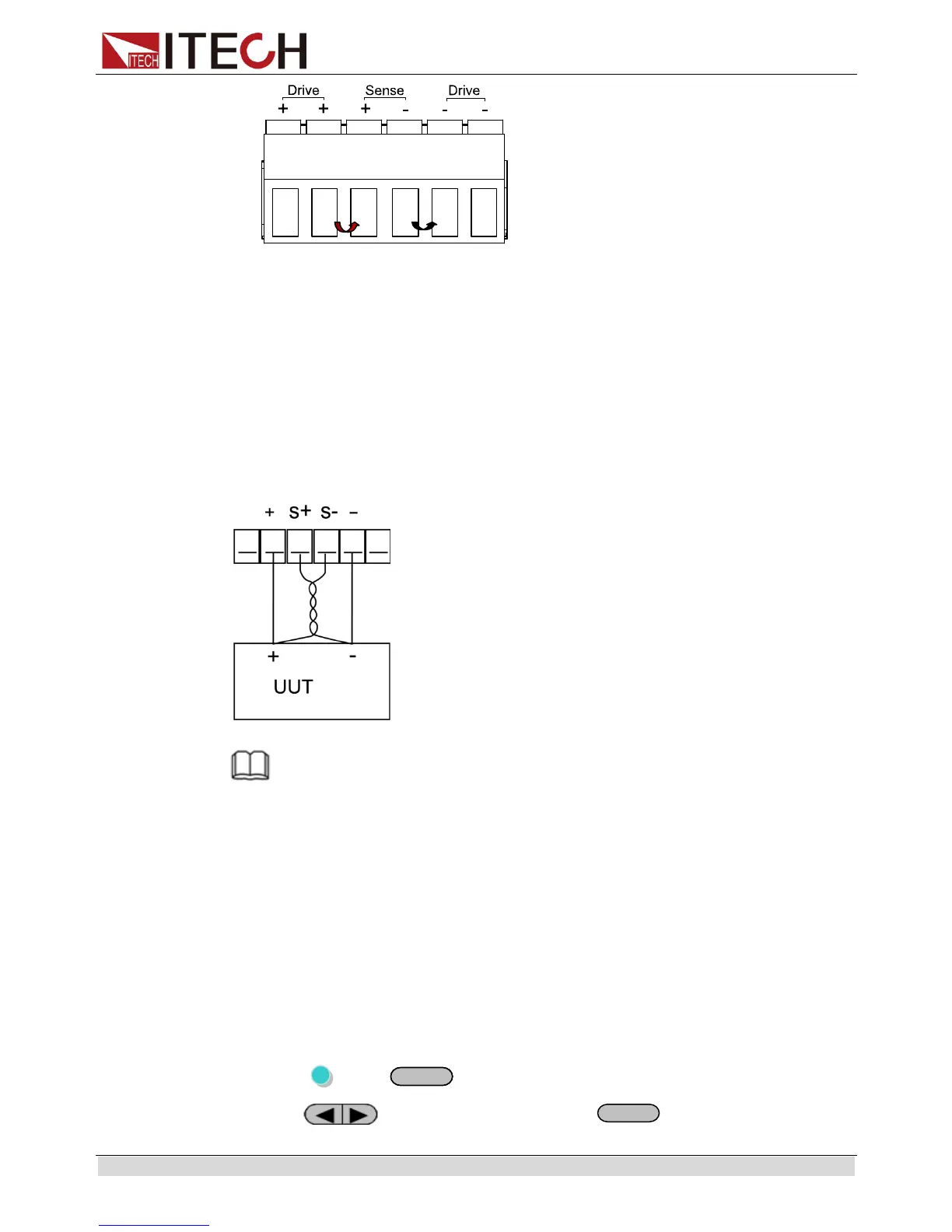
Remote sense can compensate for the voltage drop on the wire, the operation is:
1. Uninstall the wire or shorting clip between the Drive+ and Sense+、 Drive- and
Sense-
2. Connect a couple of wires from Sense+, Sense- and the device under test
3. Connect wires from positive and negative terminals on the front panel or the
Drive+ and Drive- terminal to DUT
Wiring Schematic Diagram of Remote Measurement is as follows:
NOTE
In order to ensure the stability of the system, please install armored twisted pair cable from
Sense+ 、Sense- and the device under test.
3.12.2 Digital Volt Meter (DVM) and Milliohm Meter
The power supply provides a built-in 5 1/2 Digital Volt meter and milliohm meter.
Digital Volt Meter (DVM)
Digital Voltage Meter can be used to measure external DC volatage, the range is:
0~40V. IT6162B/IT6164B measurement range is: -40V~40V.
The connectors are in the rear panel. The voltage value is displayed on the bottom
left field of the display.
The operation to adjust the voltage meter range is:
1. Press (Shift)+
(Menu)to menu
2. Press to enter System menu, press
to confirm


 To Next Page