User Guide
3.3 Field Of View Setup
The image provided by the camera is critical to system performance. A good field of view (FOV) will ensure
the best possible results from the system.
The following should be kept in mind when adjusting the camera:
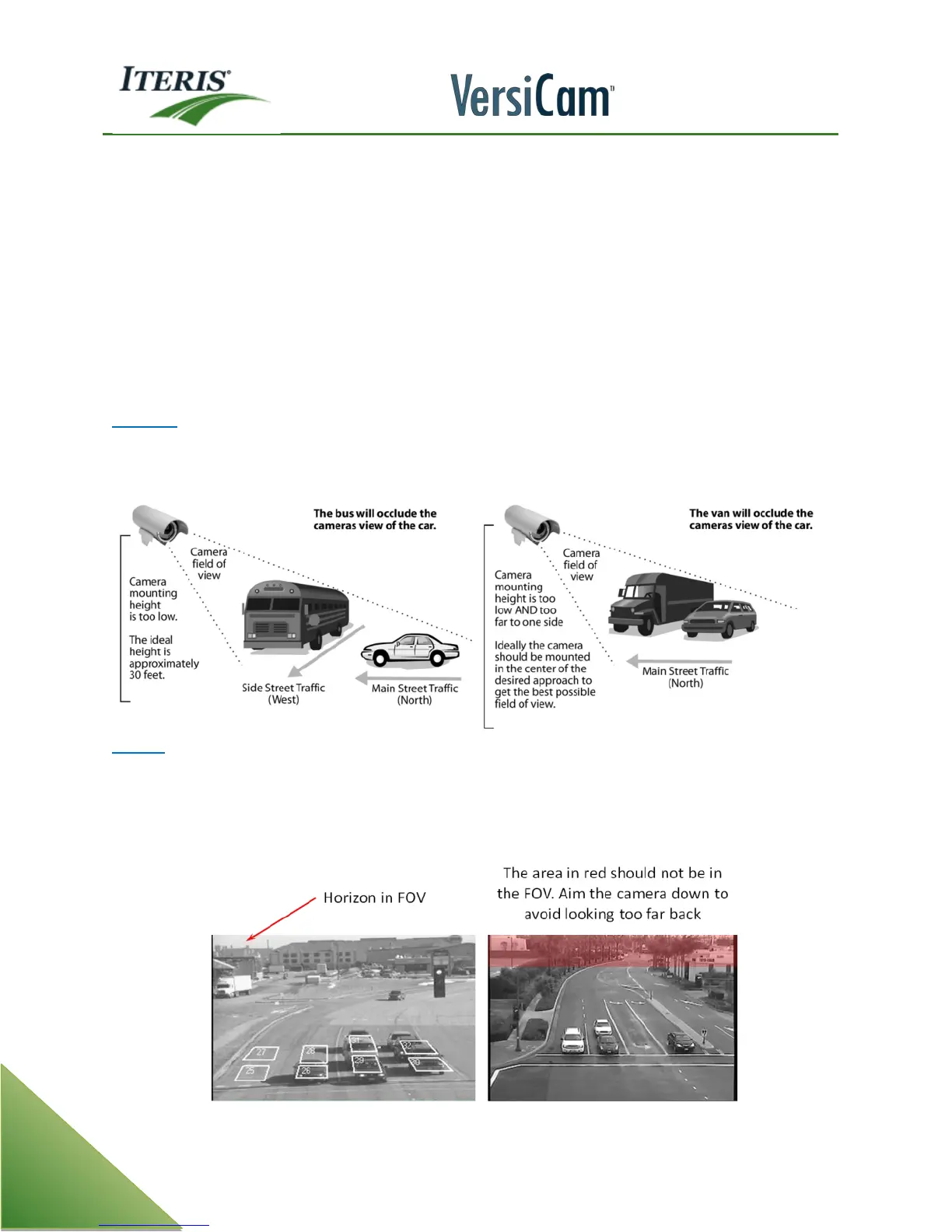
• Occlusion
• No Horizon in FOV
• Minimum 3 lane width
• Stop bar area 20% to 60% from bottom of screen
• Car bumpers parallel to bottom of screen
• Adequate area left for advanced detection
Occlusion
A major issue with camera FOV is occlusion. If large vehicles block lanes or smaller vehicles then detection
will not be possible.
Horizon
You never want the horizon to be included as part of your camera field of view. If the horizon is visible as part
of your field of view on East and West approaches, the camera maybe blinded by the sun at sunrise and
sunset. The camera should be rotated so that the bumpers of the vehicles are parallel with the bottom of the
screen.
Examples of Poor FOVs



 To Next Page