2
1
4
3
5
6
16
Operating Instructions
LCD Monitor
Your central vacuum unit is equipped with an electronic timing device that will
recommend proper maintenance of your vacuum system. These signals are only
suggestions and will do not indicate a problem with your vacuum system. They will
not stop or hinder the use of the vacuum.
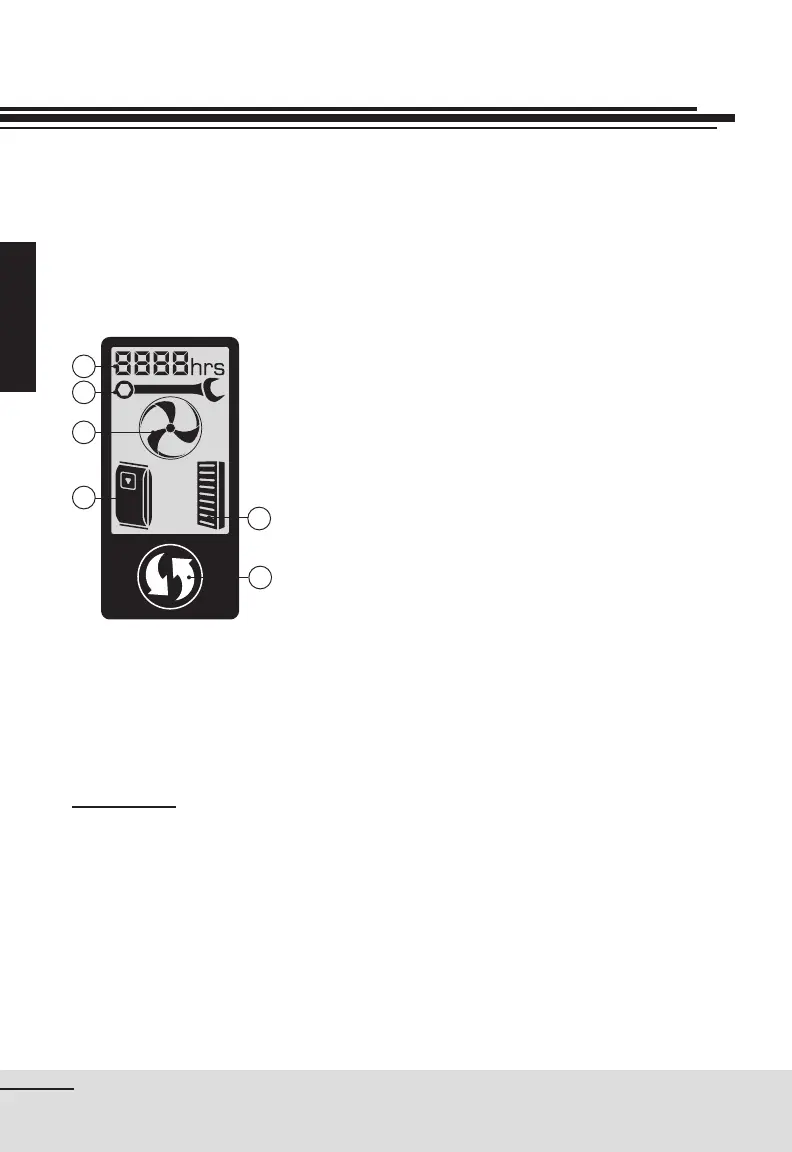
Timer – indicates hours the unit has been
operated
Flashing wrench – maintenance of the system is
required
Turbine
Without movement – unit is connected to a power
source
Movement – unit is turned on - operating
Speed of movement according to power level
chosen
Flashing Bag
Check the bag and change if necessary, or empty
the canister
Flashing Carbon Dust Filter
Replace lters
Reset – to stop the ashing icons, press the
reset button for one second.
DEMO MODE
Demo mode: to initiate a demonstration of the information center on the power
unit, press the reset button
for 5 seconds. To stop the demonstration, simply
press the reset button
.


 To Next Page