EasyManua.ls Logo

Jabra PRO 920 - 7.6 HOW TO CHANGE THE ADVANCED SETTINGS

Jabra PRO 920
33 pages
Print Icon
To Next Page IconTo Next Page
To Previous Page IconTo Previous Page
Loading...
25
english
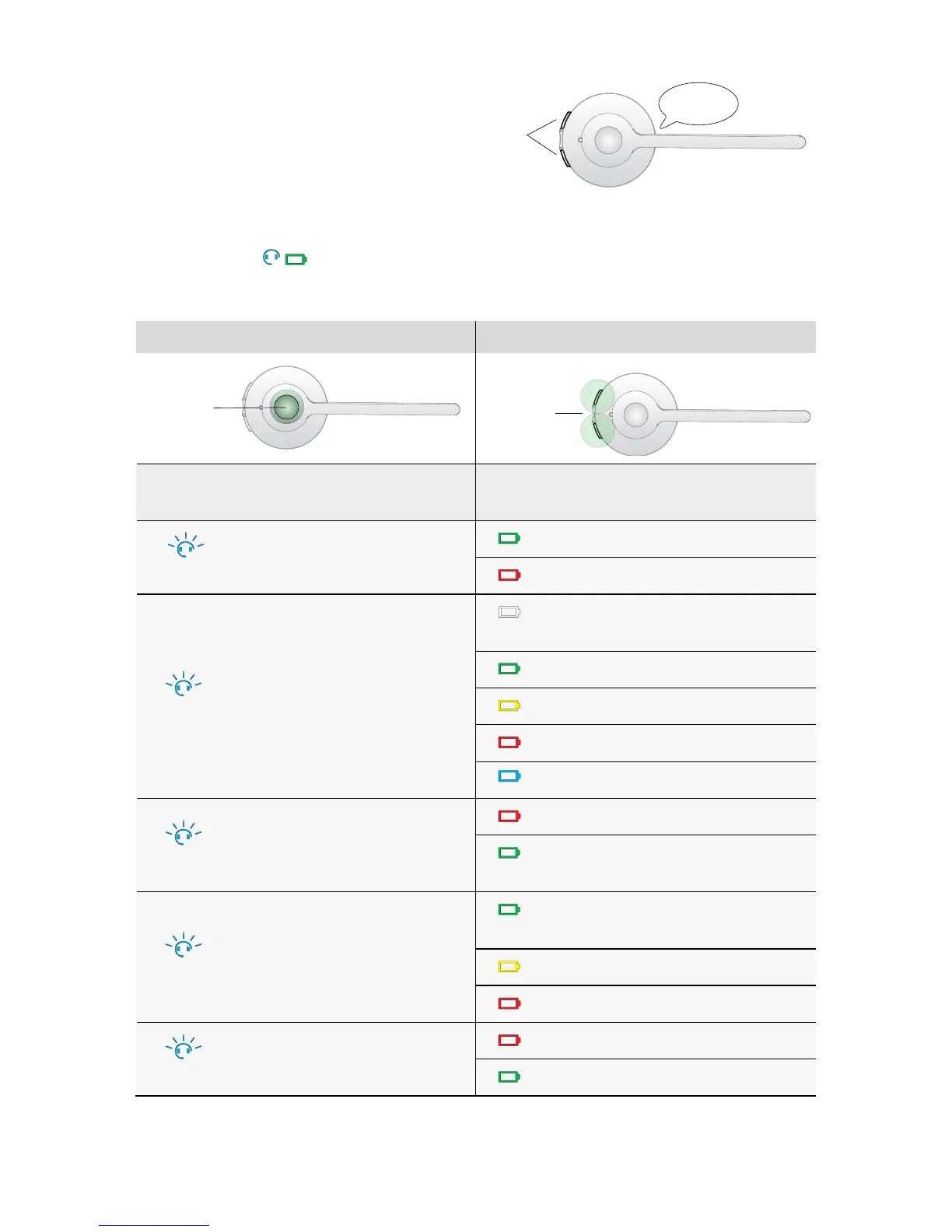
1 Start setup mode
• Put on the headset.
• Simultaneously press and hold both headset
volume buttons until the voice prompt says
“Setup” and then release the buttons.
Start
setup
SETUP
2 Setup mode
• The headset buttons are used to cycle through the settings and values.
• The base lights
,or voice prompts are used to indicate which setting and value is currently
selected.
Settings Values
Cycle
through
settings
Cycle
through
values
Base
light
Voice
prompt
Setting
Base
light
Voice
prompt
Value
ash x1
Mute reminder
tone
On (default)
O
ash x2
Ringtone
Ringtone 1
(default)
Ringtone 2
Ringtone 3
Ringtone 4
Ringtone 5
ash x3
Audio
protection
Peakstop (default)
Peakstop and
Intellitone
ash x4
Wireless range
Normal range
(default)
Low range
Very low range
ash x5
Auto sleep
mode
O (default)
On