第4章 特殊功能操作说明
4.1 上停针位调整
控制系统在恢复出厂后,可根据需要重新设置
上针位!
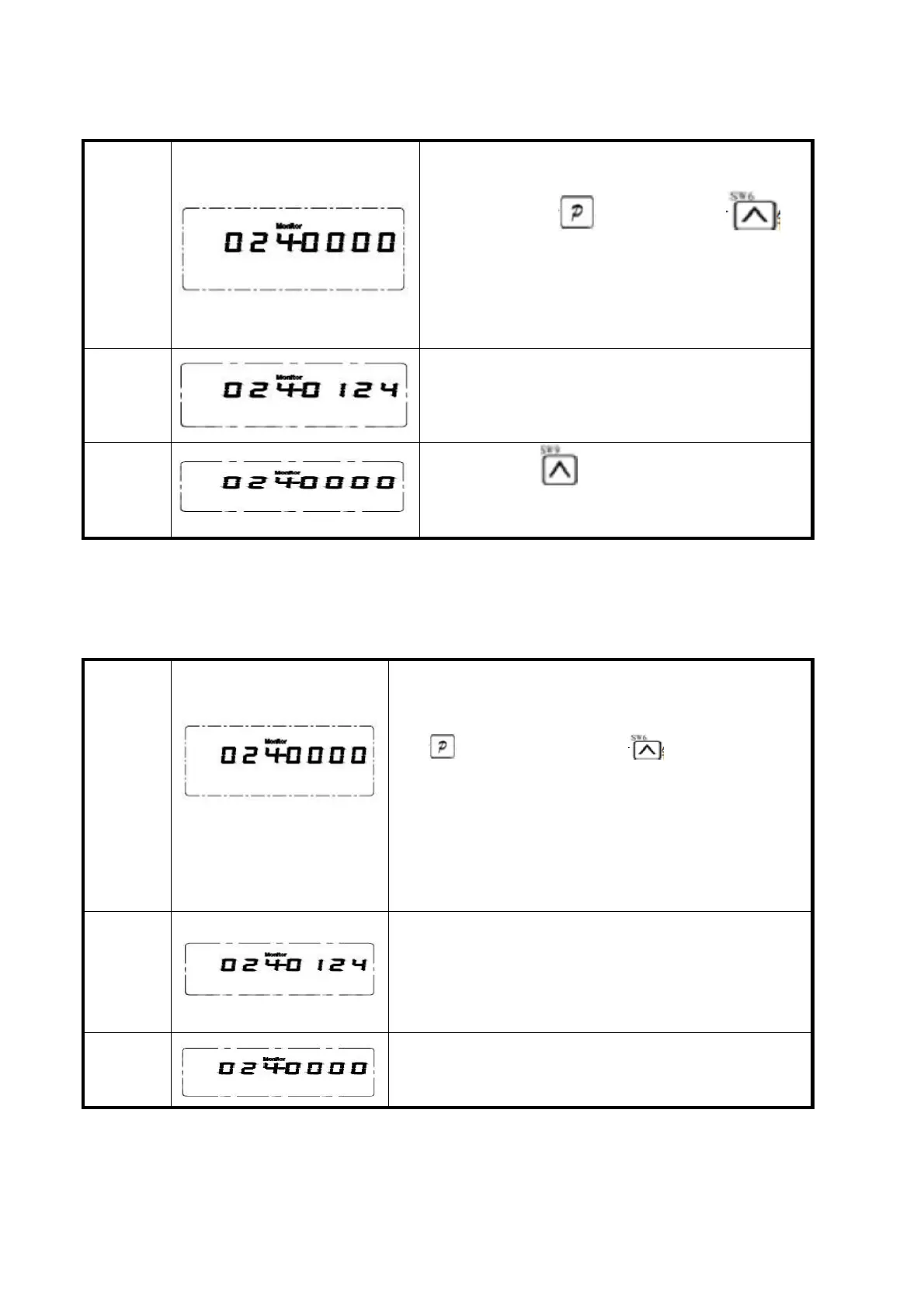
第一步:先按下 键不放,再按下
键,即进入监控模式,默认为024 号监控参
数,液晶屏显示当前角度,如为0°表明此位
置为系统当前默认的上停针位置。
第二步:转动手轮,让挑线杆到上停针位置或
希望调整到的合适位置,此时液晶屏显示调整
后的上停针位,如124.
第三步:长按 待出现“----”后放开,等
出现“8888”后保存成功。
Chapter 4 special function instructions
4.1 The needle on an adjustment
Control system after the restore factory,
can according to the need to reset the
needle!First step: the first press the
key , press the key again, namely
into monitor mode, the default value is no.
024 monitoring parameters of liquid crystal
screen display the current point of view,
such as 0 ° show that the location of the
needle on the system of the current default
location.
Step 2: turn the handwheel, let the take-up
on the needle position or want to adjust to
the appropriate location, the LCD shows the
adjusted on the needle position, such as
124.
Step 3: long press to appear after the "-"
let go, such as a "8888" after successfully
saved.



 To Next Page