9
10
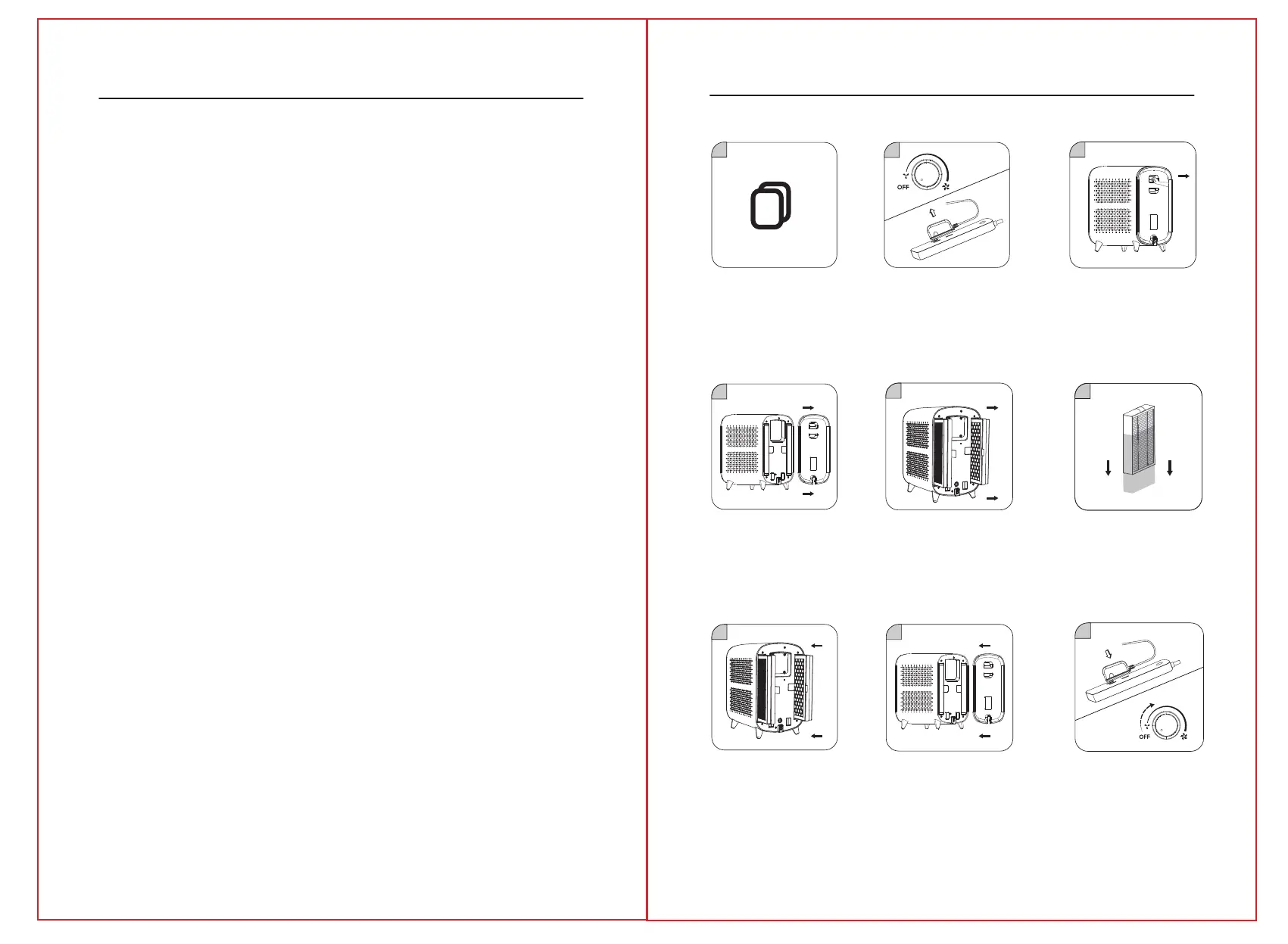
2. Rotate the knob left to the leftmost
end, turn off the machine and unplug
the adapter
4. Lift the filter cover off from
the air purifier
5. Take out the old filter from
the machine
5. Plug in the adapter and twist the
rotary clockwise to power on and
adjust it to the position for appropriate
fan speed.
1
2
3
4
5
6
7
8
9
3. Press down down the button on
rear cover plate and pull it out slightly,
then take out 2x Filter.
6. Remove the protective film on the
filter before use.
7. Put into New 2x Filter without
protective film.
8. Close the rear cover plate,then it
is done.
THE ADAPTER MUST BE UNPLUGGED BEFORE ANY MACHINE MAINTENANCE OPERATION.
1. CLEANING THE BODY OF THE DEVICE (RECOMMENDED ONCE A MONTH):
1) Use a soft cloth to remove stains.
2) Stubborn stains that are not easy to clean can be wiped off with a soft cloth dipped in an
appropriate amount of neutral detergent.
Note: do not use hard objects to scratch the machine shell. When removing the base,
follow the instructions to avoid damaging machine parts.
2. FILTER CLEANING AND REPLACEMENT :
1) Filter replacement will be reminded by the built-in program, which can be replaced
according to the service life of the machine, or can be replaced in real-time by the
filter‘s mandatory service life reset function.
2) when dust accumulates on the surface of the composite filter, you can use a vacuum
cleaner to clean the surface dust, to extend the service life of the filter (it is
recommended to clean once a month. Do not wash).
* Depending on the machine’s environment, the filter’s life will be different. For example, in
places where people smoke and pets are present, the life of the screen is shorter. When the
purification effect is not good, replace the filter in time.
* Please dispose of the used waste filters according to the relevant regulations of solid waste.
1. When the filter reset button
lights red, it prompts the user
to replace the filter
Care & Maintenance
Replacement filters
P
o
w
e
r
O
n



 To Next Page