Getting Started XT3 User Manual
Janam Technologies LLC Version 1, March 2020 Getting Started 2—8
The Home Screen
In Android, the home screen is the central launchpad for all of the XT3’s most frequently used
features and applications. The home screen can consist of multiple screens (on the XT3 you can add
additional screens to the right of the home screen).
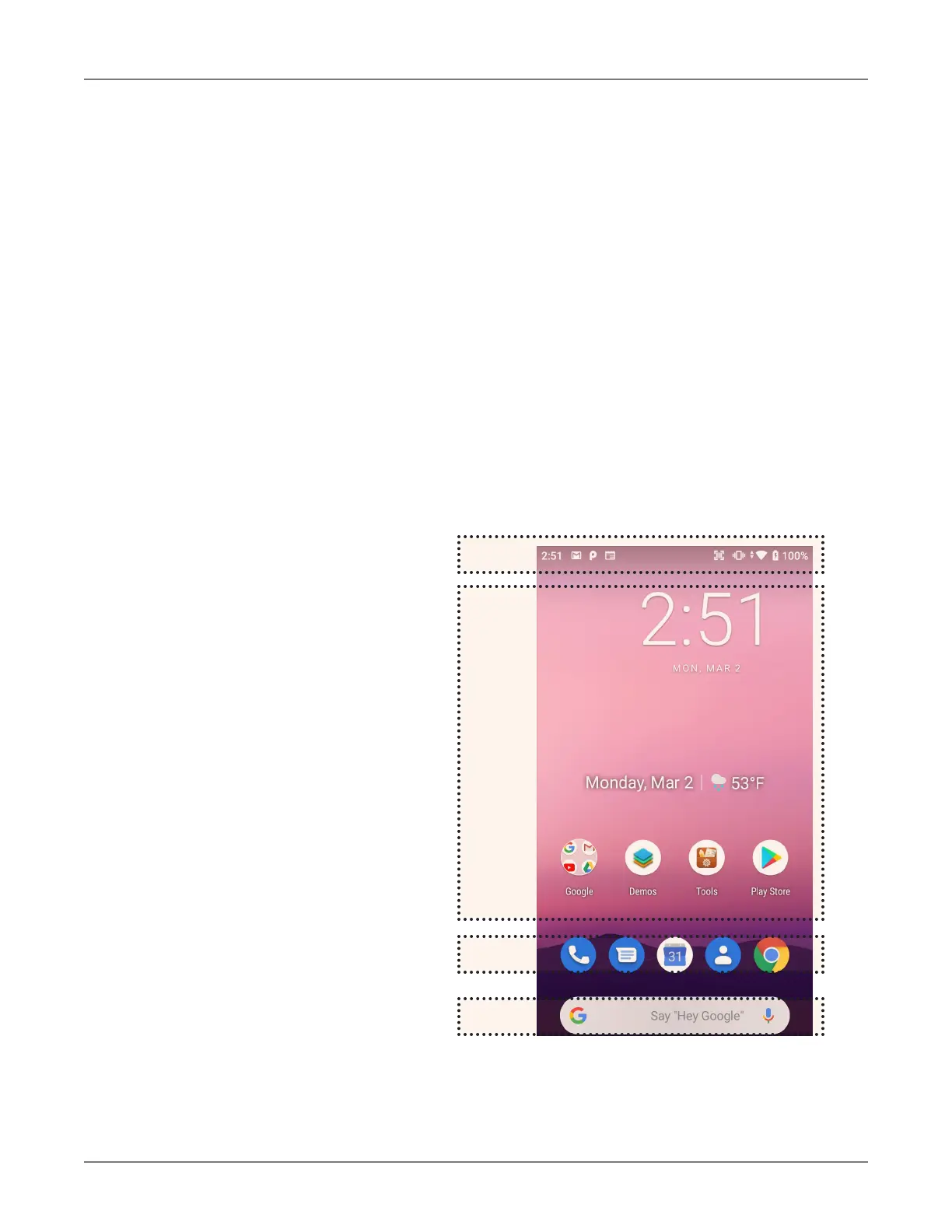
The home screen contains the status bar on top of the screen and the favorites tray at the bottom.
The status bar displays various information icons. Swipe down to expand it and show more detail.
The favorites tray can have up to five (changeable) favorites.
Between the status bar and the favorites tray are apps icons (which can also be folders containing
multiple apps) and widgets. Tapping on apps icons launches the app. Touch and hold to rearrange
icons. Widgets perform functions, like showing the time, weather, news, or act as shortcuts.
Status Bar: shows status icons
and notifications. Drag down to show
the Quick Settings panel.
Apps and Widgets: this area is
for app icons, app folder icons, and
widgets.
Favorites Tray: place most often
used app icons here. Tap to launch.
Search Bar: search by text or by
voice (say “Hey Google”).


 To Next Page