Backup, Restore, and Reset
Android backup concept
Android does not offer a traditional full backup (i.e. one large file from which all software, settings,
and data can be restored). Instead, Android synchronizes settings and data with Google Drive,
including WLAN passwords, bookmarks, contact and email information, a list of installed applications,
application data, words added to dictionaries, app data, and most of the device settings.
All of this can be restored in case of a failure, or when moving onto a new device. The idea here is to
provide continuity rather than a total 1:1 full backup.
Auto Backup for Apps
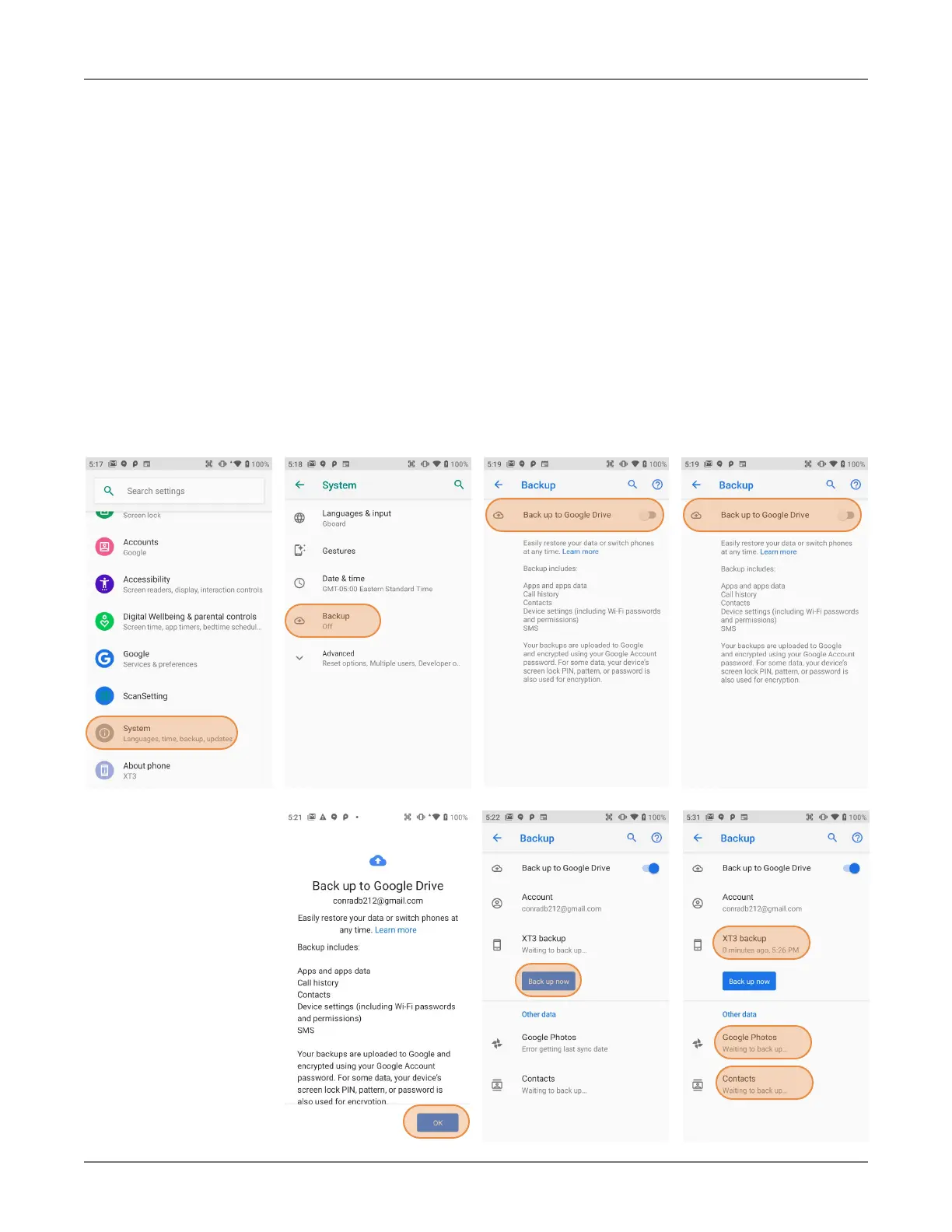
Android 9 allows you to back up various settings and data to your Google Drive account in the cloud.
Enable the process in Settings > System > Backup > Backup to Google Drive. Toggle that on.
If you haven’t OK-ed backup yet, do it now. Then tap on Back up now.
XT3 Setup XT3 User Manual
Janam Technologies LLC Version 1, March 2020 XT3 Setup 3—3
With the above settings
in place, all of the se-
lected data, settings, and
configurations will auto-
matically be backed up
to Google. You can also
opt to backup at any
time, either all supported
applications or just a
subset.
To restore everything,
log into your Google ac-
count and all data and
settings will be restored.


 To Next Page