XT3 Setup XT3 User Manual
Janam Technologies LLC Version 1, March 2020 XT3 Setup 3—11
Device Settings (continued)
Storage
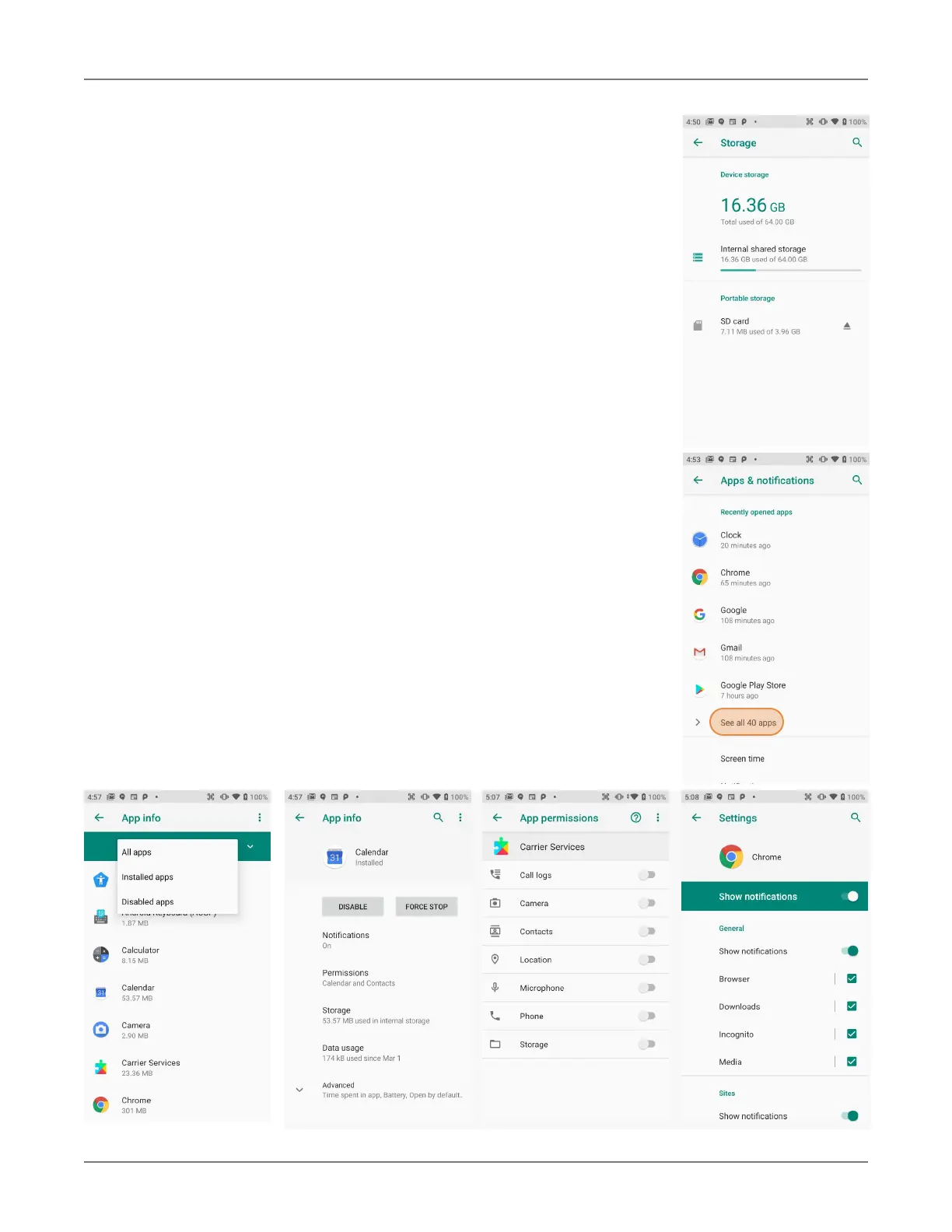
Touch Storage from the Settings screen to view use and space sta-
tistics for the internal storage on the device and the installed SD
card. The SD card screen lets you eject or format a card.
Apps
Touch Apps & Notifications from the Settings screen to see re-
cently opened apps. Tap on See all xx apps to view either all apps
or only installed or disabled apps.
Tap on an app to see its App info screen that contains detailed sta-
tistics on an app including its notification and permissions options,
the amount of storage or cache used, the time spent using the app,
its battery usage, and its default settings. You can perform the fol-
lowing actions:
c Force stop the app,
c Disable the app,
c Show and set notifications options,
c Set app install location,
c Clear stored data,
c Clear cache, or
c Manage battery use,
c Open the app by default
c Manage battery use.
c See app details (where it’s from, ec.).


 To Next Page