XT3 Setup XT3 User Manual
Janam Technologies LLC Version 1, March 2020 XT3 Setup 3—12
Personal Settings
Accounts
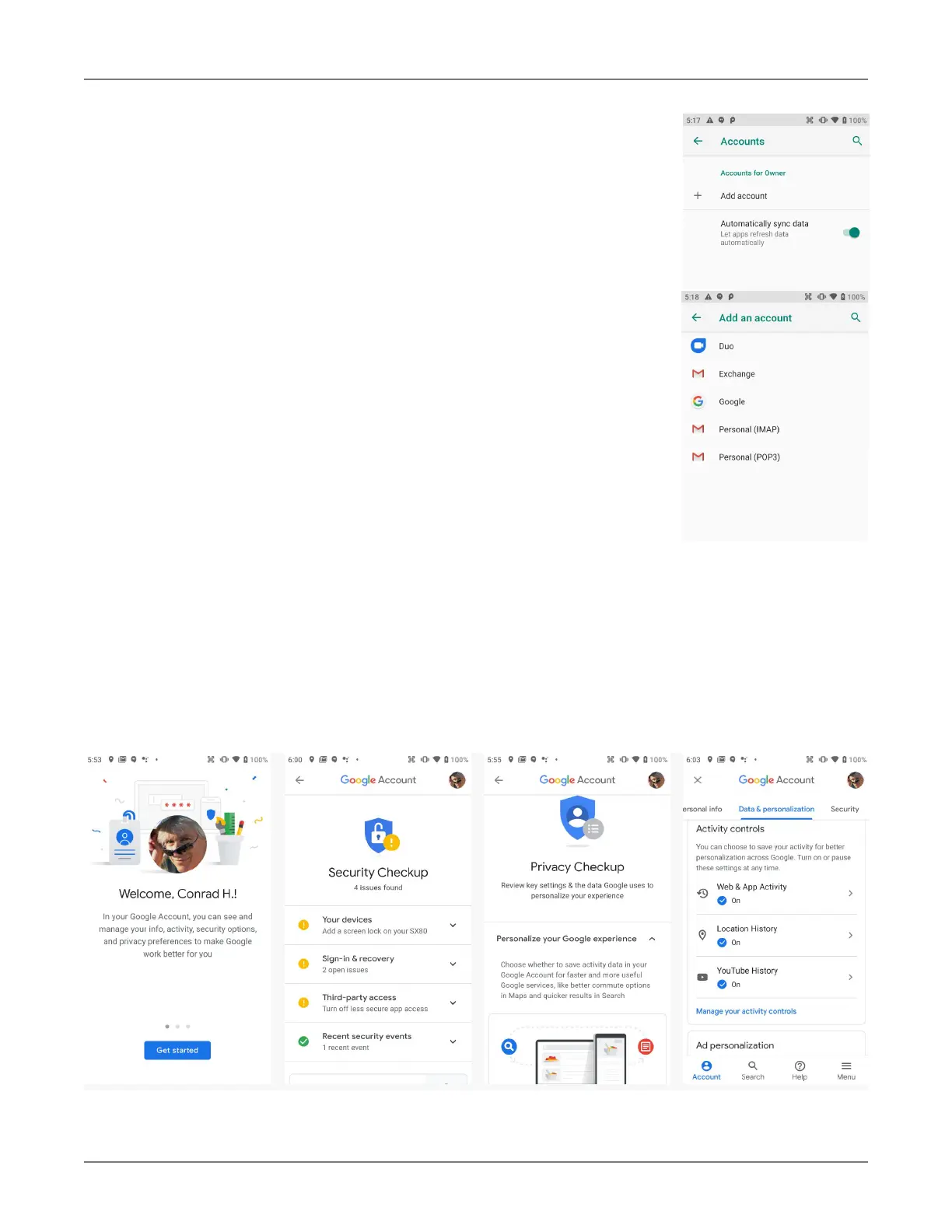
Accounts are created by going to Settings > Accounts. To add an ac-
count, tap Add account, then tap the type of account to add. Follow the
on-screen instructions to enter the required information for the account
type selected.
Depending on the type of account, you may need to provide a user name
and password, select security settings, and configure data sync prefer-
ences during the setup.
The account appears in the Accounts list when setup is complete. De-
pending on the settings you selected during the account configuration,
your XT3 device may automatically start to sync account data (e.g., email,
contacts, music and calendar, etc.).
To remove an account, go to Settings > Accounts. Tap the account you
wish to delete. Press the Menu button at the right top of the screen and
then select Remove account. Tap Remove account to confirm deletion.
Google Account
Is it mandatory to have a Google account to use Android on the XT3? It is not mandatory, but without
a Google account a lot of useful Android functionality does not work because Android is tightly inte-
grated with many Google services. Examples are backups, app and security updates, privacy settings,
location services and much more.
However, Google accounts do not have to be Gmail accounts! You can set up your Google ac-
count with any other email account you may already have.
Your Google account has numerous options, settings, and checkups that allow for personalization and
efficient use. Please examine at Settings > Google.


 To Next Page