Manual XT2 User Manual
Janam Technologies LLC Version 1, March 2020 Email 7—4
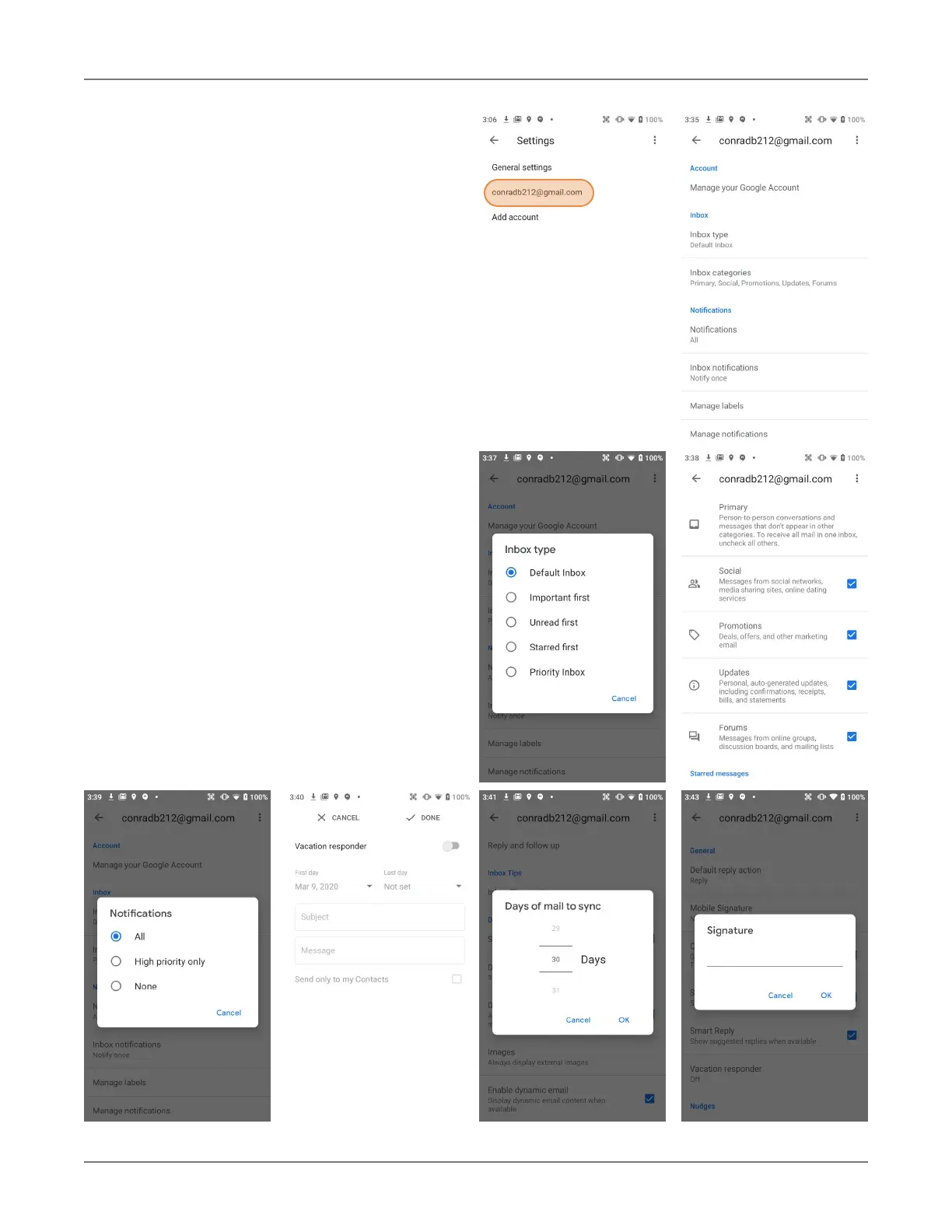
Account-specific Email settings
Here you can set the background and accent
colors for your email accounts.
Inbox
How emails in your inbox should be listed, and
what kinds of inbox categories there should be.
Notification settings
Here you can set whether you want to be noti-
fied if new email arrives. You can choose a spe-
cial ringtone, and whether there should be a
vibrate or other alert.
Signature
Business email usually benefits from a cus-
tomized signature with name, title, company,
etc. This is where it’s set up.
Data usage
Email practices can affect data usage. This in-
cludes whether images should be shown auto-
matically, whether email should be synced for
an account, and the frequency of syncing
(every 15, 30, 60 minutes or never).
Vacation responder
Here you set up the automatic response if
you’re on vacation or away from the office.


 To Next Page