Tab Section Option Description
Basic Scanning Trigger timeout (sec) Specifies the trigger time out in seconds. If a
barcode is not decoded within the specified
timeout, the default Notifier indicates that
decoding is failed.
Enable Auto Scan Enable Auto Scan with specified interval.
Auto Scan interval Set Auto Scan interval time.
Enable Cont. Scan Enable Continuous Scan without any interval.
Enable Touch Scan Enable Scan by screen touch (red scan button).
Wedge mode Result Type Select Result Type: User Message, Keyboard
Event, Clipboard, Intent Broadcast, Custom
User Message, Keyboard Event
Terminator Select the desired barcode end method from the
pull down list (None, Space, Tab, LF, Tab & LF)
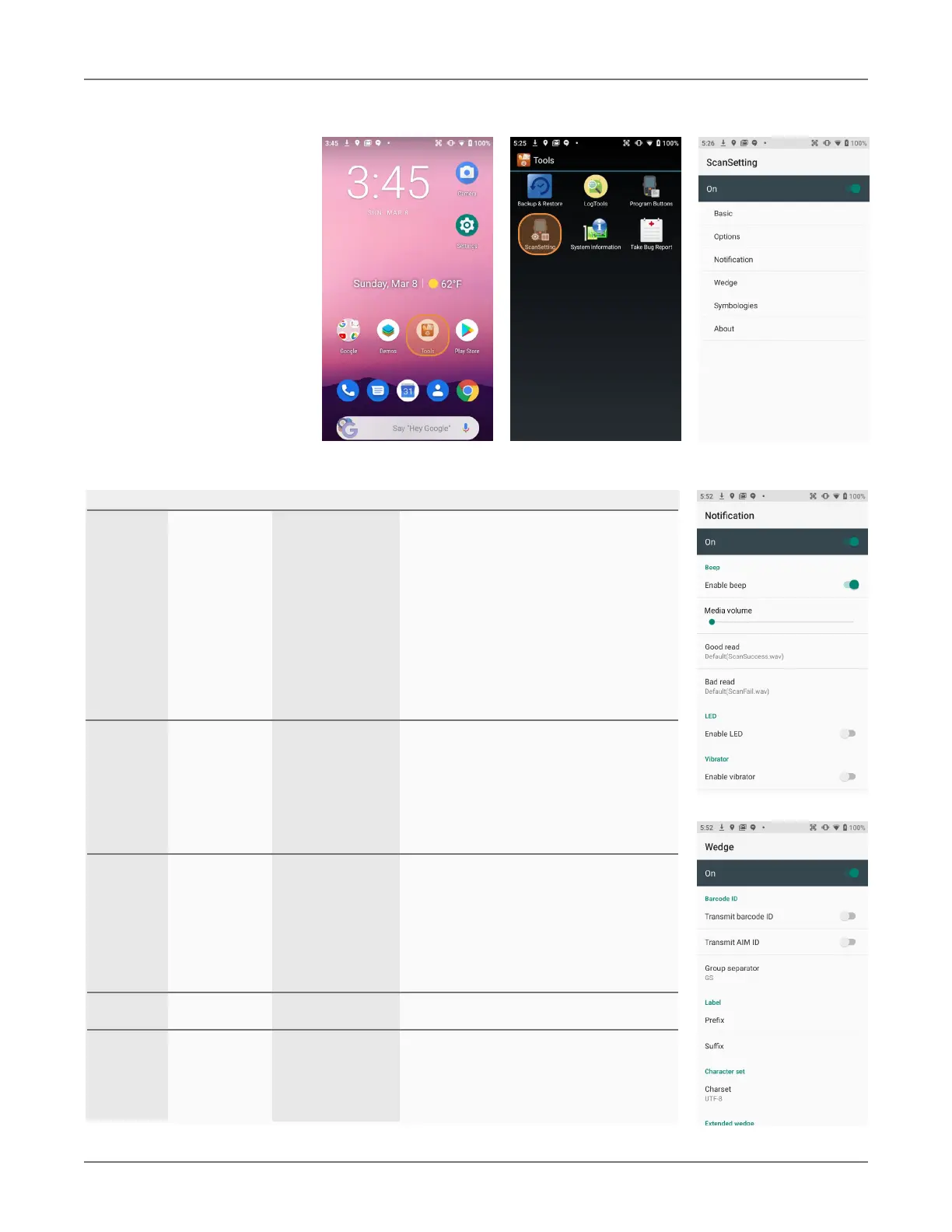
Notification Beep Enable Beep Enable/disable beep and set volume.
Good read Set sound to indicate good read.
Bad read Set sound to indicate bad read.
LED Enable LED Set enable/disable visual scan indicators.
Vibrator Enable Vibrator Set enable/disable vibrator operation.
Good read Set vibration time after good read.
Bad read Set vibration time after bad read.
Wedge Barcode ID Transmit Barcode ID Transmits predefined barcode ID in Detail tab.
Transmit Barcode ID Transmits predefined AIM ID in Detail tab.
Group separator SYN, ETB, CAN, EM, SUB, ESC, FS, GS, RD, US
Label Prefix Prefix sent prior to the decoded/received data.
Suffix Suffix sent after the decoded/received data.
Character Set Charset Select desired character set.
Extd Wedge Enable Enable extended Wedge configuration.
Symbologies Select barcode types you want to read.
There is “Enable All” and “Disable All” to enable/disable all symbologies.
About Scanner Shows scanner type and revision.
Application Shows ScanSetting version.
Data Factory reset If after modifying settings you wish to return to
the factory defaults, tap Factory Reset.
Barcode Scanning XT3 User Manual
Janam Technologies LLC Version 1, March 2020 Barcode Scanning 9—2
Scan Settings
Go to
Tools > Scan Set-
tings to configure the
XT3’s scan engine and
software. This is where
you set how the scanner
will work, how it will an-
nounce and communicate
results, what all the scan
operation settings should
be and, most importantly,
which of the numerous
code symbologies the
scanner should read.


 To Next Page