XT3 Setup XT3 User Manual
Janam Technologies LLC Version 1, March 2020 XT3 Setup 3—10
Sound
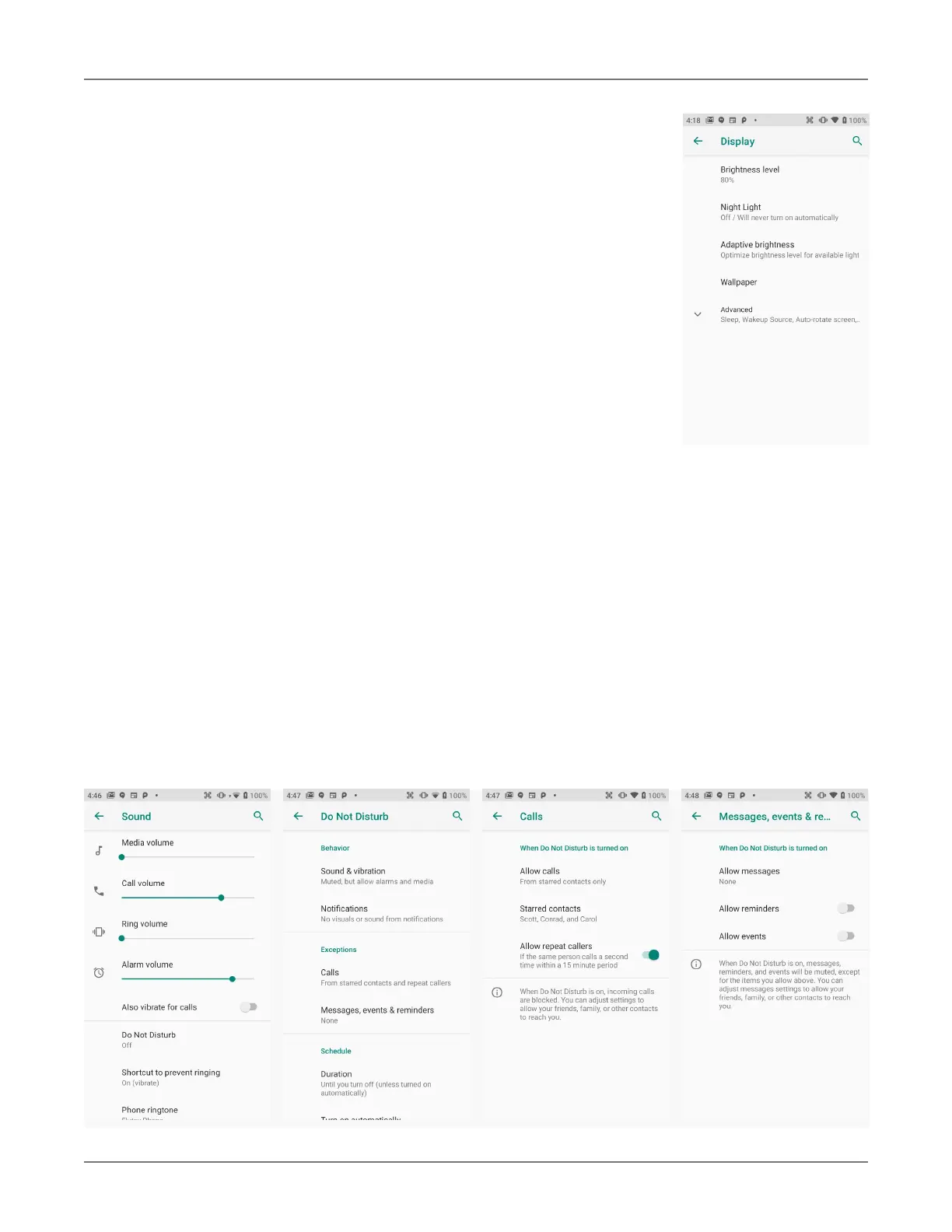
Allows setting of volume of media, calls, rings, alarms, and the vibrate intensity. Calls can be
set to vibrate or not. You can set various
Do Not disturb options, rules and restrictions for both calls
and messages.
Device Settings
The XT3 can be configured according to personal preferences. This makes
the device easy to use and helps to enhance efficiency and productivity.
Display
The Brightness level can be adjusted manually via a slider.
If turned on, Night Light turns the screen to a dim, adjustable amber color.
It can be set to turn on/off automatically at certain times.
Adaptive brightness automatically adjust the brightness level.
Wallpaper allows the user to select a screen background.
The Sleep screen allows screen timeout and device suspension be set be-
tween 15 seconds and never.
The Wakeup Source screen sets what can and cannot wake the device up
(like buttons, cables, headsets, scan triggers, etc.).
Auto-rotate screen sets automatic screen rotation on or off.
Font size can be set to Small, Default, Large, and Largest.
Display size sets icons and speech boxes to Small, Default, Large.
Screen saver sets the type of screen saver (clock, colors, photos), the
style, and the timing.
Ambient display makes the XT3 wake up and display notifications.
Device theme sets light or dark mode, or auto based on wallpaper.


 To Next Page