28
A
C
D
E
F
G
H
I
J
K
L
2
1
0
4
3
2
1
0
4
3
3
4
5
2
1
0
1
1
1
S.S.
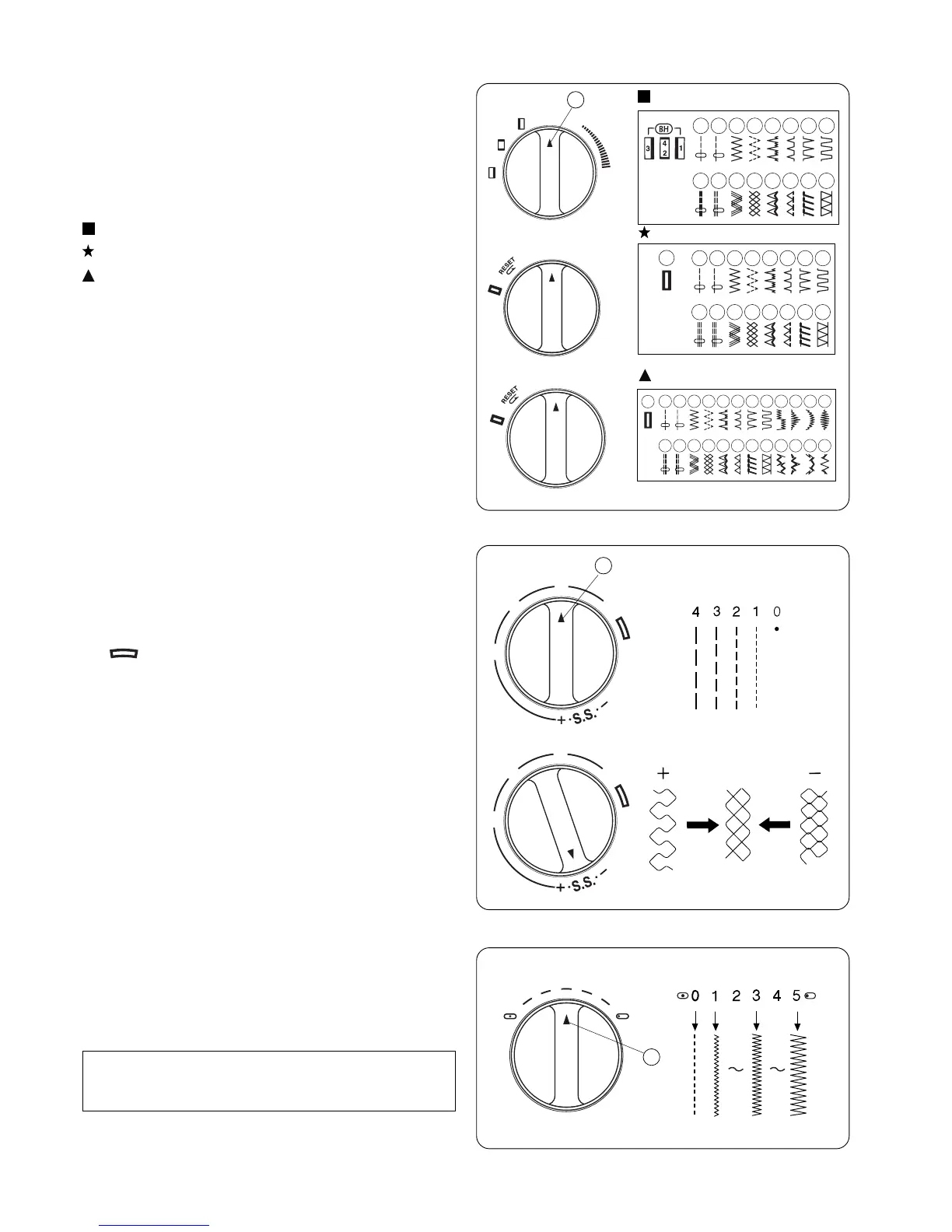
Pattern Selector Dial
Raise the needle and presser foot. Turn the pattern selector
dial to set the setting mark at the symbol corresponding to the
desired pattern.
1 Setting mark
A
B
4
2
3
1
C
D
E
F
G
H
(Model 2041S)
(Models 2041SX, 2041NX)
Turn the stitch length dial to set the setting mark at the desired
stitch length.
The higher the number, the longer the stitch length.
1 Setting mark
• “ ” is the recommended setting for buttonhole stitching.
• Adjust the dial in the 0.5–4 range when you sew the zigzag
stitch.
• Set the dial at “S.S.” to sew the stretch stitch pattern sewing.
• If the stretch stitch pattern is not uneven, turn the stitch
length dial in the direction of “–” to compress it, or “+” to
expand it.
Stitch Length Dial
Stitch Width Dial (Except Model 2041S)
Turn the stitch width dial to set the setting mark at the
desired stitch width.
The higher the number, the wider the stitch width.
1 Setting mark
Note :
Raise the needle above the fabric, when you turn the stitch
width dial.
A
C
D
E
F
G
H


 To Next Page