EN EN
Pg 7 of 11
4329P OM | Part No: 950-0628-001 | Rev 1.0 20221201
© 2023 HARMAN International Industries. Incorporated All rights reserved.
Stand-by Mode
The 4329P system will enter low power standby mode automatically when no signal activity
isdetectedattheactive/selectedsourcefor>10minutes.
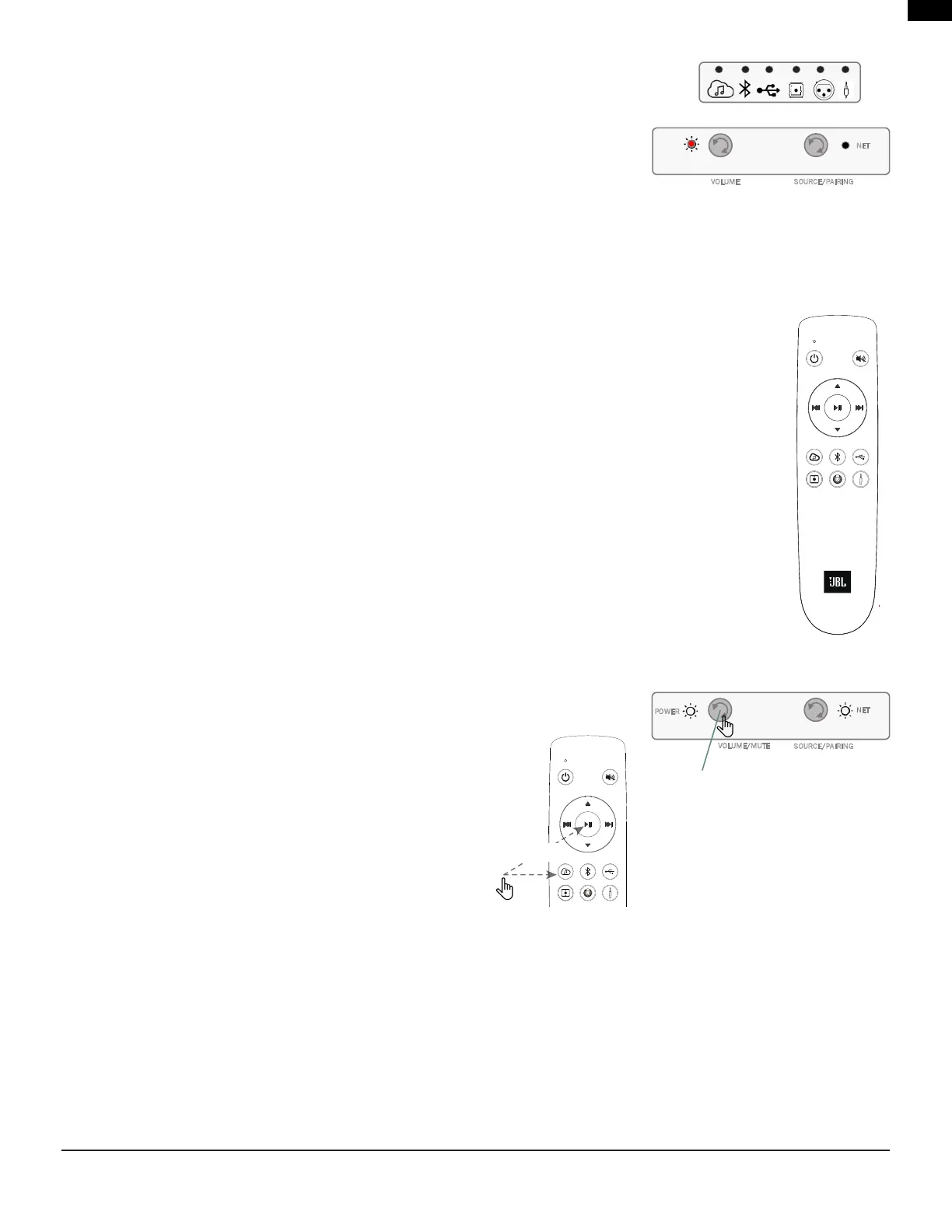
While the system is in stand-by, the Power LED on both the Primary speaker and Secondary
speakerwillilluminatesolidRedcolor.
Waking the system from Stand-by mode and restoring it to normal operation can be
achievedby:
• AshortpressofanybuttononthePrimaryspeaker.
• AnAudiosignalisdetectedthroughthelastsourceselected(exceptUSBorOptical),thisincludesStreamingandBluetooth
Streaming as long as Network is On
Remote Control
Included with the 4329P system is a Bluetooth hand-held remote control allowing for easy control of the primary
operationsofthesystemfromupto40'(12m).
• Power
• Mute
• TransportSkipback
• TransportPause/Play
• TransportSkipforward
• VolumeUp
• VolumeDn
• Streaming
• BTSource
• USBAudion
• Digital(Opticalin)
• Balancedinput
• Aux-in(3.5mm)
• LED(Feedbackpurposes)located
adjacenttoPowerOn/Obutton
Pairing the Bluetooth Remote
• Onthe4329PPrimaryspeaker,PressandholdtheVolume/Mutebuttonfor>3seconds.
• OntheRemotecontrol,PresstheStreaming&Play/Pause/OK
button simultaneously.
NET
VOLUME SOURCE/PAIRING
Primary Speaker
NET
VOLUME/MUTE
SOURCE/PAIRING
POWER
BTLEREMOTEpairingmodetriggered
by a long press > 3 seconds
Long Press
> 2sec


 To Next Page