EN
Pg8of11
4329P OM | Part No: 950-0628-001 | Rev 1.0 20221201
© 2023 HARMAN International Industries. Incorporated All rights reserved.
8. Other Modes
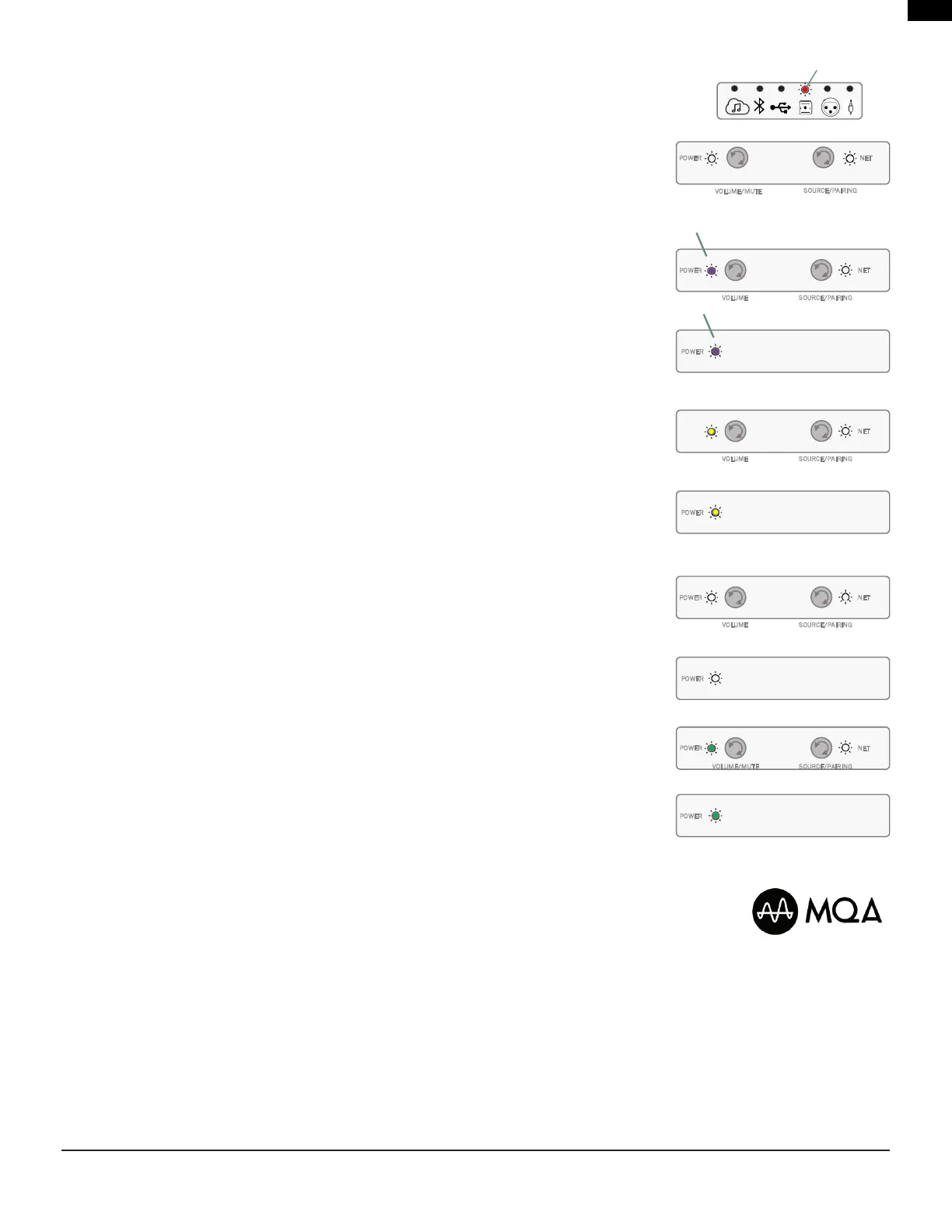
Protection Mode
The4329Psystemisprovidedwithdierentlevelsofprotection,intherareeventthatthesystem
detects and internal malfunction, it will be represented by the selected Source icon to illuminate
solidRedcolor.Thesystemwillremaininthatstateforaslongastheprotectioneventispresent.
(Theexampletotheright,anissuehasresultedwhiletheOpticalinputwasselected.)
Software Upgrades
• Softwareupgradesareautomatic,aslongasthesystemisconnectedtoanactivenetwork.
• Ifavalidupdateisavailable,theunitwillautomaticallystarttheupdateprocesswhichwillbe
indicatedbythePowerLEDstoilluminateandashPurpleincolor.
• Whencompleted,thePowerLEDswillreturntopreviousstatusandnormaloperationwill
resume.
Speaker Detection
When powered, if the 4329P system does not detect wireless or wired connectivity between the
Primary and Secondary speakers, Both Power LEDs will illuminate solid Yellow color.
CheckyourconnectionsasoutlineintheSpeakerSystemSet-upinSection4.
(Theexampletotherightshowsnoassociatedspeakerdetectedandprimaryspeakerconnected
toanetwork.)
Tethered High Resolution Audio Mode – 192kHz / 24bit Connection
Whenawired/tetherconnectionviatheDigitalLink/Cat5ecableisdetectedbetweenthe
Primary and Secondary speaker, Both Power LEDs will illuminate in solid White color.
Wireless Audio Mode – 96kHz / 24bit Connection
When the Primary and Secondary speaker are connected wirelessly, Both Power LEDs will
illuminate in solid Green color.
MQA Content
The4329PsystemsupportsMQA(MasterQualityAuthenticated)technology,assuchhastheabilityto
playbackMQAaudiostreams.
WhenStreamingsourcehasbeenselectedandanMQAlehasbeendetectedinplayback,theStreaming
sourceLEDwillindicatethetypeofMQAlebeingplayedbackbythefollowingcolorchanges:
• StreamingSourceLEDilluminatedinsolidGreen=GenuineMQAle
• StreamingSourceLEDilluminatedinsolidBlue=MQAStudio
• StreamingSourceLEDilluminatedinsolidMagenta=MQBandisonlyrendering.
POWER
NET
SOURCE/PAIRING
/VOL MUTEUME
Solid
Primary Speaker
NET
VOLUME SOURCE/PAIRING
POWER
Primary Speaker
Secondary Speaker
NET
VOLUME SOURCE/PAIRING
POWER
POWER
Primary Speaker
Secondary Speaker
NET
VOLUME/MUTE SOURCE/PAIRING
POWER
POWER
Secondary Speaker
NET
VOLUME SOURCE/PAIRING
POWER
POWER
FLASHING
FLASHING
Primary Speaker
Secondary Speaker


 To Next Page