8
MONO MIC/LINE INPUTS
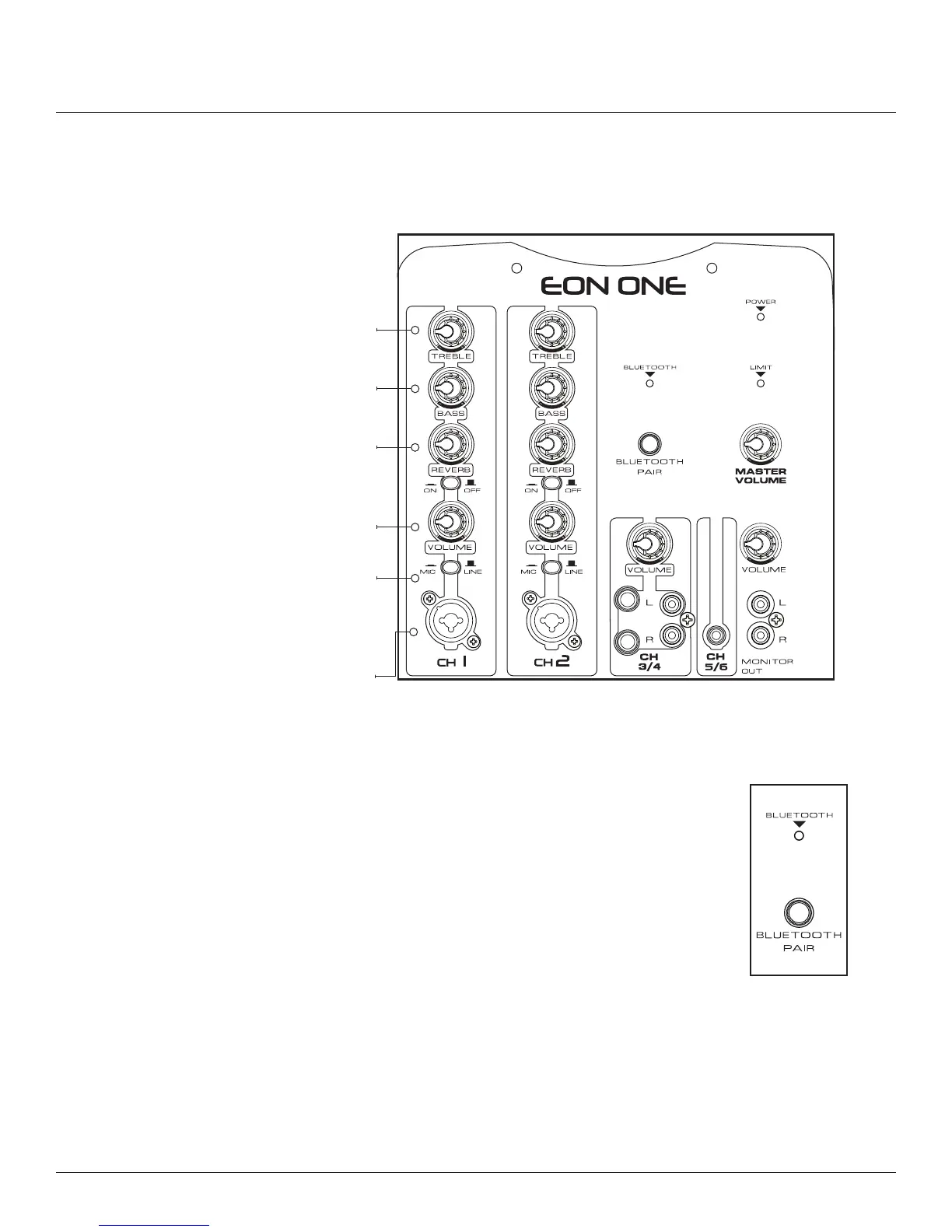
Moving from left to right there are 2 identical input strips comprised of (from top to bottom) a treble control,
bass control, reverb control, reverb on/off button, volume control, mic/line selector and a XLR 1/4" combination
connector�
Treble control adjusts the amount of high
frequencies on the particular channel
Bass control adjusts the amount of low
frequencies on the particular channel
Combination 1/4" phone plug and
XLR male input
Effect control adjusts the amount of
effect on the particular channel
Channel Volume control adjusts the
gain on the particular channel
MIC/LINE “SELECTOR” allows you to
select between a microphone (XLR)
input and a line (1/4" phone) input
BLUETOOTH INPUT
The EON ONE comes equipped with the ability to stream Bluetooth audio� To connect a
Bluetooth device, rst press the BLUETOOTH PAIR button on the back of the EON ONE. Then
select "EON ONE" from the source device to complete the pairing� Once paired, the blinking
BLUETOOTH LED will turn solid and audio can be streamed from the connected device�



 To Next Page