INPUT CHANNEL
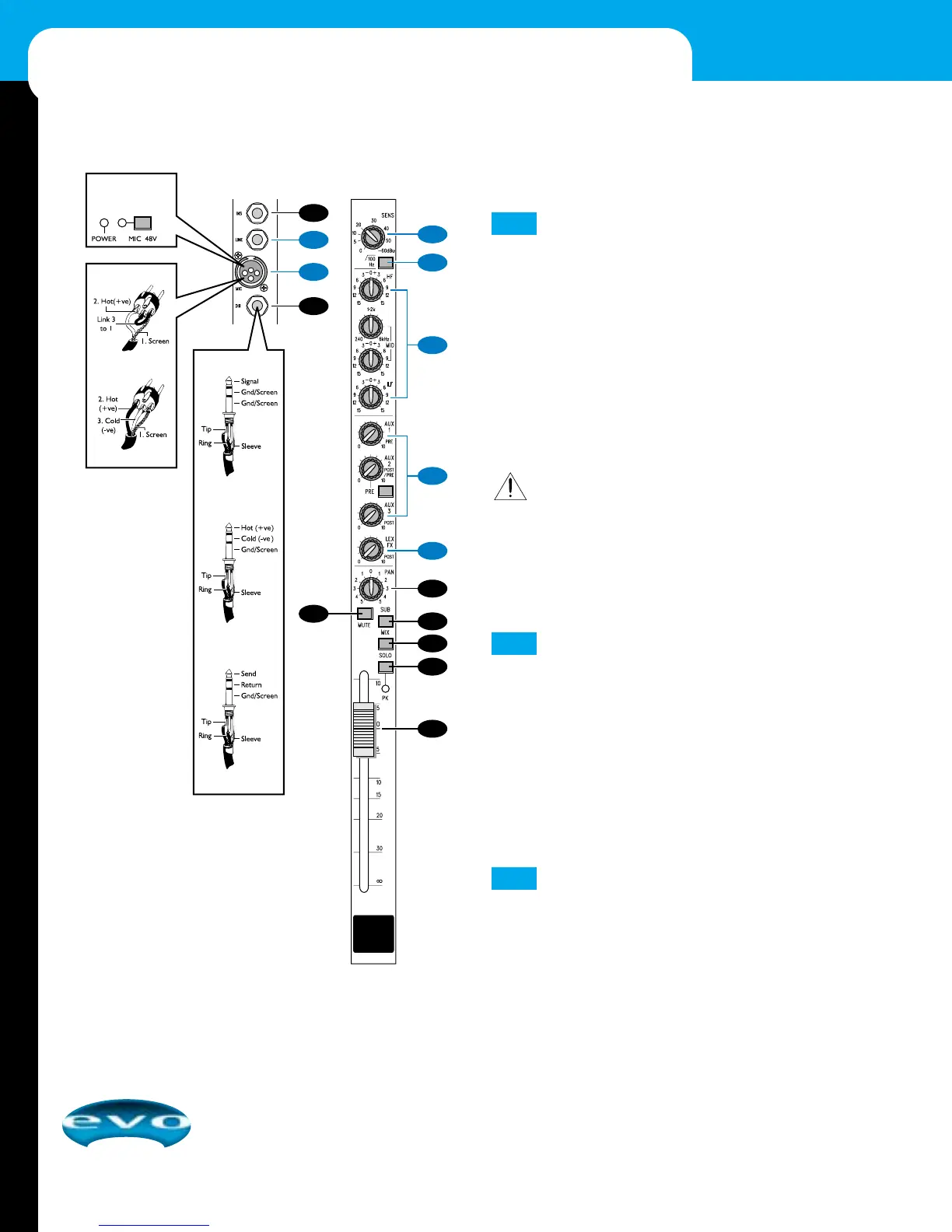
MIC Input
The MIC input accepts a male XLR connector and is designed
to suit a wide range of balanced or unbalanced signals. Use pro-
fessional dynamic, condenser, or ribbon microphones, because
their low impedance helps to reduce background noise com-
pared to low-cost high-impedance microphones. If you press
down the MIC 48 V switch (see master section detail) the XLR
receptacle provides a suitable power voltage for professional
condenser microphones (a.k.a., Phantom Power). When using a
MIC input, unplug any signal from the LINE input and adjust
the input level using the SENS control.
IMPORTANT: To prevent damage to the mixer or external
devices, only connect condenser microphones when
MIC
48 V
is off (i.e., switch up), and only turn it off or on with
all output faders down. When using unbalanced micro-
phones, make sure
MIC 48 V is off, since phantom power
supplied on pins 2 and 3 of the XLR connector may damage
the equipment.
LINE Input
Each LINE input accepts a 3-pole A-gauge (TRS) plug. Use this
high impedance input for sources other than microphones,
such as keyboards, drum machines, synthesizers, tape
machines, or guitars. The LINE input is balanced for low noise
and top-quality signal transfer from professional equipment.
To use unbalanced sources, wire the plugs as shown and keep
cable lengths as short as possible. When using a LINE input,
unplug any microphone from the MIC input and adjust the
input level using the SENS control.
SENS (Sensitivity)
This control sets how much of the source signal is sent to the
rest of the mixer. Too high, and the signal will distort as it
overloads the channel. Too low, and the level of any back-
ground hiss will be more noticeable, and you may not be able
to get enough signal level to the output of the mixer.
3
2
1
10
MIXER OPERATION





 To Next Page