www.jbl.com
INSTALLATION
INSTALLING THE DISPLAY UNIT
1. Select a safe site for the display unit, and temporarily place it there. Check the viewing angle from the
driver’s seat while adjusting the display unit’s pivot arm. If the viewing angle meets your needs, then
skip to Step 2. Otherwise, change the viewing angle as follows:
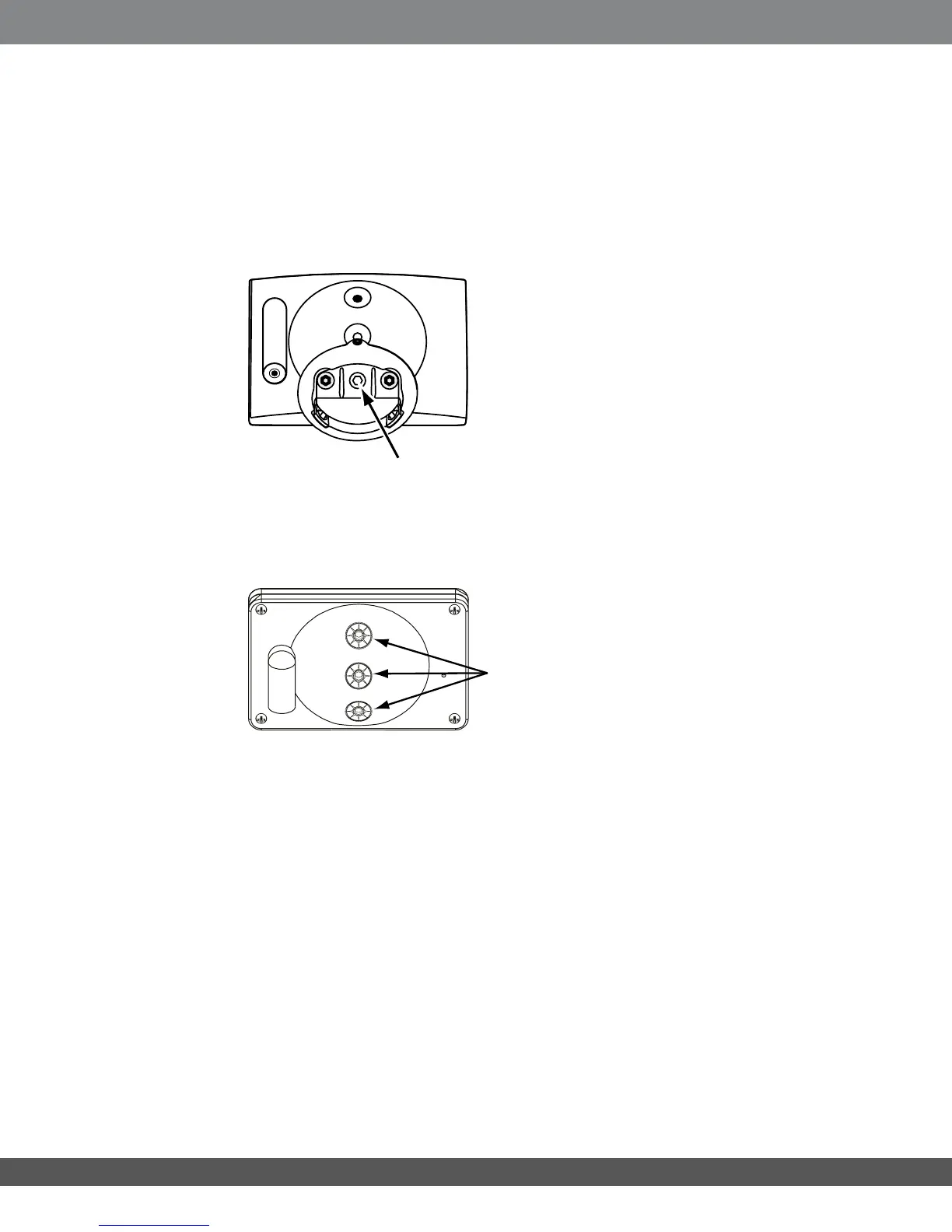
a) Using the supplied 3mm hex wrench, loosen the recessed hex screw (inside the display base) until
the pivot arm is free from the display assembly. The hex screw will remain captive.
b) Select one of the other two viewing-angle positions. Reassemble the parts in reverse
order and tighten the recessed hex screw.
2. At the base, using the supplied 1.5mm hex wrench, loosen (but do not remove) the hex
set screw.
3. You can install the display unit using one of the supplied adhesive pads or the supplied
mounting screws.
Recessed
hex screw
Attach the base
to one of the
three positions
19


 To Next Page