www.jbl.com
USING THE MS-8
SYSTEM SETTINGS MENU
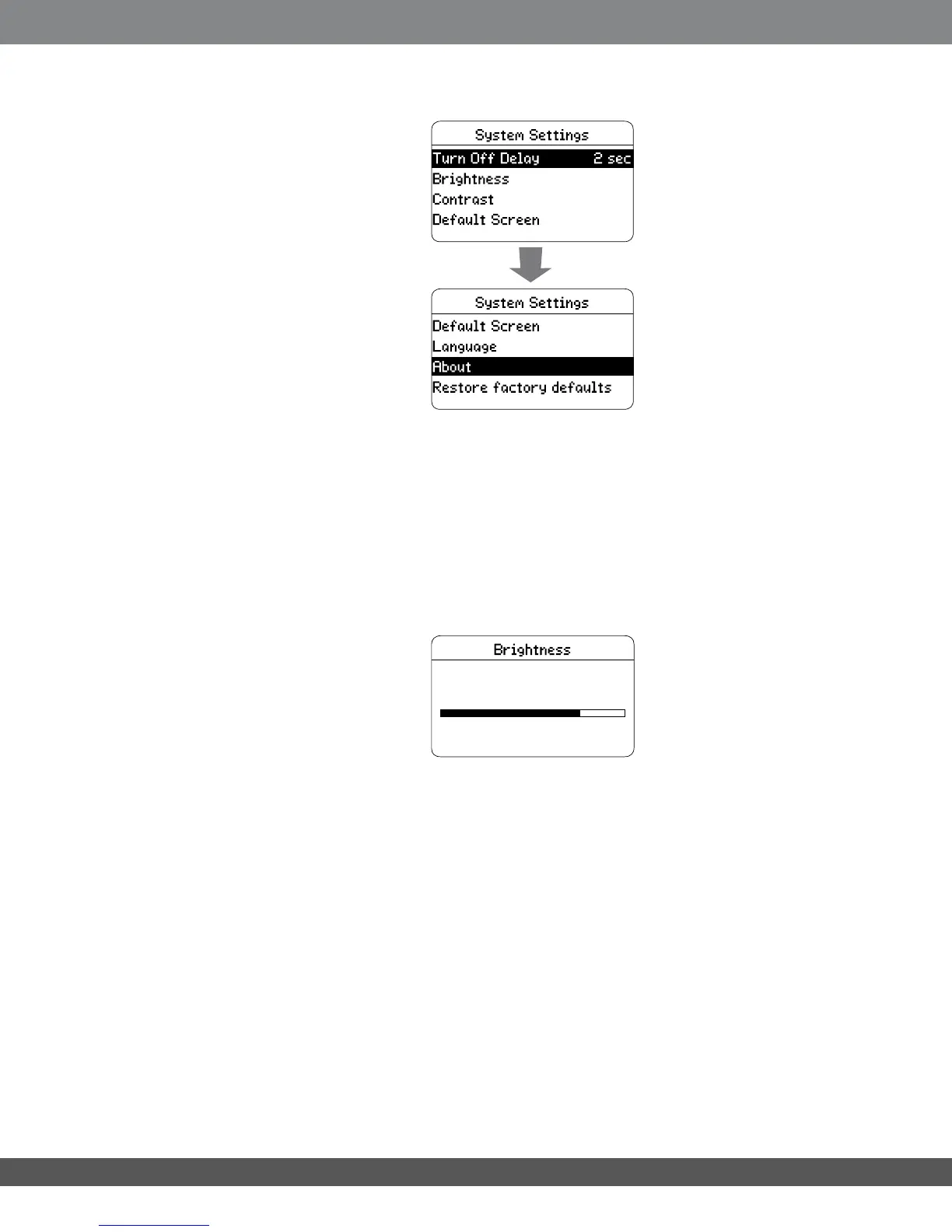
This menu lets you adjust the MS-8’s various system settings:
Turn off delay: This setting lets you select a delay time for the MS-8 to turn
additional ampliers off via its Remote Out terminal when the MS-8 goes into
its standby mode. The options are zero seconds (no delay), two seconds or ve
seconds. The factory default is two seconds.
Brightness: This setting lets you adjust the display’s brightness. Press the Select
button; then use the Left and Right navigation buttons to change the brightness.
When you’re nished, press the Select or Back button to return to the System
Settings screen.
Contrast: This screen lets you adjust the display’s contrast. Press the Select
button; then use the Left and Right navigation buttons to change the contrast.
When you’re nished, press the Select or Back button to return to the System
Settings screen.
Default Screen: This setting lets you choose which screen the MS-8 will default to
when you turn it on – the Main Menu screen or the Audio Controls screen.
Language: This screen lets you select the MS-8’s screen language. The following
languages are available: English, Spanish, French, Portuguese, German, Dutch,
Italian, Danish, Norwegian, Swedish and Finnish.
About: This screen displays the rmware versions loaded in your MS-8.
Restore Factory Defaults: This option erases ALL of the MS-8’s settings and
lters, and returns the unit to its out-of-the-box state.
40


 To Next Page