Lights up when the microphone is muted.
7. button
Press to mute or unmute the microphone.
Hold for more than 5 seconds to turn the RGB light on or off.
8. Charging LED
Indicates the charging and battery status.
9. 3.5mm audio jack
10. USB-C port
11. Voice focus boom microphone
1. Flip up to mute, or flip down to unmute the microphone.
12. button
1. Hold for more than 2 seconds to enter Bluetooth pairing mode.
13. slider
Slide upwards / downwards to power on / off the headset.
Slide upwards and hold for more than 5 seconds to enter 2.4G pairing mode.
14. Status LED (Power / 2.4G / Bluetooth)
15. RGB Lighting Zones
16. Flat-fold ear cup
* ANC (Active Noise Cancelling): Experience total immersion while gaming by suppressing the outside
noise.
** TalkThru: In TalkThru mode, you can hold natural conversations without removing your headset.
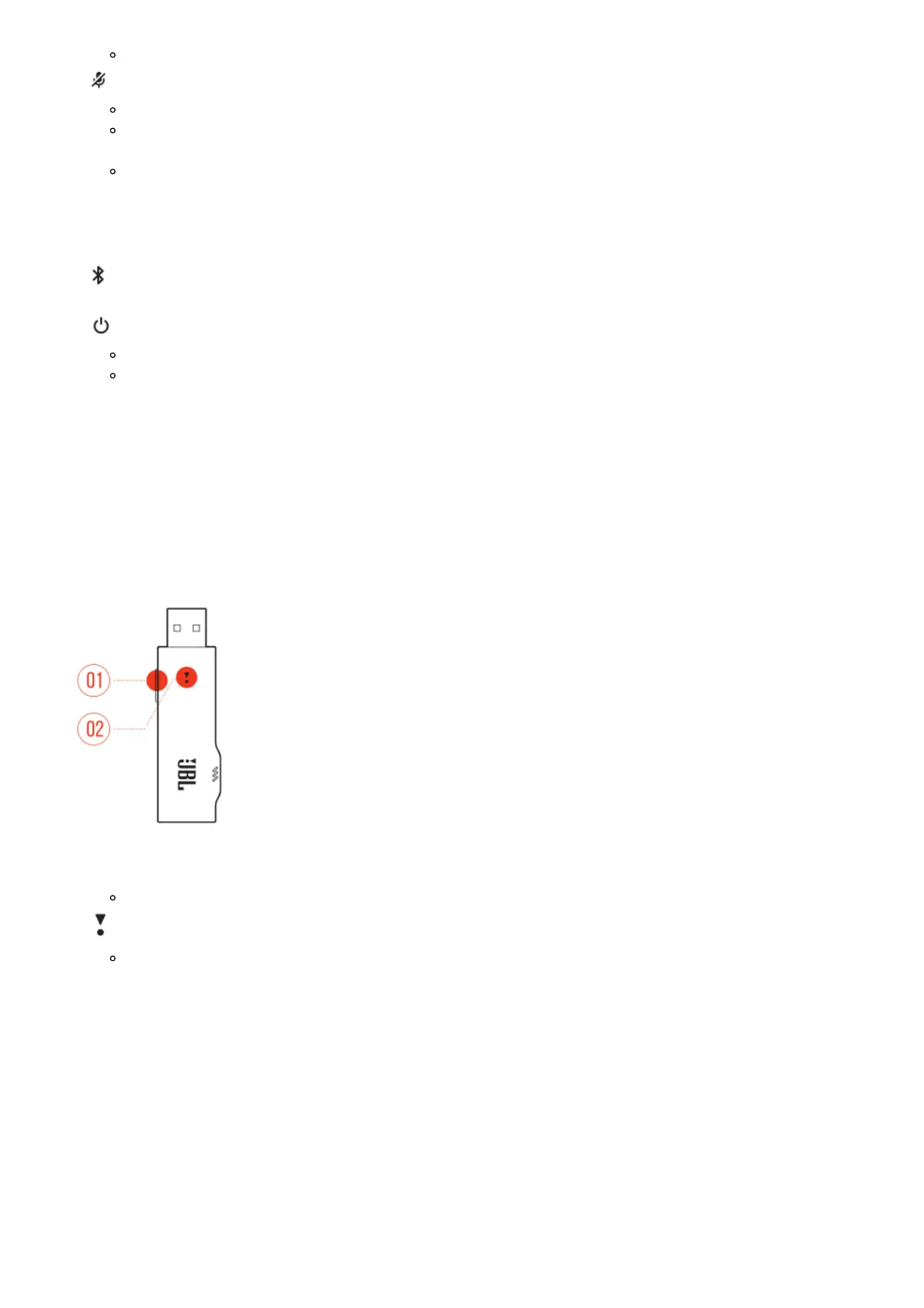
Controls on 2.4G USB wireless dongle
1. CONNECT button
Hold for more than 5 seconds to enter 2.4G wireless pairing mode.
2. LED
Indicates the status of 2.4G wireless connection.
Controls on 3.5mm audio cable



 To Next Page