EasyManua.ls Logo

JBL SRX828SP - User Manual

JBL SRX828SP
45 pages
Print Icon
To Next Page IconTo Next Page
Loading...
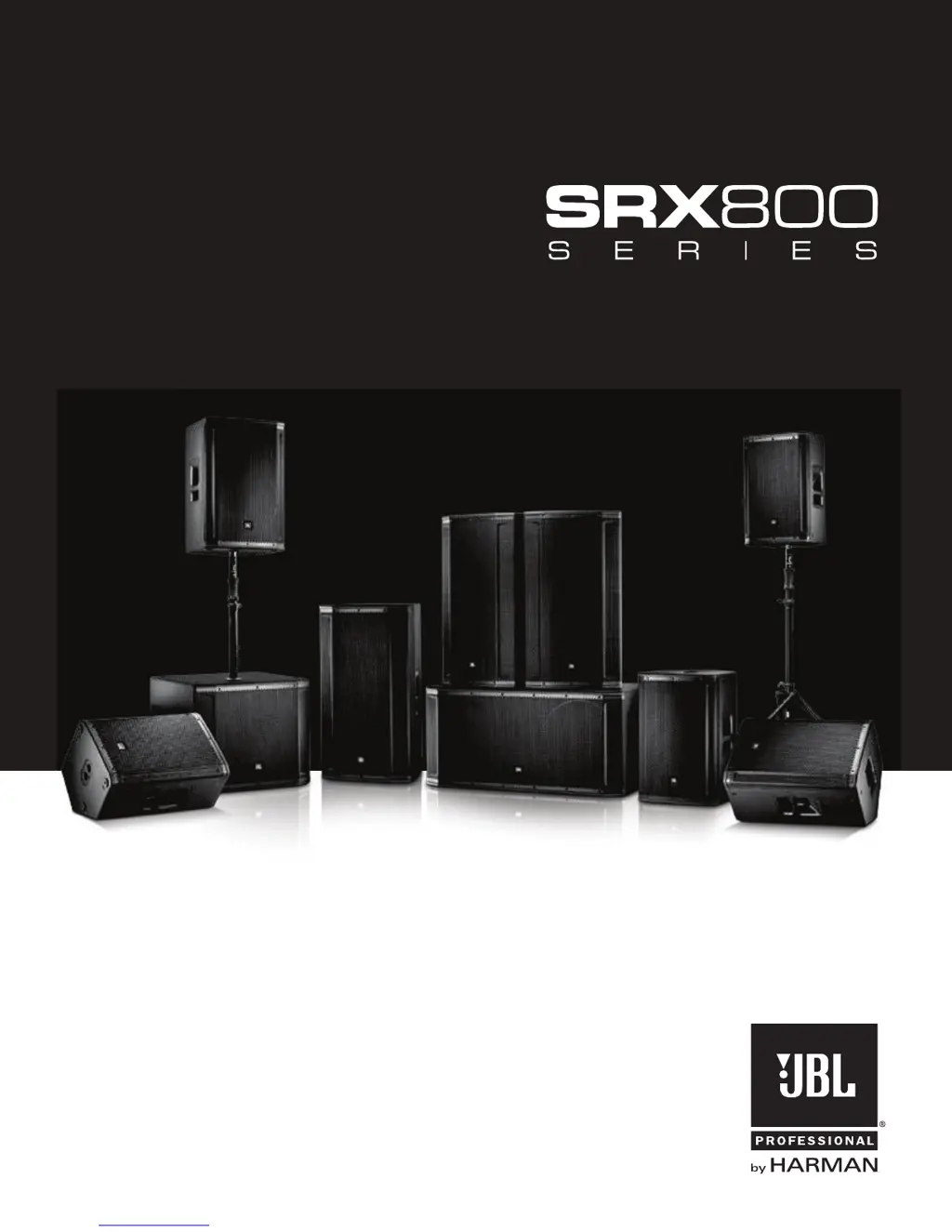
SRX812P SRX815P SRX835P SRX818SP SRX828SP
USER’S GUIDE

Other manuals for JBL SRX828SP

Questions and Answers

  • C
    Christopher NguyenAug 20, 2025
    How to reduce hum or buzz in JBL Speakers with long cables?
    • J
      justinbrandtAug 20, 2025
      If you're experiencing hum or buzz with your JBL speakers, and it's due to an excessively long unbalanced cable run, try using the balanced outputs if they are available.
  • N
    Norma HicksAug 22, 2025
    What to do if my JBL Speaker System has no sound but the speaker comes on?
    • M
      Margaret BrooksAug 22, 2025
      If your JBL Speaker System powers on but produces no sound, here’s what to check: * Ensure that the signal source (mixer, instrument, etc.) is sending a signal. Check the VU meters on the source mixer and verify that any tape or CD is playing. Use headphones to confirm the instrument is sending an audio signal. * Inspect the cables and connections for faults. Disconnect and then re-seat the signal cables. If you suspect a cable is bad, replace it with one that is known to be working correctly.
  • J
    Judy LucasAug 25, 2025
    What to do if my JBL Speakers sound distorted and the PEAK light is on?
    • G
      gcrosbyAug 25, 2025
      If the signal from your JBL speakers sounds distorted and very loud, and the PEAK light is frequently on, it's likely due to an excessive input signal trying to exceed the speaker's capabilities. To resolve this, reduce the output level of the source.
  • L
    Lauren GoodwinAug 26, 2025
    How to fix JBL Speakers when there is no sound?
    • M
      matthewsmithAug 26, 2025
      If there is no sound from your JBL speakers, make sure the speaker is connected to an active AC power source and that the circuit is on. Also, verify that the power is switched on and the power LED is illuminated.
  • A
    Alexander WarnerAug 27, 2025
    Why is there noise or hiss coming from my JBL Speakers?
    • B
      Brandon NashAug 28, 2025
      If you hear noise or hiss at the output of your JBL speakers, the issue might be a noisy source device. Try disconnecting the devices connected to your speaker one at a time. If the noise disappears, the problem lies with the source or the connecting cable.
  • A
    Alexander OwensAug 29, 2025
    What to do if JBL Speakers sound distorted at moderate volumes?
    • M
      Matthew MelendezAug 29, 2025
      If the signal from your JBL speakers sounds distorted even at moderate volumes and the LIMIT light is not lit, the mixer or another source might be overdriven. Consult the owner's manual for your mixer and adjust the controls as needed.
  • C
    Christopher BurnettAug 31, 2025
    Why is there no sound from my JBL Speakers when using a microphone?
    • S
      sandraturnerAug 31, 2025
      If you are getting no sound from your JBL speakers with a microphone directly connected, it could be that the microphone requires phantom power. Try switching to a dynamic microphone, using a battery-powered microphone if available, or using an external phantom power supply for condenser-type microphones.
  • M
    Melissa AustinSep 2, 2025
    Why do my JBL Speakers have hum or buzz with improper gain?
    • K
      Karen ConnerSep 2, 2025
      If you're experiencing hum or buzz with your JBL speakers, it may be due to an improper system gain structure. Try reducing the input level controls and increasing the output level of your source devices.
  • W
    wilsondanielSep 4, 2025
    Why does hum or buzz in JBL Speakers change with mixer levels?
    • M
      Maria FuentesSep 4, 2025
      If the hum or buzz from your JBL speakers increases or decreases when the mixer level controls are moved, it could be due to an improper AC ground or faulty equipment connected to the mixer input. Disconnect or mute channels one at a time to isolate the problem. Refer to the owner’s manual of the faulty equipment for troubleshooting help.
  • T
    Troy HesterSep 6, 2025
    What to do if the JBL SRX828SP Speaker System signal sounds distorted and very loud?
    • T
      Thomas MayerSep 6, 2025
      If the signal from your JBL Speaker System sounds distorted and the PEAK light is frequently lit, it indicates that the input signal is too high, exceeding the speaker's capabilities. Here’s what you can do: * Reduce the output level of the audio source. * Lower the level controls on the speaker itself. * Consider using additional SRX800 speakers to distribute the load.

Summary

Safety Instructions

Declaration Of Conformity

Safety And EMC Compliance Specifications

Details safety and EMC compliance specifications for the product.

UL Compliance Specifications

Lists UL compliance specifications for the product.

FCC Statement

Details FCC compliance and radiation exposure statements.

IC Warning

Provides warning information from Industry Canada.

Quick Setup Guide

Configuration Options

Illustrates various ways to set up the SRX800 speakers.

SRX812 P, SRX815 P, SRX835 P Back Panel Interface

Control Interface

Details LCD screen, power button, encoders, master encoder, and back button.

Input;Output Ports

Describes CH1/CH2 inputs, direct outs, and mix out connectors.

Connectivity and Status

Explains IEC inlet, Ethercon connector, and status LEDs.

SRX828 SP, SRX818 SP Back Panel Interface

Control Interface

Details LCD screen, power button, encoders, master encoder, and back button.

Input;Output Ports

Describes CH1/CH2 inputs and direct outs connectors.

Connectivity and Status

Explains IEC inlet, Ethercon connector, and status LEDs.

Overview - SRX800 Family

SRX812 P, SRX815 P - Block Diagram

SRX835 P - Block Diagram

SRX818 SP - Block Diagram

SRX828 SP - Block Diagram

SRX812 P Specifications

SRX815 P Specifications

SRX835 P Specifications

SRX818 SP Specifications

SRX828 SP Specifications

Purposeful Product Design

Portability Design Features

Details design elements for portability, including handles, suspension points, and stacking feet.

Component Elements

HF Driver Technology

Describes the JBL 2432H 3" voice-coil Compression Driver and its performance.

Low Frequency Driver Technology

Explains JBL's Differential Drive® Technology ferrite drivers.

Mid Frequency Driver Design

Details the SRX835's midrange driver derived from the VTX 20 system.

Patented Waveguide Technology

Explains JBL's patented Progressive Transition Waveguides for directivity.

Component Elements

HiQnet Network Control

Explains network control via Audio Architect and SRX Connect apps.

Premium DSP Technology

Details the onboard user-configurable DSP suite including PEQs and delay.

Crown DriveCore Amplification

Highlights the 2000W Crown DriveCore amplification technology.

Back Panel LCD

Preset Management

How to access and select presets using the Master Encoder and Back Button.

Display Settings

Toggling the LCD panel dimming feature and sleep mode on or off.

Back Panel LCD

Meter Display

How to access and view input meters for channels.

Network Configuration

Accessing and adjusting network settings like IP, Subnet, HiQNet, and DHCP.

System Information

Accessing system information like model, version, and MAC address.

SRX Presets

Main and Monitor Presets

Standard tuning for full-range speakers and monitor configurations.

Speech and Subwoofer Presets

Ideal presets for speech intelligibility and subwoofer matching.

Crossover Presets for Full-Range Systems

Tunings for SRX full-range speakers used with other subwoofers.

Crossover Presets for Subwoofers

Tunings for SRX subwoofers used with other full-range speakers.

Cardioid Subwoofer Presets

Tunings for rear-facing subwoofers in cardioid systems.

Premium DSP Technology

V5 Compatible Tunings

Details V5 tuning compatibility, 96kHz FIR filters, and LevelMax™ limiting.

User Controllable DSP Suite

Lists DSP features: PEQs, delay, signal generators, input mixing, monitoring.

SRX Connect App Control

Control via proprietary app for iOS and Android devices.

Audio Architect Control

Advanced system control using Audio Architect software.

Networking

Direct Network Connection

Connecting a speaker directly to a computer via Ethernet.

Wired Network Connection

Connecting speakers to a network via a router or switcher.

Wireless Network Connection

Connecting speakers wirelessly for control via apps.

Smart Device App

Loudspeaker Placement and Suspension

Speaker Aiming Guidelines

Guidance on aiming speakers for optimal audience coverage.

Feedback Prevention Placement

Advice on speaker placement relative to microphones to prevent feedback.

Turntable Placement Advice

Recommendation to place speakers away from turntables to avoid feedback.

Multi-Speaker Usage

Suggestion to use more speakers in large or reverberant spaces for better sound.

PA vs. Monitor Positioning

Guidance on upright PA use versus side-stage monitoring.

Troubleshooting

Warranty Information

Warranty Coverage and Protection

Defines who is covered, what is covered/excluded, and payment responsibilities.

Obtaining Warranty Service

Instructions on how to get warranty service or repairs.

Warranty Limitations

Details limitations on implied warranties and exclusion of damages.

Contact Information

Quickstart Guide

Unboxing Instructions

Step-by-step instructions for unboxing the speaker.

Optional Setup Configurations

Illustrations of various optional speaker setup configurations.

Back Panel

Powering On the System

Steps for powering on the speaker system.

Connecting Audio Inputs

Instructions for connecting audio sources to the speaker inputs.

Setting Output Levels

Guidance on setting the output volume levels for the speaker.

SRX835 P Datasheet

Key Features Overview

Highlights the main features of the SRX835P speaker.

Purposeful Product Design

Details the speaker's design for portability, ruggedness, and ease of use.

Transducer Technology

Explains the premium JBL transducers used in the speaker.

DriveCore Amplification

Describes the 2000W Crown DriveCore amplification technology.

Control and DSP Features

Outlines the user-configurable DSP and control features.

SRX800 Series General Overview

HiQnet Network Control

Explains HiQnet Network Control capabilities and setup.

Flexible Backpanel Features

Details the features of the SRX800 series back panel.

System Configuration Options

Describes various system configurations using SRX800 models.

SRX835 P Datasheet

Applications

Describes the applications for the SRX835P powered PA speaker.

Specifications

Lists detailed technical specifications for the SRX835P speaker.

JBL SRX828SP Specifications

General IconGeneral
Frequency Response (-10dB)29 Hz - 150 Hz
Frequency Response (-3dB)35 Hz - 120 Hz
Max SPL Output141 dB
Power Rating2000W Peak
Amplifier DesignClass D
AC Power100V - 240V ~ 50/60 Hz
System TypeSelf-powered dual 18" subwoofer
Input Connectors2 x XLR-1/4" combo jacks
Input Impedance20k ohms balanced, 10k ohms unbalanced
Signal IndicatorsLimit, Signal, Power
CoolingVariable speed fan
Enclosure18 mm plywood
GrillePowder coated, perforated steel
LF Driver2 x 18"
FinishBlack DuraFlex finish

Related product manuals