Adjusting the Headrest Position
It is important to ensure your child is situated in a position offering both
comfort and support.
!
Head Support Positioning
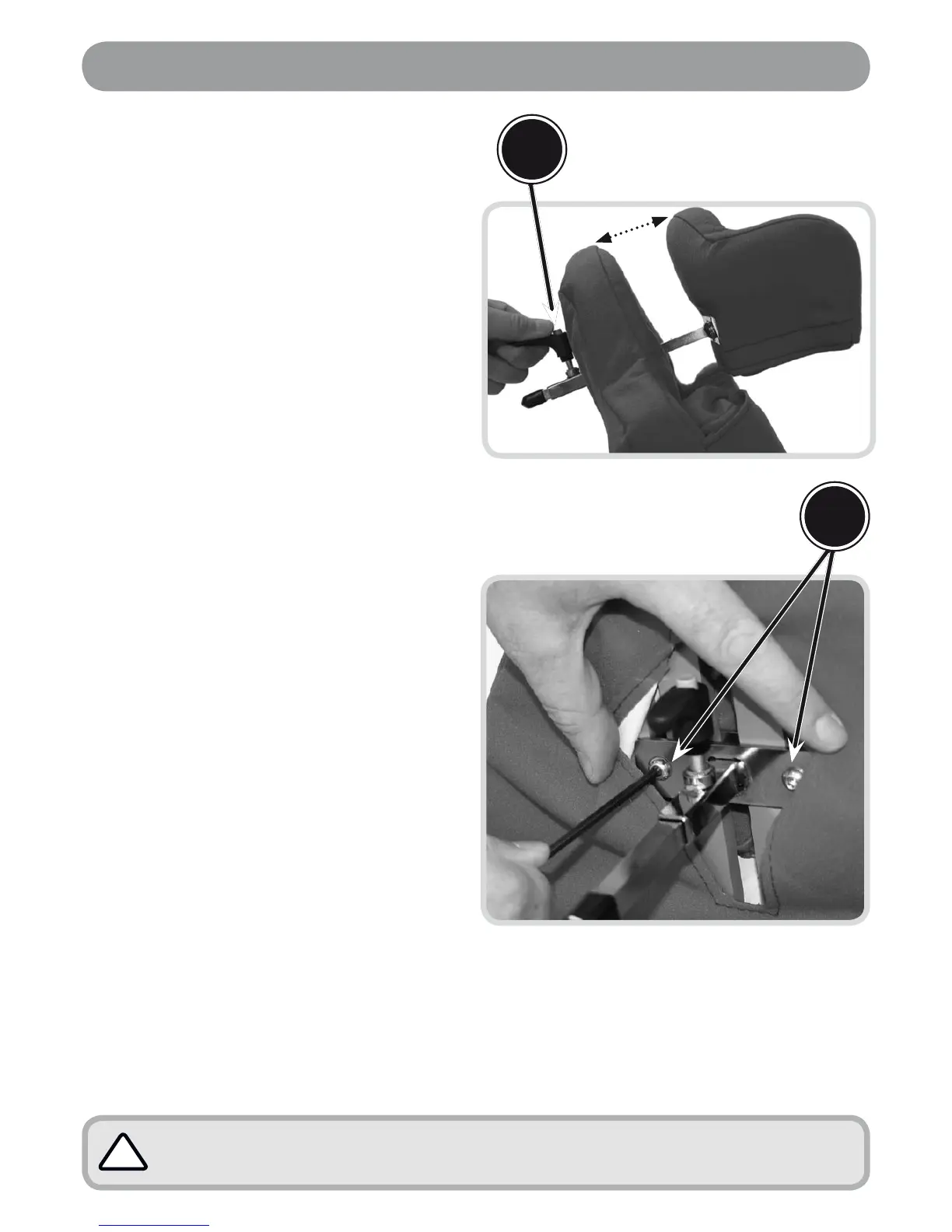
Loosen lever (A) by turning it in the
anticlockwise direction. Once loose,
the head support should be free to
be manually moved towards or away
from the back as indicated.
The head support can also be
manually removed from the chair by
sliding forward, away from the chair
until you have disengaged it from
its locating bracket.
To lock the head support in the desired
position tighten the lever by turning it
in the clockwise direction until it can
no longer be adjusted manually.
Height of Head Support
Loosen the two bolts (B) by turning them
in the anticlockwise direction by a full
turn using the allen key provided. (Do
not completely remove these bolts!)
Once loose the head support can be
manually slid up or down on the plastic
back support within the range of its
location channel.
When the desired position has been
achieved, lock the head support into
place by tightening the allen key bolts,
turning them in the clockwise direction
until the head support is secure.
•
•
•
•
•
•
(A) is the locking lever which is used to
adjust the depth position of the head
support (it is also used to remove the
head support entirely.)
(B) are the two allen key bolts which are
used to adjust the height positioning of the
head support.
A
B



 To Next Page