7- Cleaning
7.5 Cleaning the doser opening and cooler box
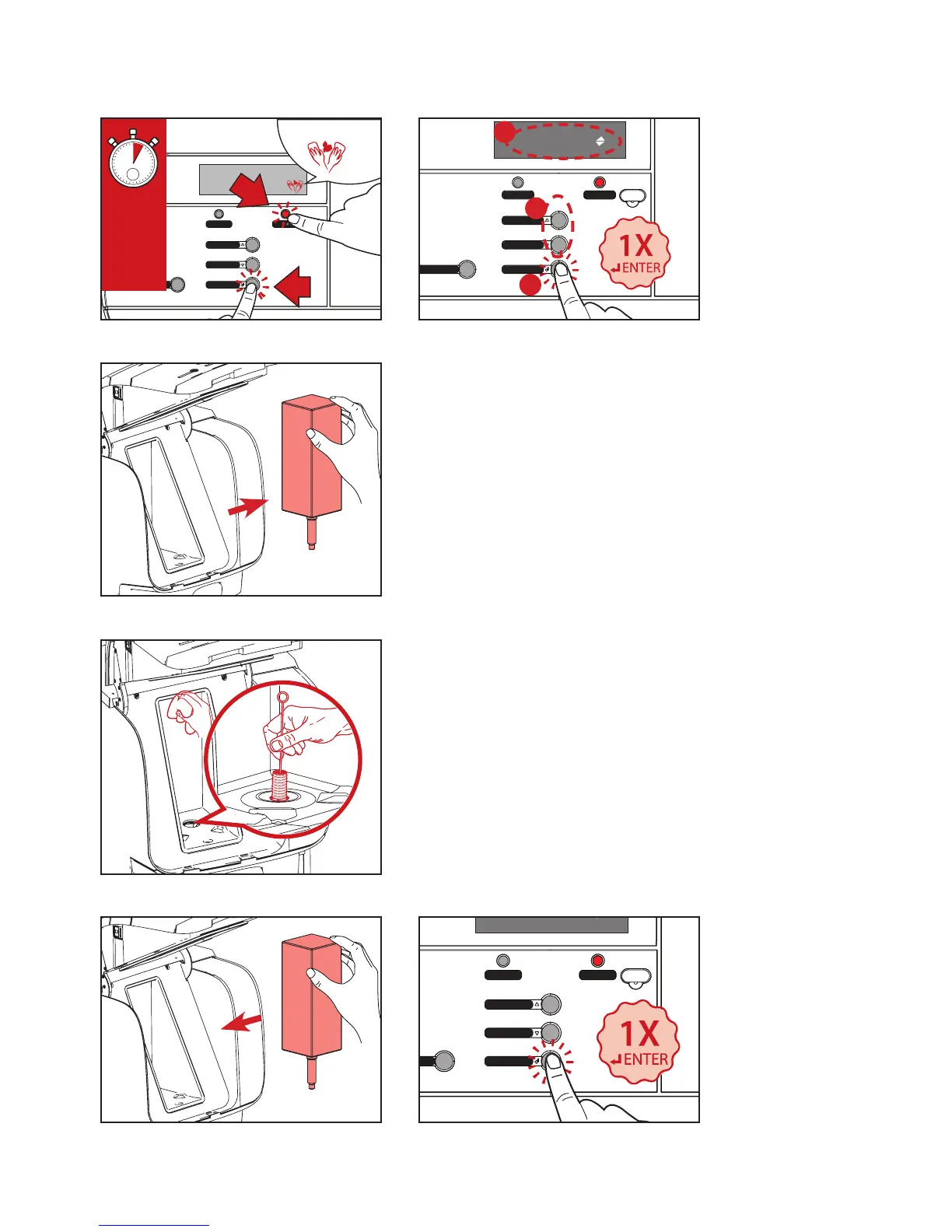
1. Press and hold STOP (A) and ENTER (B) buttons
simultaneously for 2-3 seconds to enter the cleaning mode
(See Fig.1).
2. The display will show FLUSHING, press UP or DOWN (A)
until the display shows CLEANING (B), then press ENTER (C)
to continue (See Fig. 2). The display will show:
REMOVE PRODUCT PACKS CLEAN COOLING BOX
3. Open the dispenser door and remove the product pack (See
Fig.3). When the pack has been removed the display will
show CLEAN COOLING BOX PRESS ENTER TO CONFIRM
4. Clean the doser opening with a brush and the interior of the
cooling compartment with a clean, damp cloth and dry with
a clean cloth or paper towel (See Fig.4). Then replace the
product pack (See Fig.5).
5. Press ENTER to continue the cleaning procedure (See Fig.6).
The display will show:
REMOVE AND CLEAN MIXING TRAY (Proceed to next page).
Hot water
Coee large
StopStrength
Coee
Pot coee
+B
A
A+B:
2-3
sec
Hot water
Coee large
StopStrength
Coee
Pot coee



 To Next Page