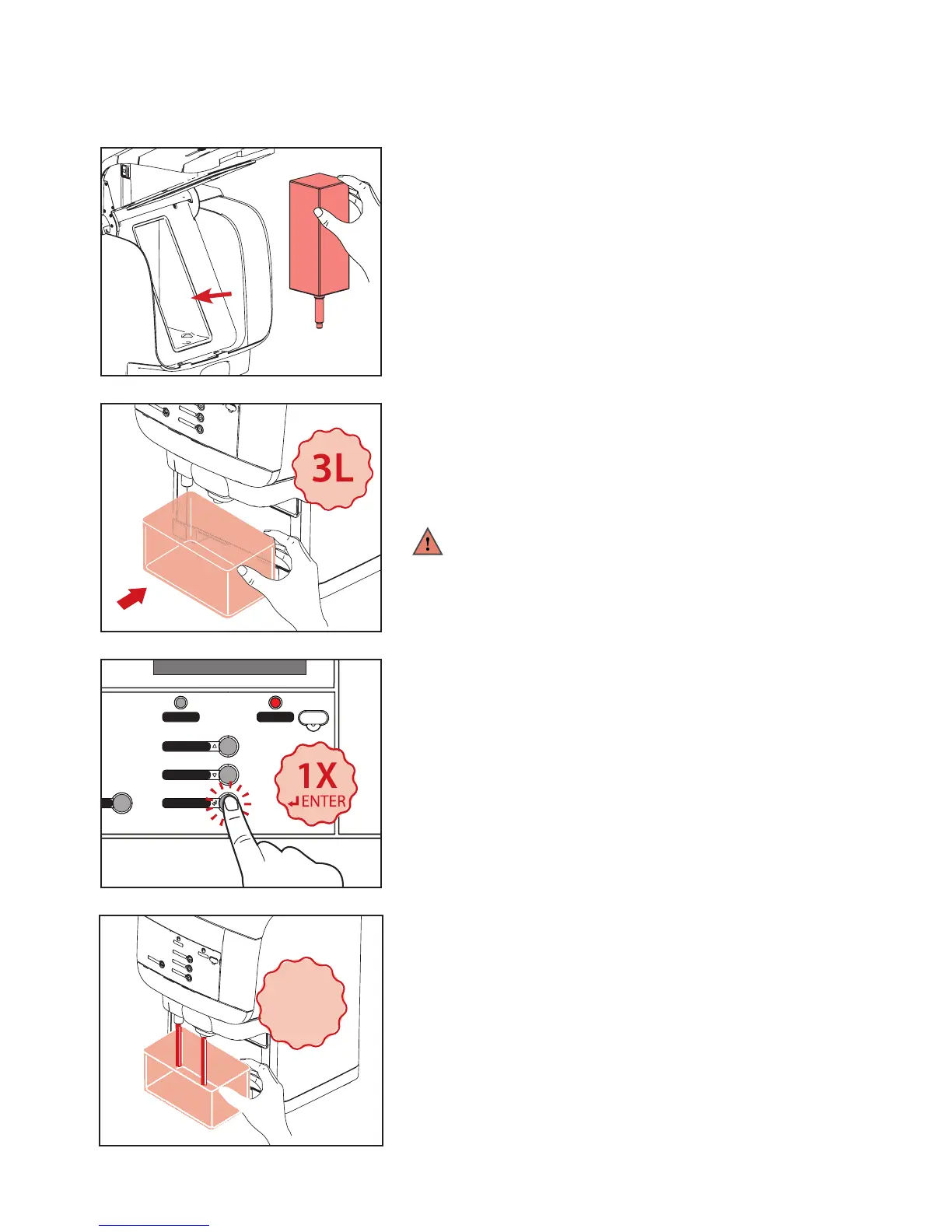
1. When the pack is removed, the display will show:
PLACE BACK PRODUCT PACK
Reinstall the product pack if it has not passed the expiry date.
If expired, replace with a new product pack (See Fig. 1).
2. When the pack has been placed in the cooling compartment,
the display will automatically continue and show: PLACE BIN
MIN 1L PRESS ENTER TO CONFIRM
3. Remove the drip tray and place a 3 liter container (See Fig.2)
under the outlets, then press ENTER .
4. Press ENTER to begin flushing the drink outlets (See Fig 3-4).
CAUTION HOT LIQUIDS is shown in the display.
When done, dispose of the flushed water and replace the
drip tray. The dispenser is ready for use.
Warning:
The water being dispensed is hot! Avoid scalding! Keep
hands and other body parts away from the dispenser
during the flushing process. Never let children perform the
cleaning procedures.
7- Cleaning
7.7 Replacing product pack and ushing the outlet



 To Next Page