Need help?
Do you have a question about the Jecod D Series and is the answer not in the manual?
Details on using physical buttons for operation and mode selection.
Explains core features like Master/Slave control and pump characteristics.
Overview of different wave-making modes like Classic, Sine, and Constant.
Instructions for using the feeding mode to pause the pump for feeding.
How to lock and unlock the controller's function keys for security.
Steps to find and download the "Jebao Aqua" mobile application.
Navigating the app to control pump speed, mode, and ON/OFF switch.
Detailed configuration of manual wave settings, including flow and frequency.
Customizing wave parameters and selecting operation modes within the app interface.
Configuring multiple wave makers to operate together as a synchronized group.
Setting up the primary wave maker in a group for master control functions.
Configuring secondary wave makers to operate under the master control.
Adding, managing, and controlling multiple wave makers in synchronized groups.
Device management tasks including setting time, renaming, and deleting devices.
Understanding LCD error codes and APP error messages for effective troubleshooting.
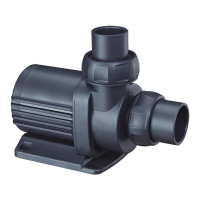
The Jecod D Series Vario Wave Maker is a sophisticated piece of equipment designed to replicate natural sea environments within fish tanks or ponds. It leverages high technology to create an ideal habitat for various marine life. To ensure proper assembly and operation, users are advised to read the manual carefully.
The Vario Wave Maker offers a range of advanced features for precise control and enhanced user experience:
The Vario Wave Maker offers intuitive operation through both its physical buttons and the mobile application.
The dedicated mobile application, "Jebao Aqua," can be downloaded from the APP Store or Google Play. Users can also scan the QR code provided in the manual or on the package.
Users need to register an account via email, filling in the required information. After registration, they can log in using their account and password. A "Forgot password" option is available for password reset.
From the "Devices" interface, a long press on the device icon (for 2 seconds) enters the device control interface.
Regular maintenance is crucial for ensuring the longevity and optimal performance of the Vario Wave Maker:
 General
| Type | Submersible Water Pump |
|---|---|
| Material | Plastic |
| Size | Varies by model |
| Weight | Varies by model |
| Voltage | 220-240V |
| Usage | Aquariums, ponds |


 To Next Page