15
OPERATIONCDR5620
Bluetooth - Handsfree Operation
Tips
EN
Nyne ADS15
USB CHARGE
5V 1A
4 5
10
1
11
6 7 8
3
2
9
Preparation
Pairing a New Device
Connecting a
Paired Device
Bluetooth Phone
Main Menu
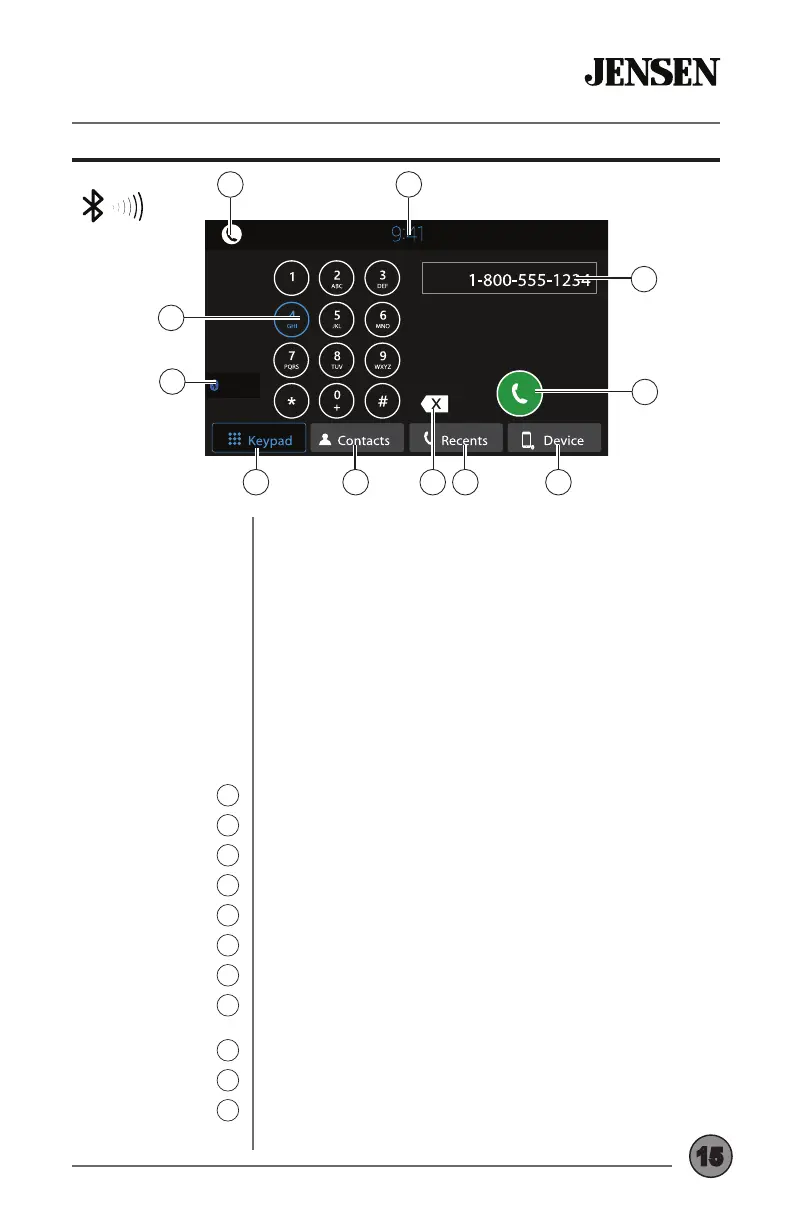
1
Keypad
2
Last Source
3
Display Keypad
4
Contacts
5
Backspace
6
Recents
7
Device List
8
Talk
9
Phone Number
10
Standby
11
Before you can use a Bluetooth device, it must be paired
and connected. Make sure that Bluetooth is activated on
your device before you begin the pairing process.
Complete the pairing sequence from your Bluetooth device.
The unit name is “JENSEN BT”. The Bluetooth passcode
is “0000”. The unit can be in any mode of operation when
pairing is performed. On certain phones, pairing may need
to be done more than once.
Most Bluetooth devices will connect automatically if the
device is in range when the unit is powered-on. If your
device was previously paired but does not connect, enter
the Bluetooth setup menu and turn Auto Connect on.
To access the phone, select Bluetooth Phone from the Main
Menu or press the phone icon from any operational mode.
Press to return to the main menu.
Use the keypad to dial a phone number.
Press to return to the last audio source.
Press to display the keypad.
Press to display contact list.
Press to backspace when using the keypad.
Press to display a list of recent calls.
Press to display a list of paired devices, then press the
desired device name to connect.
After entering a phone number, press to connect a call.
Displays the phone number entered using the keypad.
Press to put the unit in standby mode. Press anywhere on
the screen to return to the previous mode.


 To Next Page