--------
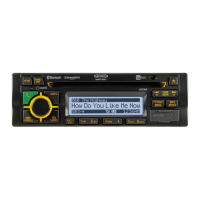
JHD40BT
BLUETOOTH
OPERATION
The
JHD40BT includes built-in Bluetooth technology
that
allows
you
to
connect this head unit
to Bluetooth devices for streaming audio playback.
About
Bluetooth
Technology
~uetooth
Is
a
$hort~range
wireless radio connectivity technology developed
as
a cable
replacement for various electronic devICeS. Bluetooth operates in 2.4
GHz
frequency range
and
transmits voice and
data
at
speeds
up to 1 megabit per second. Bluetooth was launched
by a special interest group (SIG) comprised
of
Ericsson Inc., Intel Corp., Nokia Corp., Toshiba
and
IBM
in 1998, and it
is
currently developed by nearly 2,000 companies worldwide.
The
Bluetooth word
mark
and logos are
owned
by
the
Bluetooth SIG.
Jne.
and
any
use
of
such
marks is
under
license. Other trademarks and trade names are 1hose
of
their respective
owners.
Bluetooth
Menu
Options
NOTE: Please note that some
BT
~nu
options are
only
available while the
unit
is
In
BT
Audio
mode.
Press
and
hold the
AUDIO/MENU
button (3) to enter menu adjustment mode. Repeatedly
press
the
VOL
+/.
buttons (2) to access the "Bluetooth OnJOff' menu function. Press the INFOI
ENTER
button (18)
to
tum
the Bluetooth function
On
or
Off.
The
following menu options
are
available
when
the
unit
is in Bluetooth mode:
Bluetooth
Pair
<ENTER>: Press the
INFOIENTER
button to begin pairing with a
61uetooth enabled device is pairing mode.
Bluetooth Device: Press the INFOJENTER button to view a list
of
previously paired mobile
phone device models. Press
the
SEEKfTUNEfTRK
buttons (13. 14) to vIew devices from
the tist. You cannot delete a device that is actively connected. Press the INFO/ENTER
button to
select
the device. Press the
SEEKfTUNEtTRK
buttons to choose
lockfUniock,
Disconnect
or
Delete
for
this device.
locklUnlock:
The
JHD40BT
can store
up
to
5 devices for
BT
connection.
The
devices
are stored in FIFO (First In First Out) order.
To
prevent a device
from
being
bumped from the list
when
more
than 5 deVices are used,
you
must
lock the device.
To Lock/Unlock a device. press
the
INFO/ENTER
button
to
display/change the
Locked
(5)or
Unlocked
(2)
icon.
Disconnect
To
disconnect a paired device, press the INFO/ENTER button to
temporarily remove the
BT
link.
The
link can be re-established through your phone
menu
by
selecting the
JH040BT
for
connection.
Delete: To delete a device from
the
list, press the INFO/ENTER button.
Selecting Tracks
During playback, press
the
SEEKfTUNEfTRK
1«I »1 button (13114) to play the previous
or
next track.
Pausing Playback
Duling
playback. press
the
11>11
button (5)
to
pause
tI1e
BT
AUDIO
player.
"BT
Audio Pause"
will
appear
on
the.
LCD. Press
1/:>11
again
to
resume playback.
If
you
change
to another mooe,
the
mobile phone audio will pause. Press the MODE button (4)
to
return to BT
mode
and
resume mobile phone audio playback..
Use SEEKfTUNEfTRK
to Navigate
Press ENTER the List P ENTER
8T
Device
----:
Dev!ce 1
~
ress~
.....
----;
Device 2
Device 3
Device 4
Device 5
[DeVi="~--=-LOCk/UnlOCk
Disconnect
Delete
Device
5
Lock/Unlock
Disconnect
Delete
Pairing
a
Bluetooth
Device
Before
you
begin, consult the owner's manual
for
the Bluetooth device you
want
to
pair
with the
JHD40BT.
1,
Make
sure the device Is
on
and ready to receive a signal from
the
JHD40BT. With the
JHD40BT
in
BT
Audio mode, choose BT
PAIR
from the
JHD40BT
menu
and press
the
INFO/ENTER
button to select ON. The
unit
is
waitlng to connect to a mobile phone
device,
With
the.
BT
function
of
the mobile
phone
device turned on, search for a Bluetooth
device.
2.
When
the
Bluetooth device
has
completed it's search, the
mobile
phone will
disp~ay
the
Bluetooth device name (JHD40BT).
3.
Select
JHD40BT
The
BT
AUDIO
Icon (.r:I) on the radio
LCD
will display.
4, Enter the pairing password (0000),
if
requested.
After connecting successfully, you are able to listen to
music
stored
on
your Bluetooth enab1ed
device through
the
radio.
Answering
a Call
When answering a call using
the
connected phone,
6T
AUDIO will pause.
After
hanging up
tram the
can,
BT
AUDIO
to continue
on
SOme
phones. It
may
be
necessary to press
the
play
button to resume
BT
AUDIO.
BT
Audio
(A2DP)
The
A2DP
music
is available for Bluetooth enabled phones when the phone IS connected. To
access Bluetooth
mode
and play songs stored
on
your phone, press the
MODe
button (4).
While in
BT
mode
O.
the
aT
AUDIO
icoo
(.r:I)
illuminates
on
the
fi LCD.
JHD40BT
NOTE:
If
a Bluetooth device ;s disconnected due to the
power
beJng
turned
off
or
if
the
device
is
disconnected inadvertently.
the
unH
will
automatically search
for
the matching
BT
mobile
phone
when the
power
is restored.


 To Next Page
 Loading...